44 Assembly, Connection and Putting into Operation
An electrically-insulated output only requires electricity if the
output is active (switched-on). You can therefore minimize the
negative influence of an electrically-insulated output on the
battery life by setting the pulse duration to the lowest possible
value when using it as a pulse output.
The configuration software "enSuite" can be used for this pur-
pose.
The electrical insulation of the outputs is not an approved elec-
trical isolation in accordance with ATEX. An approved Ex-
isolator is required when using the device in Ex zone 1.
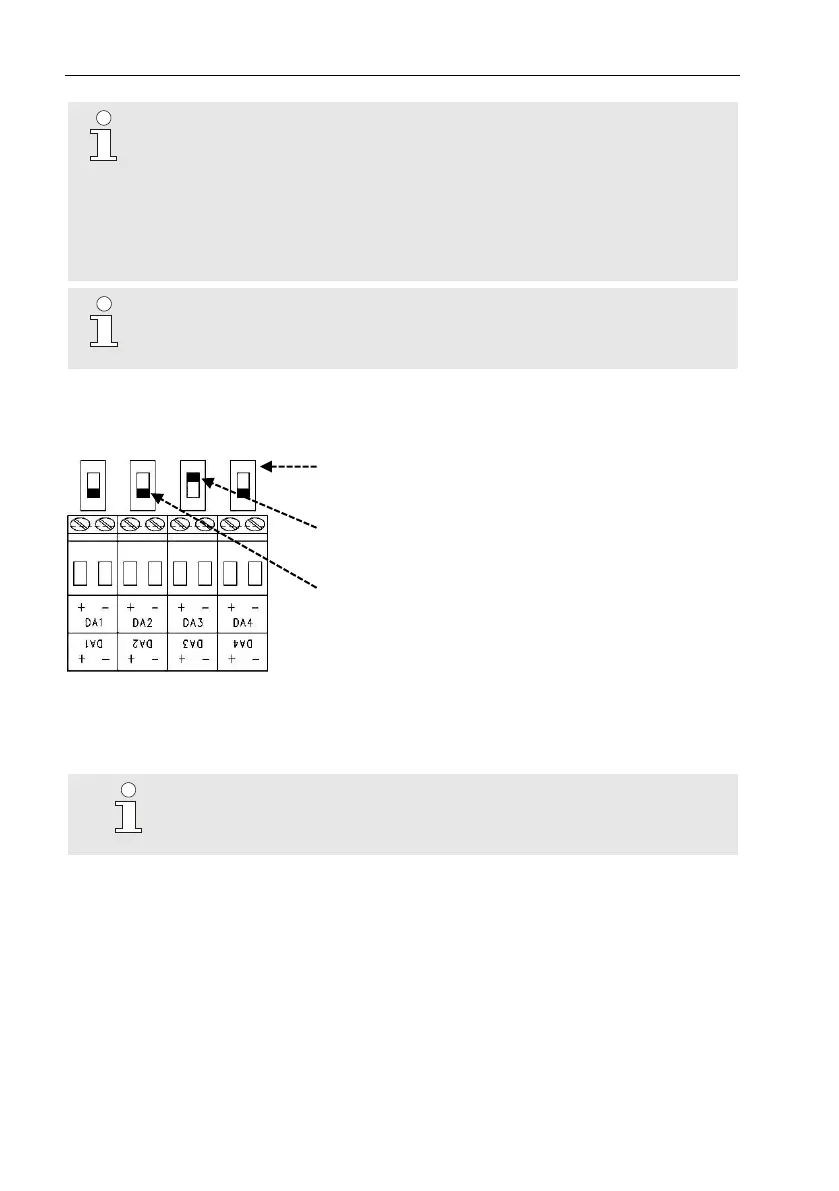
In order to activate the electrical insulation of an output, please move the
switch lever behind the corresponding output terminal away from the termi-
nal:
Electrical insulation switch
Output "DA3" is electrically insulated
(the switch slider is on top)
Outputs "DA1", "DA2" and "DA4" are not elec-
trically insulated (the switch sliders are under-
neath)
5.2.7 Earthing the EK280 housing
The housing of the EK280 must always be earthed.
A M6 screw is provided for this on the left-hand side of the
housing.
1. The earth-cable must have a minimum diameter of 4mm
2
.
2. Use the cable to connect the screw on the left-hand side of the housing
with the equipotential bonding strip.



 To Next Page