Assembly, Connection and Putting into Operation 55
5.3.1.16 Deleting the certification data log
The log can only be deleted if the calibration lock is open.
Move the cursor to the "Serv." register and to the value "ClCDL" (delete
certification data log) via the following path:
Serv. Change and Delete ClCDL
Press the ENTER button "0" will start to flash.
Change the value to "1" with the arrow keys or .
After you have entered the value, press the ENTER button to confirm
the input. The input value can be deleted by pressing the ESC button.
5.3.1.17 Closing and securing the calibration lock
After all settings subject to calibration regulations have been adjusted,
close the calibration lock in the same way that it was opened: Press the
buttons described in chapter 5.3.1.1 once again. The calibration switch is
secured with an adhesive label as described in chapter 0.
5.3.1.18 Programing a data transfer
To discover the wide range of possibilities for remote data transfer to a con-
trol center via the integrated modem or via a device connected to the ter-
minal interface, please follow the corresponding instructions in the EK280
Application Manual, which you can download from www.elster-
instromet.com.
The data transfer settings can be configured without opening the calibration
lock.
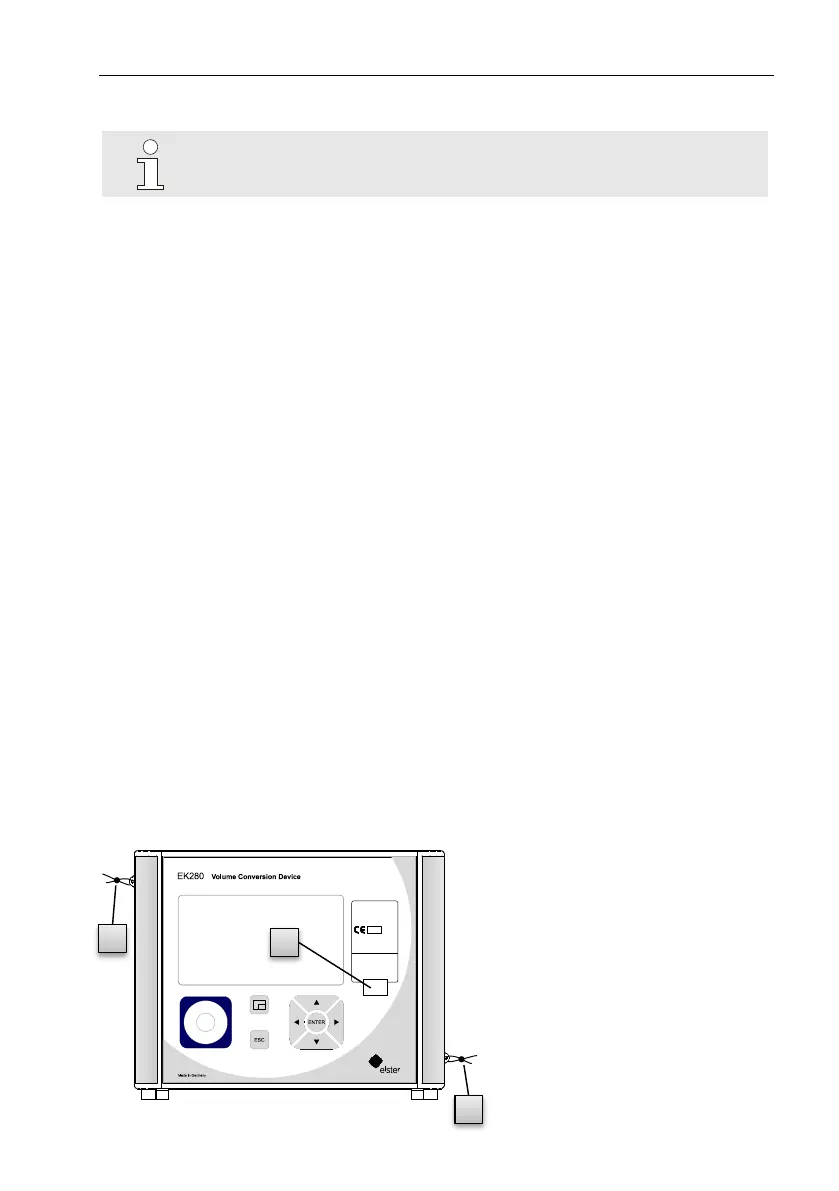
5.3.2 Sealing
5.3.2.1 External view
1 Possible sealing point to
secure the identification
plate via adhesive seal.
2 Optional user lock: Seal
covers using wire seals
through sealing eyelets.
Instromet
EK280
Year: 2011
Serialno.: 1234567
M 11 0102
MPE at ref. conditions 0,5%
IP65 EN12405-1
EC type-examination number:
T10339



 To Next Page