EasyManua.ls Logo

Eltek BC2000 - User Manual

Eltek BC2000
56 pages
Print Icon
To Next Page IconTo Next Page
Loading...
Part No. D
Dis
p
C
o
BC
2
O
60000023
5
p
lay
o
mpa
c
2
00
0
5
Ope
r
c
t, Inte
0
an
d
r
atio
grate
d
d
JC2
n M
a
d
, HJ,
DC
P
000
Doc. No.
2
Pu
a
nua
l
a
nd J F
r
P
ower
Con
t
2
055882, Iss
blished 20-J
u
l
r
ont
W
Syste
m
t
roll
e
ue
5.1
u
n-14
W
ire
m
s
e
rs

Questions and Answers

  • B
    Bonnie BrownAug 18, 2025
    Why is my Eltek BC2000 Controller showing a Redundancy Alarm?
    • C
      Cameron RodgersAug 18, 2025
      If the Eltek Controller displays a Redundancy Alarm, it means the total load current has surpassed the combined current capacity of 'N' rectifiers in an 'N+1' redundant system. To resolve this, either add more rectifiers to the system or reduce the system load to maintain redundancy.
  • R
    Robert HouseAug 21, 2025
    What to do if my Eltek Controller displays an AC Fail alarm?
    • A
      austin28Aug 21, 2025
      If the Eltek Controller shows an AC Fail alarm, check if the commercial AC circuit breaker or fuse has tripped. If tripped, reset the AC circuit breaker(s) or replace the AC fuse(s) in the AC Service Cabinet. If commercial AC service is lost, use an alternative energy source like a UPS or a generator.
  • J
    Jennifer HoffmanAug 23, 2025
    How to fix a Batt Dischrg Alarm on my Eltek BC2000?
    • K
      Kristen ChavezAug 23, 2025
      If the Eltek Controller displays a Batt Dischrg Alarm, first verify that the system output voltage is at the correct level. If the voltage is correct, check the battery discharge set point (Batt Dischrg) and adjust it if necessary. This alarm often appears after a commercial power failure or due to an incorrect set point.
  • A
    Amanda EspinozaAug 26, 2025
    What should I do if my Eltek Controller has a Distrib Alarm?
    • J
      James McbrideAug 26, 2025
      If the Eltek Controller shows a Distrib Alarm, reset the DC circuit breaker(s) or replace the tripped fuse in the distribution section.
  • S
    Steven HunterAug 27, 2025
    What does Module Comm mean on my Eltek BC2000 Controller and how do I fix it?
    • T
      tstewartAug 27, 2025
      If the Eltek Controller displays a Module Comm alarm, it indicates that rectifier module(s) are not communicating or have been removed. Replace any removed module(s) in the shelf slot(s). You can clear this alarm by pressing the Left button on Alarm on the home screen and acknowledging the pwr dev com alarm.
  • T
    Tammy BrightAug 30, 2025
    What does Comm Alarm mean on my Eltek Controller?
    • J
      Joseph Jones PhDAug 30, 2025
      If the Eltek Controller displays Comm Alarm, it means that the LVD module(s) is(are) not communicating, or has been removed. Replace the removed module(s). This alarm can be cleared by pressing Left button on System Alarm.
  • G
    gregory88Sep 1, 2025
    What does I Share Alarm mean on my Eltek BC2000 Controller?
    • M
      Mackenzie WilsonSep 1, 2025
      If the Eltek Controller displays an I Share Alarm, it indicates that one or more rectifiers are not sharing the total system load equally. Replace the faulty rectifier(s). Note that the AC OK and DC OK LEDs of the faulty rectifier(s) might still be GREEN.
  • R
    Renee WarrenSep 3, 2025
    What does LVD Open mean on my Eltek Controller?
    • V
      Valerie ColonSep 3, 2025
      If the Eltek Controller displays LVD Open – Low Voltage Disconnect Open, it means the Low Voltage Disconnect contactor has been opened in the battery termination panel, and / or distribution panel(s). This alarm is normally present during deep battery discharge. If batteries are not in discharge, reset the disconnect voltage (Disconnect V) of the contactor to a lower value, by going into LVDs Menu under Modules. Check to make sure if the contactor is open or close by going into LVDs under Modules, and checking contactor State.
  • E
    Elizabeth StewartSep 6, 2025
    Why does my Eltek Controller show a Temp. Probe Alarm?
    • P
      Paula SmithSep 6, 2025
      If the Eltek Controller displays a Temp. Probe Alarm, it means temperature probe(s) have been removed from the Temp / Aux input terminals of the controller. Insert the temperature probes back into proper positions.
  • J
    Jennifer RiosSep 8, 2025
    What causes a Thermal Runaway alarm on my Eltek BC2000 Controller?
    • S
      susanhancockSep 8, 2025
      If the Eltek Controller displays a Thermal Runaway alarm, it means the battery temperature has exceeded the T Runaway Temp set point, and the plant voltage has been reduced to the thermal Runaway V set point. Check to ensure proper ventilation is available for the batteries.

Summary

Overview

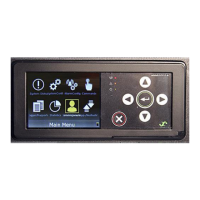
Display Screen

Describes the display unit's OLED screen, scroll knob, and buttons.

Status Indicators

Explains the function of the green (OK) and red (ALM) LEDs on the controller.

Navigation Buttons

Details the use of the scroll knob and two buttons for menu navigation.

Audible Alarm

Describes the audible alarm and how to silence it.

Controller Connections

Lists the physical connection types available for the controller.

Controller Installation and Setup

Basic Installation

Provides step-by-step instructions for installing the BC2000 and JC2000 controllers.

Controller Input Ports

Explains the use of TEMP/AUX input ports for temperature probes and auxiliary alarms.

Temperature Probe Input

Details installing temperature probes for battery temperature compensation.

Controller Settings

Explains how controller settings are configured based on profile numbers.

Viewing Information (Login Not Required)

Home Screen Information

Describes the three pages of information displayed on the home screen.

System Status

Details the first page of the home screen showing system status and internal temperature.

Date and Time

Explains how the date and time are displayed on the second home screen page.

Profile and Preset

Describes controller profile numbers and presets for system settings.

Temperature Probes (If Installed)

Explains how temperature readings appear on the home screen when probes are installed.

Screen Saver

Explains the purpose and behavior of the controller's screen saver feature.

Main Menu

Lists the submenus accessible from the main menu for controller navigation.

View Shunt Current

Instructions on how to view current shunts connected via LVD cards.

View Individual Rectifier Output Current

Instructions for viewing the output current of individual rectifiers.

View Firmware Version

How to find the controller and display firmware versions.

View IP Address

Instructions for locating the controller's IP address.

Settings and Configuration (Login Required)

Administrator Login

Details the process for logging into the controller as an administrator.

Change System Time and System Date

Instructions for manually setting the controller's time and date.

Shunt Setup

Configurable settings for shunts monitored by LVD cards.

Input Port Setup

Guides setting up TEMP/AUX input ports as alarm inputs.

Change Float Voltage

How to adjust the system's predefined float voltage.

Generator Setup

Details requirements for interfacing the controller with a diesel generator.

Restore Preset

Instructions for restoring factory default settings using presets.

Change Temperature Units

How to change temperature readings from Celsius to Fahrenheit.

Run Relay Test

Procedure to test the alarm cable connection and relay states.

Change Audible Alarm

How to configure the audible alarm settings for different alarm statuses.

Change Beep Volume

Adjusts the volume of the controller's beep alerts.

Change Screen Saver Settings

Adjusts the screen saver timeout period and behavior.

Ringers

Configurable parameters for ring generators, including voltage, frequency, and priority.

Battery Features (Login Required)

Battery Current Limit

Feature to limit rectifier voltage to control current flow to the battery shunt.

Battery Discharge Test

Procedure to test the health of batteries by discharging them.

Boost Mode

Enables charging batteries at a higher voltage for a specified period.

Over Temperature

Allows adjustment of temperature thresholds for over-temperature alarms.

Temperature Compensation

Algorithm for adjusting output voltage based on battery temperature.

Thermal Runaway

Feature to reduce rectifier output voltage during excessive battery heating.

Basic Troubleshooting

Appendix - Parameter Settings and Ranges

Relative Parameters for Display;Telnet

Figure illustrating relative parameter settings and their relationships.

Modules

Lists configurable parameters for LVDS, Ringers, and PM sections.

Activate

Details executables and configurable parameters for activation functions.

Thermal

Details configurable parameters for Over Temp, T Comp, and T Runaway.

Probes

Configurable parameters for TEMP/AUX probe input behavior.

Display

Configurable parameters for brightness, beep volume, and screen saver.

Presets

Information on restoring factory default settings via presets.

Appendix - Controller Menu Trees

Controller Menu Tree Diagram

Visual representation of the controller's menu structure and navigation paths.

Navigation Controls

Explains the function of the left button, right button, and scroll knob.

System Parameters

Details configurable parameters within the System menu.

Alarming Parameters

Details configurable parameters within the Alarming menu.

Modules Parameters

Details configurable parameters within the Modules menu for rectifiers, LVDS, ringers, and PMs.

Contactor Parameters

Configurable parameters for LVD contactors.

Ringer Parameters

Configurable parameters for ring generators.

Activate

Details executables and configurable parameters for activation functions.

Battery Management

Details configurable parameters for Battery Discharge Test and Boost.

Generator

Details configurable parameters for generator state, type, and battery settings.

Thermal

Details configurable parameters for Over Temp, T Comp, and T Runaway.

Probes, Network, and Display

Configurable parameters for probes, network settings, and display options.

Version and Presets

Information on viewing versions and configuring presets.

Eltek BC2000 Specifications

General IconGeneral
Input Frequency47-63 Hz
Max Output Power2000W
Storage Temperature-40°C to +85°C
Communication InterfaceRS-485
Cooling MethodForced Air
Protection FeaturesOvervoltage, overcurrent, short circuit, overtemperature

Related product manuals