109
FUSO ORARIO
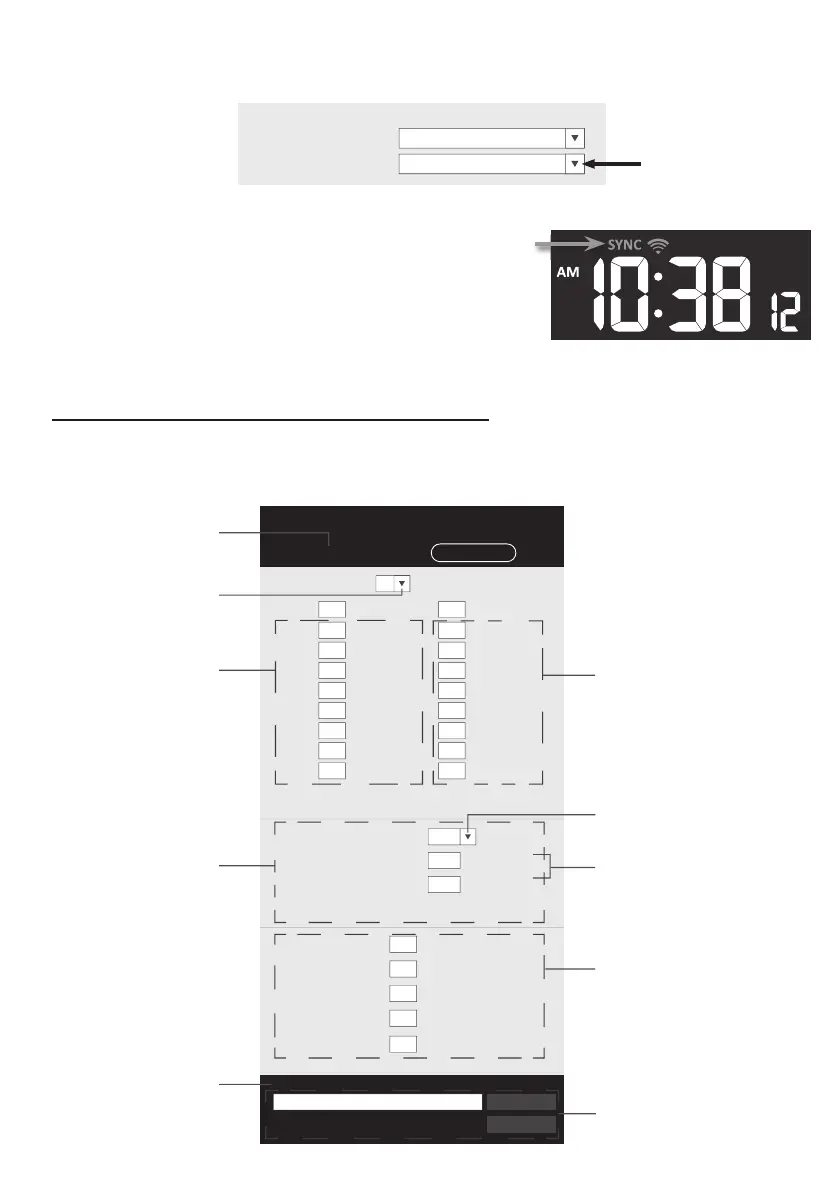
Per impostare automaticamente la visualizzazione dell'ora sul fuso orario locale, modi care il fuso nella pagina
SETUP della sezione precedente da "0:00" (prede nito) al proprio fuso orario (ad esempio + 1:00 per l’Italia).
nist.time.gov
Server URL:
Time server setup
0:00
Time Zone:
STATO DELLA CONNESSIONE DEL SERVER DEL TEMPO
Dopo che la console si è connessa a Internet, tenterà di
connettersi al server dell'ora di Internet per ottenere l'ora
UTC. Una volta stabilita la connessione e l'ora della console
è stata aggiornata, l'icona “SYNC” apparirà sul display
LCD. Il server sincronizzerà automaticamente la stazione
con l'ora di Internet alle 12:00 e alle 12:00 al giorno. Inoltre,
è possibile premere il tasto [REFRESH] per ottenere l'ora
di Internet manualmente entro 1 minuto.
IMPOSTAZIONI AVANZATE NELL’INTERFACCIA WEB
Premere il tasto "AVANZATE" nella parte superiore dell'interfaccia web per accedere alla pagina delle
impostazioni avanzate. Questa pagina consente di impostare e visualizzare i dati di calibrazione della
console, oltre che di aggiornare la versione del rmware dal browser web del PC / Mac.
Upload
Browse
Firmware version: 1.00
-560~ 560hpa / -16.54 ~ 16.54inHg / -420 ~ 420mmHg
Setting Range:
Temperature
o
C
Outdoor
Indoor
CH 1
CH 2
CH 3
CH 4
CH 5
CH 6
CH 7
Humidity %
Relative Pressure Offset:
Absolute Pressure Offset:
hpa
Range: -20 ~ 20
(Default: 0.0)
Current offset: 10Current offset: -9
Current offset: -5Current offset: 2
Current offset: -2Current offset: 3
Current offset: -2Current offset: 1.2
Current offset: -5Current offset: -0.2
Current offset: -3Current offset: -20.1
Current offset: -10Current offset: 11.5
Current offset: -3
Current offset: -3
(Default: 0)
Current offset: 10
(Default: 0)
Current offset: 0.2
Current offset: -5Current offset: 1
Pressure
Range: -20.0 ~ 20.0
o
C
-36.0 ~ 36.0
o
F (Default: 0.0)
*UV gain:
Range: 0.01 ~ 10(Default: 1.00)
Current gain: 1.1
*Light gain:
Range: 0.01 ~ 10(Default: 1.00)
Current gain: 1.1
* Depends on the model
*Wind speed gain:
*Wind direction:
*Rain gain:
Range: 0.5 ~ 1.5(Default: 1.00)
Range: -10 ~ 10(Default: 0
o
)
Range: 0.5 ~ 1.5(Default: 1.00)
Current gain: 0.85
Current offset: 2
o
Current gain: 0.75
SETUP ADVANCED
Select setting unit
Press "SETUP" icon to
Setup page
Outdoor and Ch 1~7
temperature calibration
section
Pressure calibration
section
version
function only available
in PC / Mac web browser
ADVAN
ED page
Select setting unit
The rain, wind speed, UV and Light
calibration use gain method. The
wind direction is +/- 10 offset.
Outdoor and Ch 1~7 humidity
calibration section
Current offset value is the value
that you set before to offset the
pressure reading.
SETTINGS
Umidità esterna e Ch 1 ~ 7
sezione di calibrazione
Il valore di offset corrente è il valore
impostato a priori per compensare la
lettura della pressione.
La calibrazione di pioggia, velocità del
vento, UV e luce utilizza il metodo del
guadagno. La direzione del vento è
arrotondata di +/- 10.
la funzione di aggiornamento del
rmware è disponibile solo
nel browser web PC / Mac
Outdoor e Ch 1 ~ 7
calibrazione della temperatura
sezione
Premere l'icona "SETUP" per
Pagina di con gurazione
Pagina AVANZATE
Selezionare l'unità
di impostazione
Calibrazione della pressione
sezione
attuale versione
del rmware
Selezionare l'unità di impostazione


 To Next Page
 Loading...