203
FUSO HORÁRIO
Para de nir automaticamente a exibição da hora para o seu fuso horário, altere o fuso na página
SETUP da secção anterior de '0:00' (por defeito) para o seu fuso horário (ex.+1:00 na Alemanha).
nist.time.gov
Server URL:
Time server setup
0:00
Time Zone:
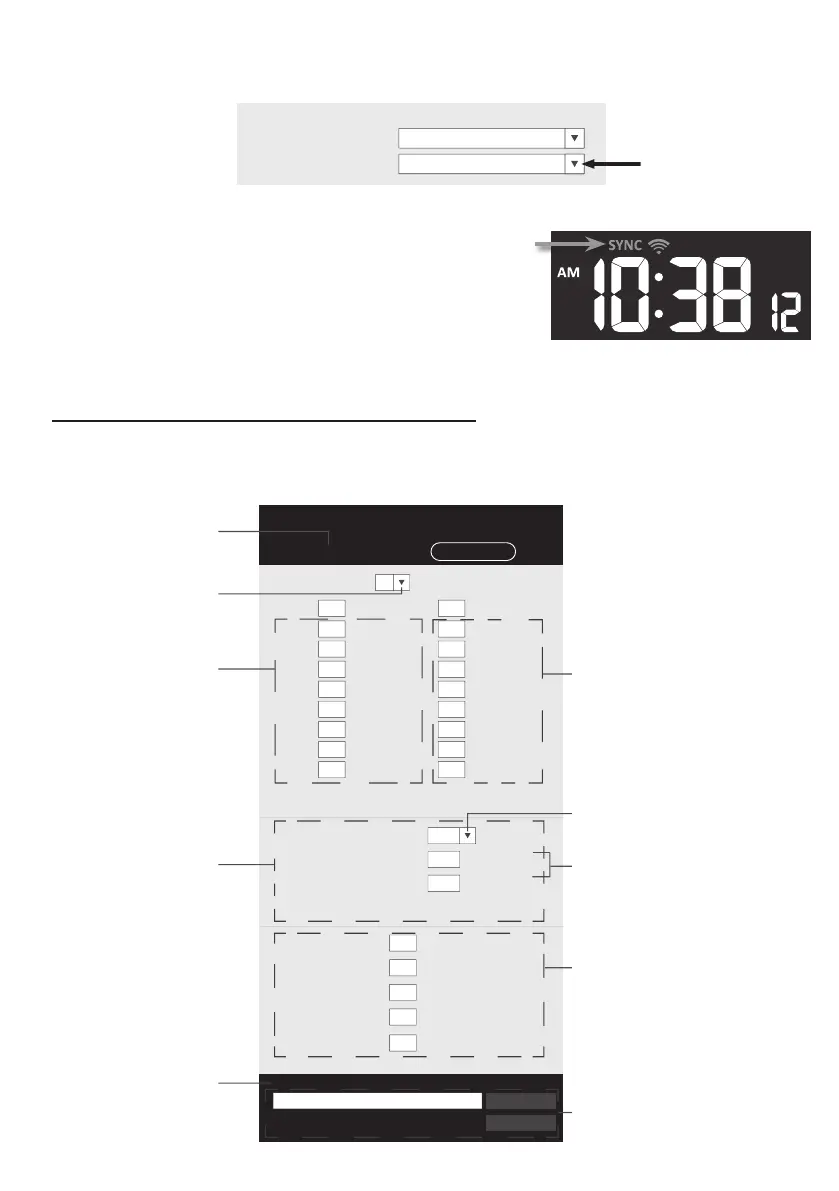
ESTADO DA LIGAÇÃO AO SERVIDOR DE TEMPO
Após a consola se ter ligado à Internet, tentará ligar-se ao
servidor de tempo da Internet para obter o tempo UTC.
Quando a ligação for bem-sucedida e a hora da consola
tiver sido atualizada, o ícone “SYNC” aparecerá no LCD.
A hora sincronizará automaticamente o servidor de hora
da Internet às 12:00 e 12:00 horas por dia. Também
pode pressionar a tecla [ REFRESH ] para obter o
tempo de Internet manualmente dentro de 1 minuto.
CONFIGURAÇÃO AVANÇADA NA INTERFACE WEB
Pressione "ADVANCED" no topo da interface web para entrar na página de de nição avançada,
esta página permite-lhe de nir e visualizar os dados de calibragem da consola, bem como atualizar a
versão do rmware no navegador web PC / Mac.
Upload
Browse
Firmware version: 1.00
-560~ 560hpa / -16.54 ~ 16.54inHg / -420 ~ 420mmHg
Setting Range:
Temperature
o
C
Outdoor
Indoor
CH 1
CH 2
CH 3
CH 4
CH 5
CH 6
CH 7
Humidity %
Relative Pressure Offset:
Absolute Pressure Offset:
hpa
Range: -20 ~ 20
(Default: 0.0)
Current offset: 10Current offset: -9
Current offset: -5Current offset: 2
Current offset: -2Current offset: 3
Current offset: -2Current offset: 1.2
Current offset: -5Current offset: -0.2
Current offset: -3Current offset: -20.1
Current offset: -10Current offset: 11.5
Current offset: -3
Current offset: -3
(Default: 0)
Current offset: 10
(Default: 0)
Current offset: 0.2
Current offset: -5Current offset: 1
Pressure
Range: -20.0 ~ 20.0
o
C
-36.0 ~ 36.0
o
F (Default: 0.0)
*UV gain:
Range: 0.01 ~ 10(Default: 1.00)
Current gain: 1.1
*Light gain:
Range: 0.01 ~ 10(Default: 1.00)
Current gain: 1.1
* Depends on the model
*Wind speed gain:
*Wind direction:
*Rain gain:
Range: 0.5 ~ 1.5(Default: 1.00)
Range: -10 ~ 10(Default: 0
o
)
Range: 0.5 ~ 1.5(Default: 1.00)
Current gain: 0.85
Current offset: 2
o
Current gain: 0.75
SETUP ADVANCED
Select setting unit
Press "SETUP" icon to
Setup page
Outdoor and Ch 1~7
temperature calibration
section
Pressure calibration
section
version
function only available
in PC / Mac web browser
ADVAN
ED page
Select setting unit
The rain, wind speed, UV and Light
calibration use gain method. The
wind direction is +/- 10 offset.
Outdoor and Ch 1~7 humidity
calibration section
Current offset value is the value
that you set before to offset the
pressure reading.
SETTINGS
Secção de calibragem de
humidade exterior e Ch 1~7
O valor de desvio atual é o valor que se
de ne antes para compensar a leitura
da pressão.
O método de ganho de uso da chuva,
velocidade do vento, UV e calibragem
da luz. A direção do vento é +/- 10
desvio.
a função de actualização de
rmware apenas disponível no
navegador web PC / Mac
Secção de calibragem
de temperatura exterior e Ch 1~7
Pressionar ícon "SETUP"
para página Setup
Página ADVANCED
Selecionar a
unidade de de nição
Secção de
calibragem de pressão
versão actual
do rmware
Selecionar a unidade de de nição


 To Next Page
 Loading...