User’s Manual
4
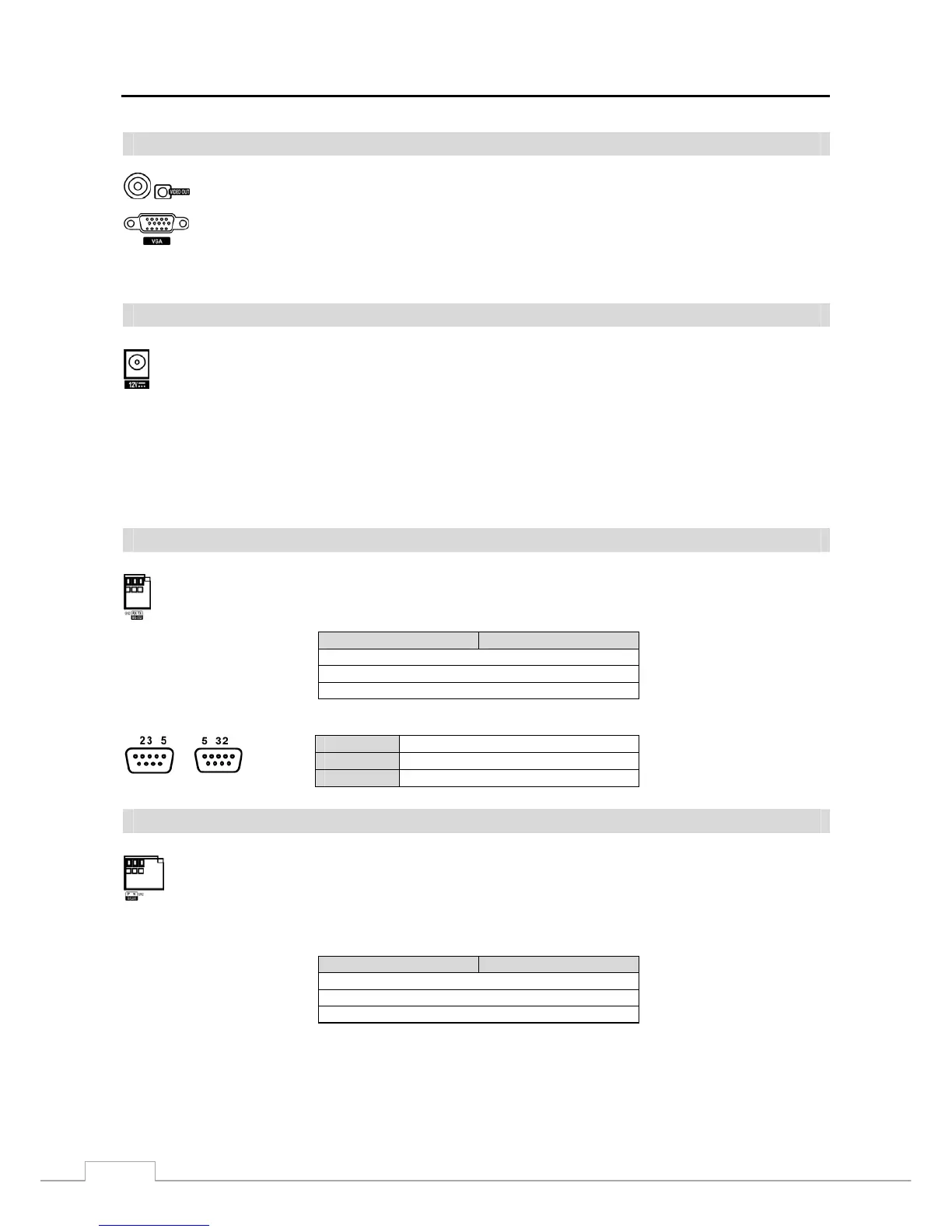
Video Out
NOTE: The VGA and Video Out (BNC) connectors may be connected to individual monitors for simultaneous
operation.
Power Cord Connector
WARNING: ROUTE POWER CORDS SO THAT THEY ARE NOT A TRIPPING HAZARD. MAKE
CERTAIN THE POWER CORD WILL NOT BE PINCHED OR ABRADED BY FURNITURE.
DO NOT INSTALL POWER CORDS UNDER RUGS OR CARPET.
THE POWER CORD HAS A GROUNDING PIN. IF YOUR POWER OUTLET DOES NOT
HAVE A GROUNDING PIN RECEPTACLE, DO NOT MODIFY THE PLUG. DO NOT
OVERLOAD THE CIRCUIT BY PLUGGING TOO MANY DEVICES IN TO ONE CIRCUIT.
RS232 Port
Connector Pin Outs:
Master Unit Slave Unit
RX → To → TXD
TX → To → RXD
GND → To → GND
NOTE: Refer to the following 9-pin connector pin out of the slave unit.
Male
Female
Pin 2
RXD (Receive Data)
Pin 3
TXD (Transmit Data)
Pin 5
GND (Grund)
RS485 Port
Connector Pin Outs:
Master Unit Slave Unit
P → To → TX+/RX+
N → To → TX-/RX-
GND → To → GND
Connect the main monitor to the Video Out connector.
A VGA connector is provided so that you can use a standard, multi-sync computer monitor as your
main monitor. Use the cable supplied with your monitor to connect it to the DVR.
Connect the connector of the adaptor to the DVR, and connect the AC power cord to the adaptor and then
to the wall outlet.
An RS232 port is provided to connect remote control devices such as a control keyboard. PTZ cameras
or text-in devices can also be connected to the RS232 port. See Chapter 3 ─ Configuration and the PTZ
camera, text-in device or remote controller manufacturer’s manual for configuring the RS232 connection.
The DVR can be controlled remotely by an external device or control system, such as a control keyboard,
using RS485 half-duplex serial communications signals. The RS485 connector can also be used to control
PTZ (pan, tilt, zoom) cameras or text-in devices. Connect RX+/TX+ and RX-/TX- of the control system
to the P (+) and N (–) (respectively) of the DVR. See Chapter 3 ─ Configuration and the PTZ camera,
text-in device or remote controller manufacture’s manual for configuring the RS485 connection.


 To Next Page