User’s Manual
10
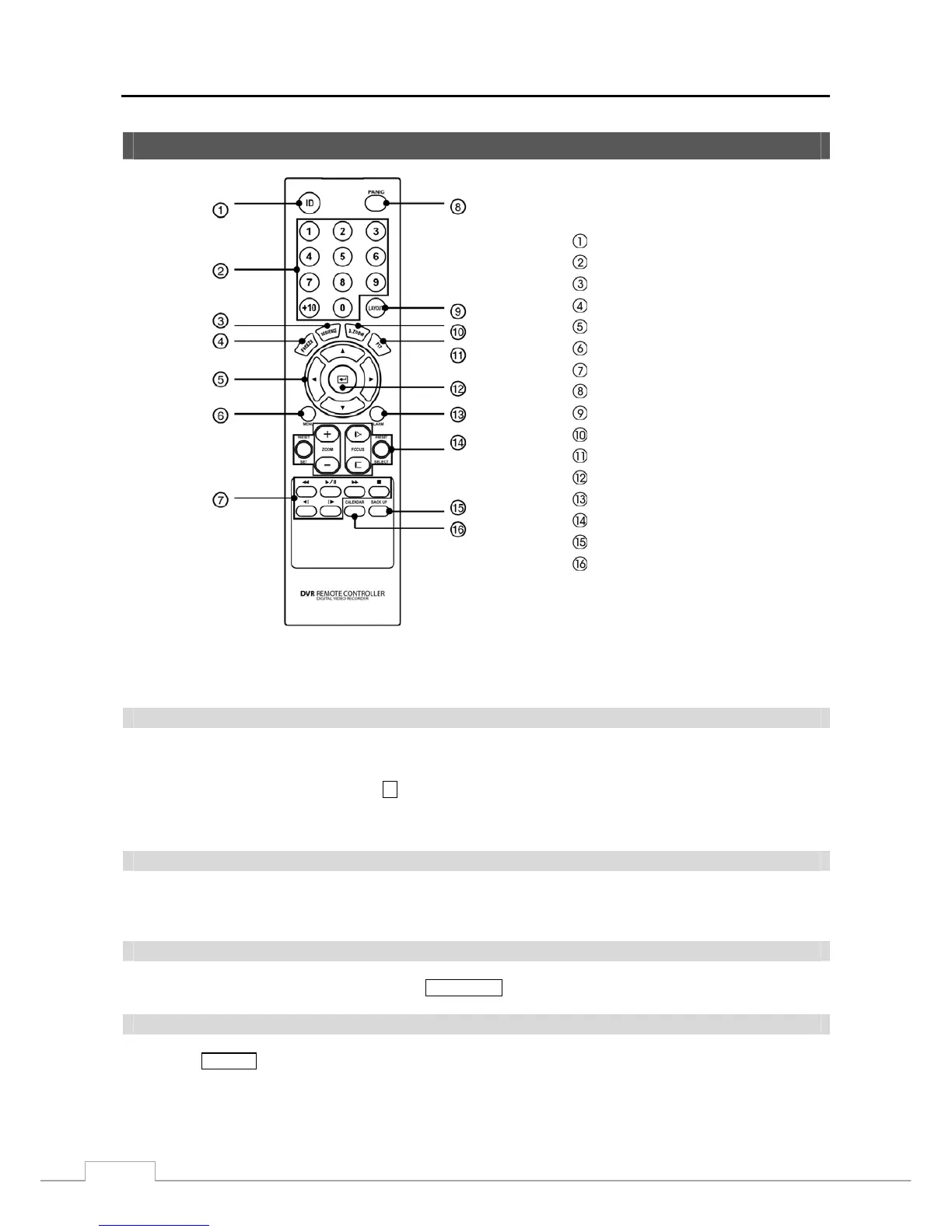
Remote Control Buttons
ID Button
Camera Buttons
Sequence Button
Freeze Button
Arrow Buttons
Menu Button
Playback Buttons
Panic Button
Layout Button
Zoom Button
PTZ Button
Enter Button
Alarm Button
PTZ Control Buttons
Back Up Button
Calendar Button
Figure 4 — Infrared remote control.
NOTE: For simplicity, the button descriptions in this manual refer to the front panel buttons.
ID Button
If a DVR System ID is set to 0, the infrared remote control will control that DVR without any additional operations.
(Refer to the System Information setup screen in this chapter for further information on setting the System ID.) If the
system ID is 1 to 16, you must to press the
ID button and then press the number button (1 to 16 (+10 & 6)) in order to
control that DVR. If the System ID of two or more DVRs is set to 0, those DVRs will react to the infrared remote control
at the same time.
Camera Buttons
Pressing the individual camera buttons will cause the selected camera to display full screen. Buttons 1 to 9 are also
used to enter passwords.
Sequence Button
When in the Live Monitoring mode, pressing the
SEQUENCE button displays live channels sequentially.
Freeze Button
Pressing the
FREEZE button freezes the current live screen.



 To Next Page