16-Channel Digital Video Recorder
29
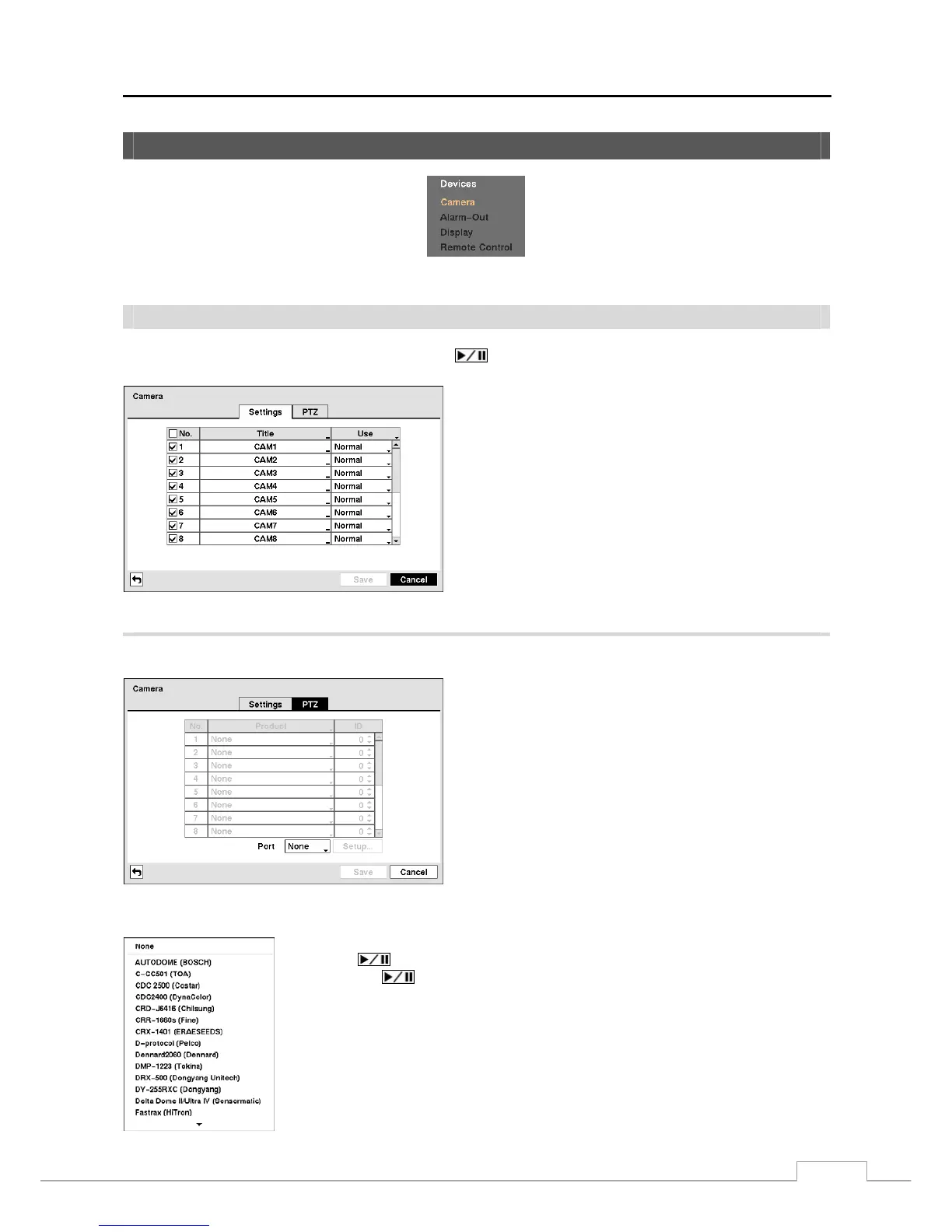
Devices Setup
Figure 28 — Devices menu.
Camera
Highlight Camera in the Devices menu and press the
button. The Camera setup screen appears.
Figure 29 — Camera setup screen.
You can turn the camera number On or Off, and you can
change the Title of each camera using the virtual keyboard.
You can also determine which cameras will display on the
monitors by selecting Normal, Covert 1 or Covert 2 from
a drop-down list in the Use column.
NOTE: When selecting the Covert 1, the DVR displays the
camera title and status icons on the covert video.
When selecting the Covert 2, the DVR displays
only camera title on the covert video.
NOTE: A user who does not have Covert Camera View
authority cannot view video from cameras set to
Covert 1 or Covert 2 in both the live monitoring
and playback modes.
Highlight the PTZ tab, and the PTZ setup screen displays.
NOTE: You will only be able to set up PTZ devices if the
PTZ port is set to RS232 or RS485.
Figure 30 — Camera PTZ setup screen.
Highlight the box in the Product column for the PTZ camera you wish to configure and
press the
button. A list of PTZ devices appears. Select your camera from the list
and press the
button. You will need to connect the camera to the RS232 or RS485
connector on the back of the DVR following the camera manufacturer’s instructions.



 To Next Page