How to get into programming mode?
First, plug the instrument to the corresponding supply, automatically a display test will be done and after that the software version
will be shown then the instrument will go to work mode. Second, press the key to enter into the programming mode, the
indication "-Pro-" will appear on the display then.
How to store programmed parameters?
If we want to save the changes that we have done in the programming, we must complete the programming of all the parameters
contained in the routine we are in. In the last step of the routine, as a result of pressing on the
key, “StorE” will de displayed
during a few seconds, meanwhile all the data are stored in memory. Then the instrument will go back to working mode.
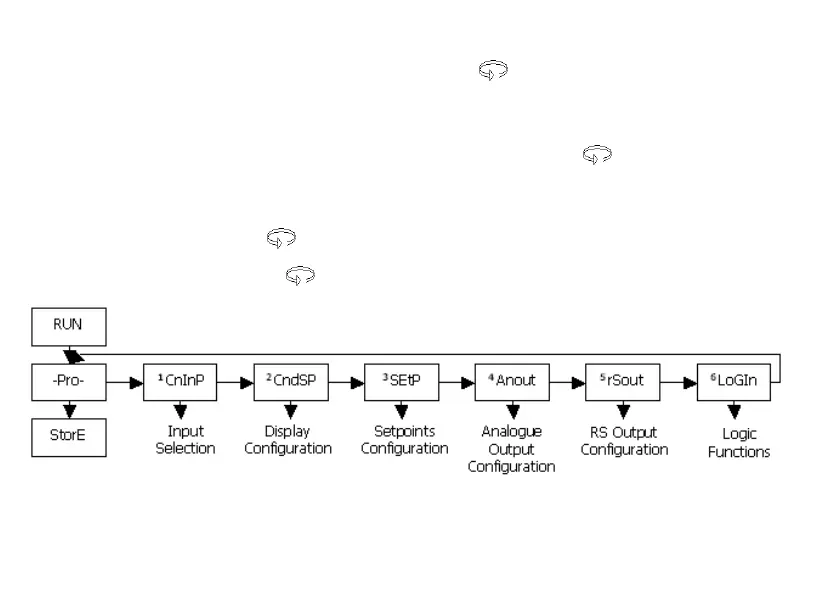
How is programming routine organised?
Programming software is composed by a number of menus and submenus hierarchically organized. On figure below, beginning
with indication "-Pro-", press repeatedly
to get access to programming menus. Modules 3, 4 and 5 will only be shown if the
option for setpoints, analogue output or RS option has been plugged in. Selecting one menu, the access to the different
programming submenus is done by pressing .
Module selection level


 To Next Page