Home
Epson
Scanner
Expression 800
Setup Guide
Page 26
Epson Expression 800 - Page 26
81 pages
Manual
Save Page as PDF
To Next Page
To Next Page
To Previous Page
To Previous Page
Loading...
19
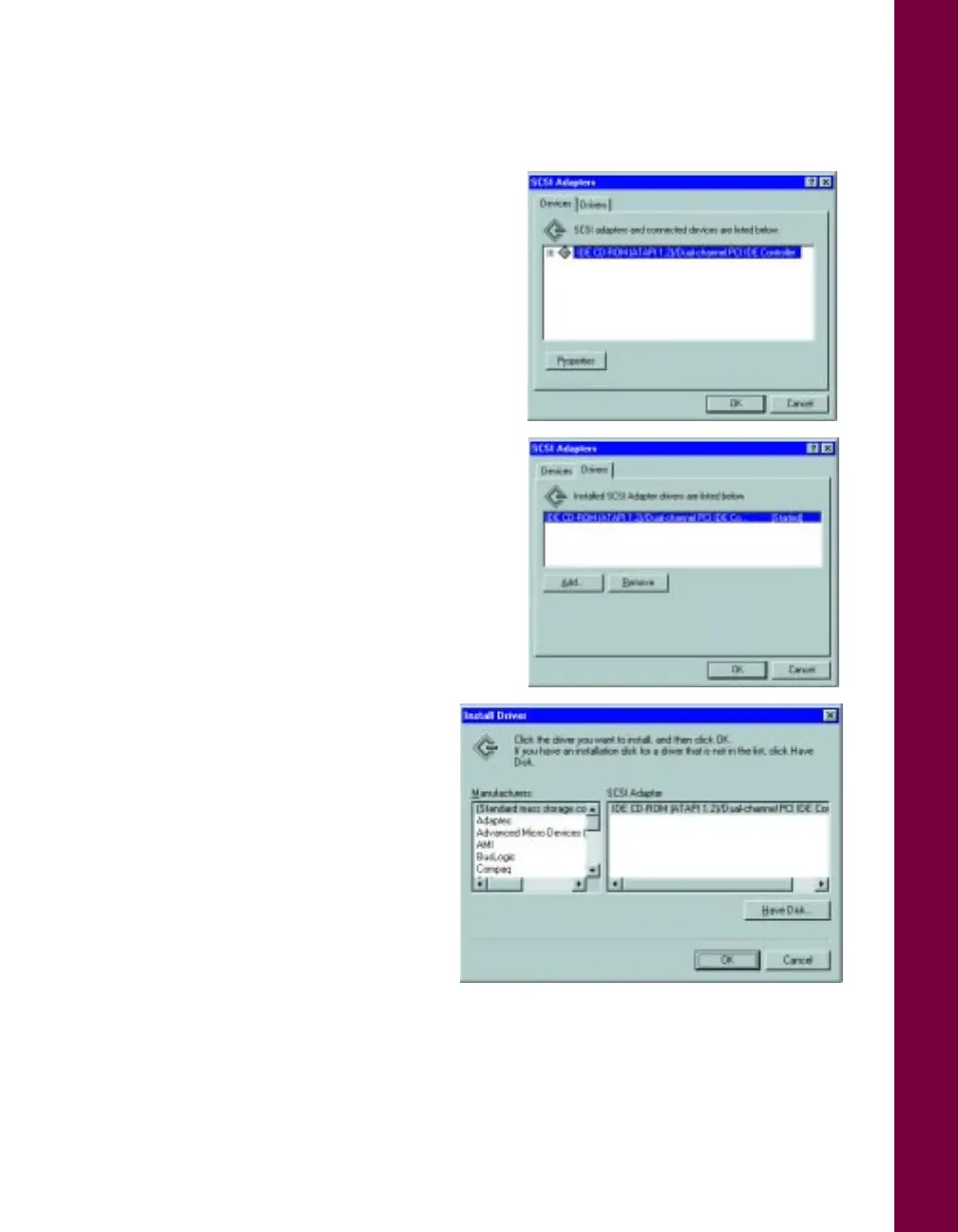
4.
Double-click
SCSI Adapters
. You see
the dia
log box on
the rig
ht.
5.
Click the
Drivers
tab
.
6.
Click the
Add
button. After a
moment
, you see th
e Inst
all
Driver dialog box.
7.
In the Manufacturers list, click
Adaptec
.
25
27
Table of Contents
Main Page
Default Chapter
2
Fcc Compliance Statement
2
A Note Concerning Responsible Use of Copyrighted Materials
3
Copyright Notice
3
Table of Contents
4
Scanning for Professional Results
8
About Your Scanner
8
About Your Software
9
About Your Documentation
10
Cautions, Notes, and Tips
11
System Requirements
12
Windows
12
Macintosh
13
Year 2000 Ready
13
Important Safety Instructions
14
Setting up Your Scanner
15
Unpack Your Scanner
16
Choose a Good Place for Your Scanner
18
Install the SCSI Interface Board
19
Unlock the Scanner
20
Set the SCSI ID Number
21
Connect the Scanner to Your Computer
22
Power on Your System
23
Install the SCSI Software (PC Only)
23
If You're Running Windows 95 or Windows 98
24
If You're Running Windows NT 4.0
25
Install EPSON TWAIN Pro
28
If You're Running Windows
28
If You're Using a Macintosh
30
Install Lasersoft Silverfast Lite
31
If You're Running Windows
31
If You're Using a Macintosh
31
Install Presto! Pagemanager
32
If You're Running Windows
32
If You're Using a Macintosh
33
Install Xerox Textbridge Classic
33
If You're Running Windows
33
If You're Using a Macintosh
34
Install Adobe Photoshop 5.0 LE
34
If You're Running Windows
34
If You're Using a Macintosh
35
How to Scan
36
Preparing to Scan
36
Scanning Tips
37
Selecting Resolution
38
Scaling (Resizing) Images
39
Batch Scanning
39
Selecting Your Scanner Driver
40
Recommended Settings
41
Step-By-Step Scanning Instructions
42
Placing Your Original Document
42
Beginning Your Scan
43
Scanning with EPSON TWAIN Pro
43
Scanning with Lasersoft Silverfast Lite
45
Viewing Your Electronic Manuals
48
Installing Adobe Acrobat Reader
49
If You're Running Windows
49
If You're Using a Macintosh
49
Copying a Manual to Your Hard Drive
50
Navigating a Manual
50
Setting up the Tpu and Adf Units
51
Transparency Unit
51
Unpacking the Transparency Unit
52
Removing the Shipping Screw
52
Installing the Transparency Unit
53
Using the Film Guides
54
Loading 35 MM Slides
55
Loading 4 5-Inch Film
56
Loading 120-Size or 220-Size (Medium Format) Film
56
Scanning Normal Documents with the Transparency Unit Installed
57
Auto Document Feeder
58
Unpacking the Auto Document Feeder
58
Installing the Auto Document Feeder
59
Scanner Maintenance
61
Transporting the Scanner
61
Transporting the Tranparency Unit
62
Cleaning the Scanner
63
Problems? Need Help
65
Identifying Scanner Parts
66
Lights and Buttons
67
Problems and Solutions
68
Setup Problems
68
Scanner Problems
69
Software Problems
70
Scanning Problems
71
Where to Get Help
74
EPSON Technical Support
74
Software Technical Support
76
Index
78
Other manuals for Epson Expression 800
User Guide
76 pages
Product Information Guide
7 pages
Installation Update
8 pages
Related product manuals
Epson Expression 636
75 pages
Epson Expression 1680
159 pages
Epson Expression 12000XL
74 pages
Epson Expression 10000XL
96 pages
Epson Expression 11000XL
75 pages
Epson Expression 1600 - Artist
18 pages
Expression 11000XL - Graphic Arts
2 pages
Epson ES-50
112 pages
Epson ES-400
169 pages
Epson ES-400 II
142 pages
Epson WorkForce ES-500W
2 pages
Epson WorkForce ES-500W II
180 pages













 To Next Page