DESCRIPTION OF OPERATION
0740 801 028
- 36 -
© ESAB AB 2017
Hardware reset
In some cases it is necessary to reset the hardware.
To do this, follow these steps:
1. With the power turned off, mount a jumper on pins 1,2 and 3 in connector CN23.
2. Turn the power on and wait until LED D10 flashes continously with a green light.
3. Turn the power off and remove the jumper.
When the power is turned on again, the hardware is reset.
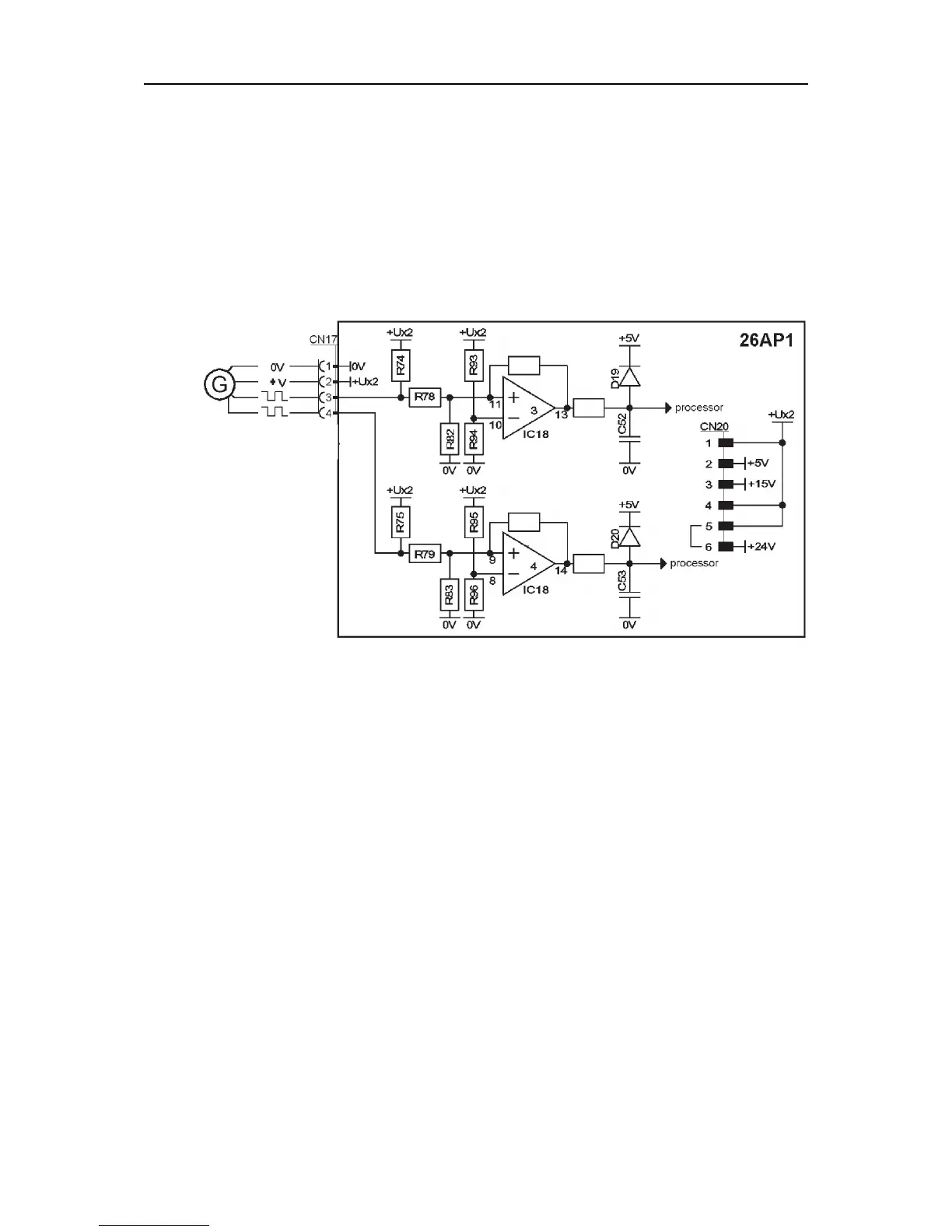
26AP1:3 Encoder for wire feed motor
The external encoder is supplied with 5, 15 or 24 V depending on the voltage selector CN20.
In the picture the jumper between pin 5 and 6 of terminal CN20 selects 24 V.
During rotation there are pulses at terminals CN17:3 and 4. The pulse frequency is a
measure of the speed. The phase relation between the two pulse trains gives the direction of
rotation.



 To Next Page