FAULT CODES
0740 801 028
- 47 -
© ESAB AB 2017
FAULT CODES
Fault codes are used in order to indicate and identify a fault in the equipment.
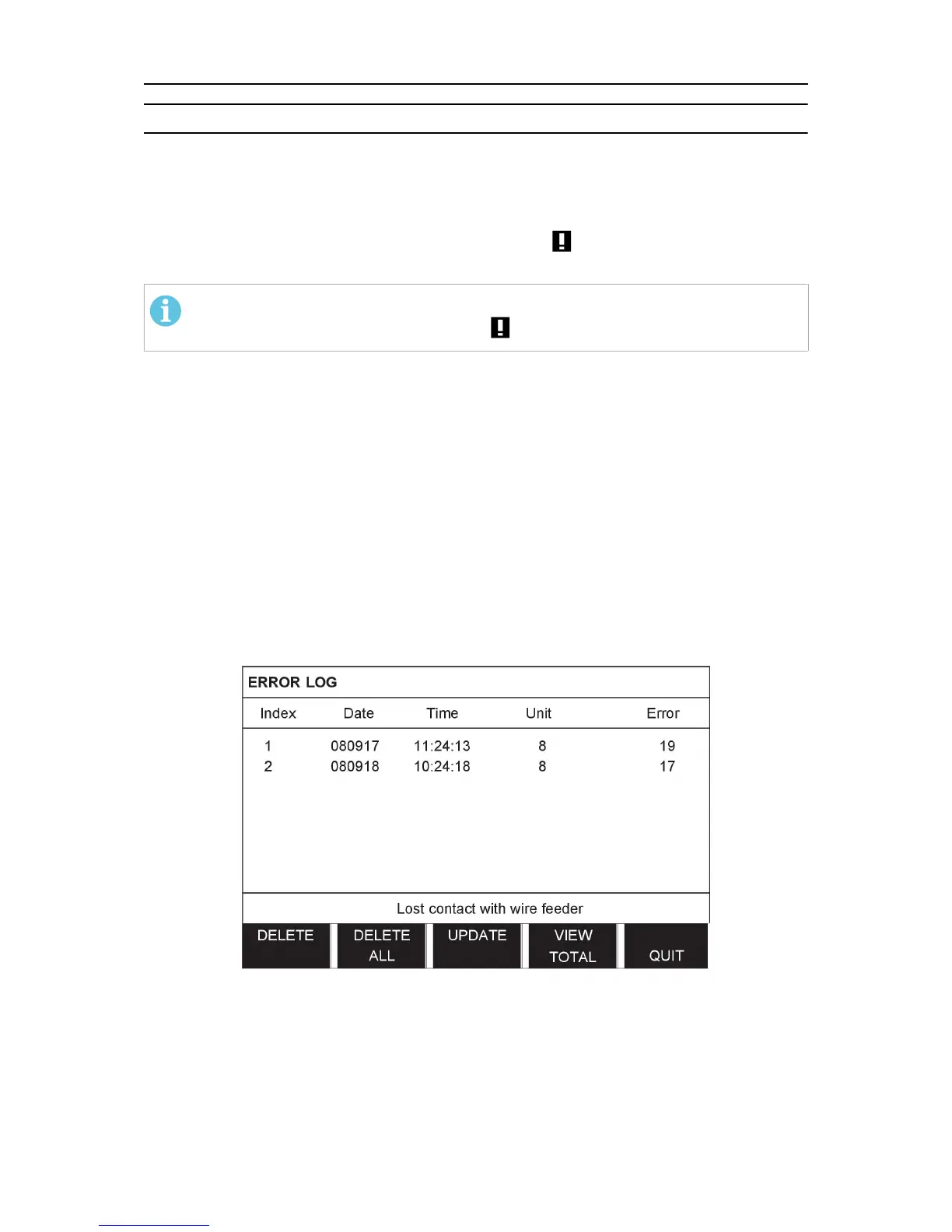
Error log
All faults that occur when using the welding equipment are documented as error messages in
the error log. They are indicated by an exclamation mark in the upper right corner of the
display.
NOTE!
Entering the error log erases the symbol from the display
When the fault log is full, the oldest message will automatically be erased when the next fault
occurs.
Only the most recent fault message is displayed on the control panel.
Faults are monitored/detected in two ways: by test routines that are run on initiation and by
functions that can detect a fault when it occurs.
Main menu → Tools → Error log
The following headings are used in the fault log:
• Index Error message number
• Date and Time When the fault occurred
• Unit Which unit has generated the error message
• Error Fault code
Delete error messages
To delete a single error messages from the fault log, position the marker at the error and then
press the soft pushbutton DELETE.
To delete all error messages from the fault log, press the soft pushbutton DELETE ALL. This
action will erase all messages from the fault log.



 To Next Page