SOFTWARE UPDATE
0740 801 028
- 60 -
© ESAB AB 2017
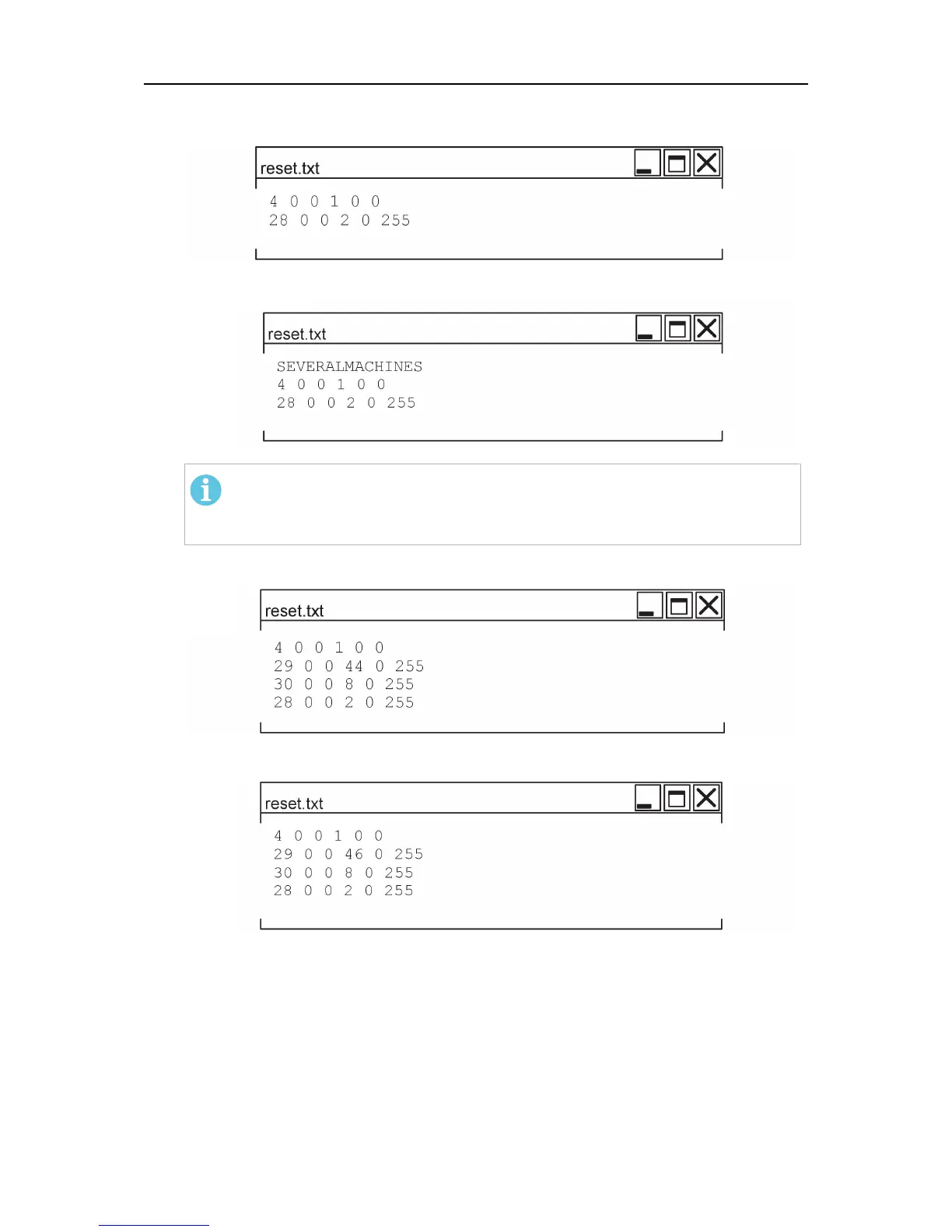
Example of reset.txt
1. To make a general reset and set baudrate to 500 kbit/s:
2. When working on several units. Make a general reset and set baudrate to 500 kbit/s,
without renaming the textfile:
NOTE!
Remove “SEVERALMACHINES” as soon as possible from your USB
memory to prevent accidental removal of data!
3. To change the machine id to 44 (PEK), node id to 8, general reset and set baudrate to
500 kbit/s:
4. To change the machine id to 46 (PAB), node id to 8, general reset and set baudrate to
500 kbit/s:
Updating software
1. Before any other action is made, export welding data and settings. Export from the units
memory to an empty USB memory (see Export/Import in the users manual for the PEK
control panel).
2. By means of a computer, save the new software (firmware) to another empty USB
memory stick.



 To Next Page