-- 47 --
1sxx02cw
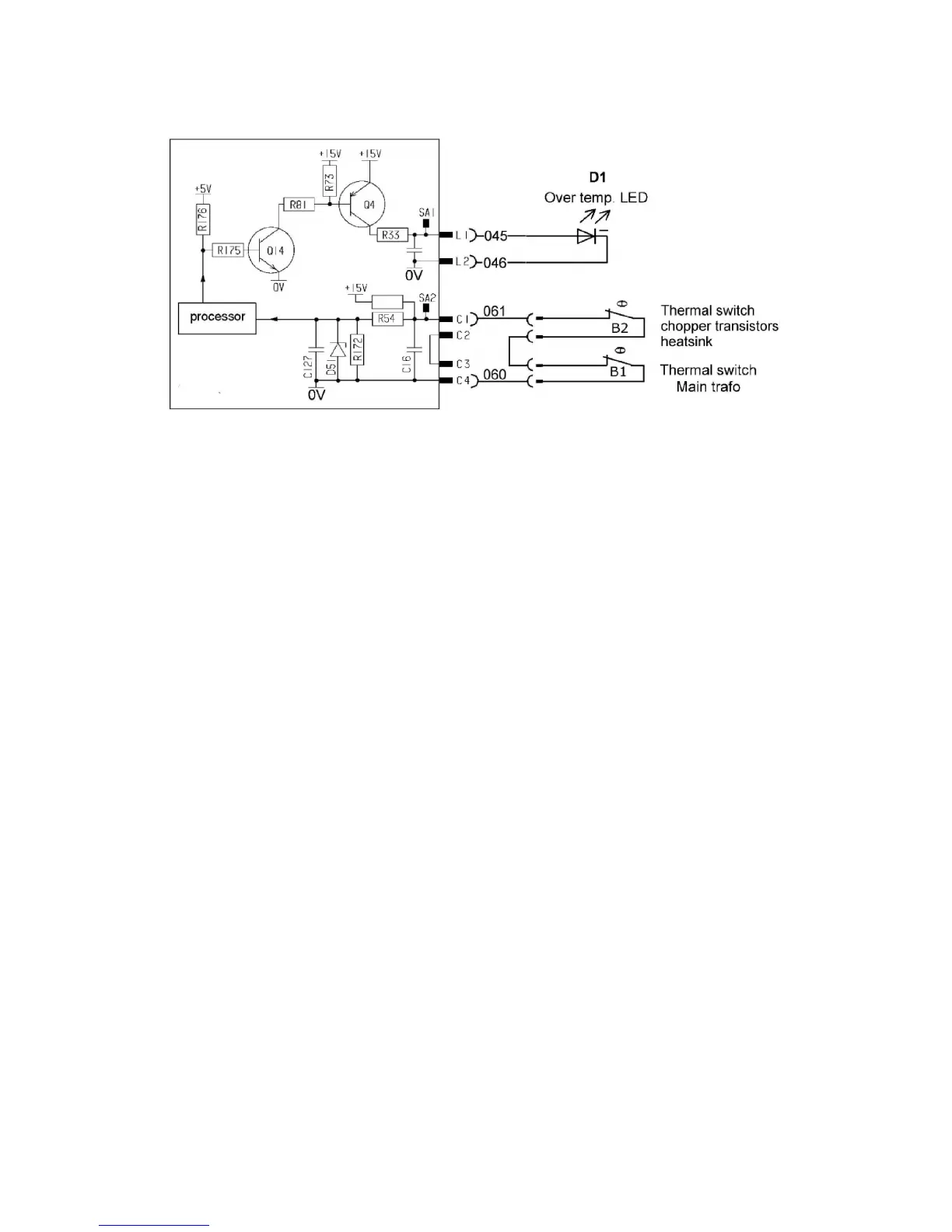
Check that voltage distribution R32,R44,R54 and R172 is correct by measuring the voltage
between C1--C4.
U = 9.4V ± 0.5V
Check that processor input P9.4 is high -- and the error message is displayed when C1--C4
is open (Led H2 is on)
If direct junction between C1 and C4 don’t remove an error message -- then problem is in
CB0 hardware.
Check that processor input P9.4 is low when C1--C4 are shorted directly.
Status of thermal cutout input can be read using ESAT software.
Service function no. 16 Read thermal cutout input
Argument 2 = 0;
Argument 3 = 0;
Response: One argument, one byte long. Value = 0 means not active, Value = 0xff means
active.
Checking Flow guard
(only machines with Flow Guard sensor)
Esab Logic Pump switch on feeder must be ”on” -- in Mig/Mag process.
Turn of the plug from X4.1--X4.2 on ACH10. When switch on torch is pressed -- an error
message should be displayed -- welding process is stopped.
The following description refers to cooling units with a flow guard: machines without a flow
guard behave as if cooling water is always flowing.
All machines without flow guard, even without water cooling have connection between
X4.1--X4.2.





 To Next Page