Names and Functions of Parts
16
Bench Top User’s Manual
4.1 Chamber
4.1.1 Front
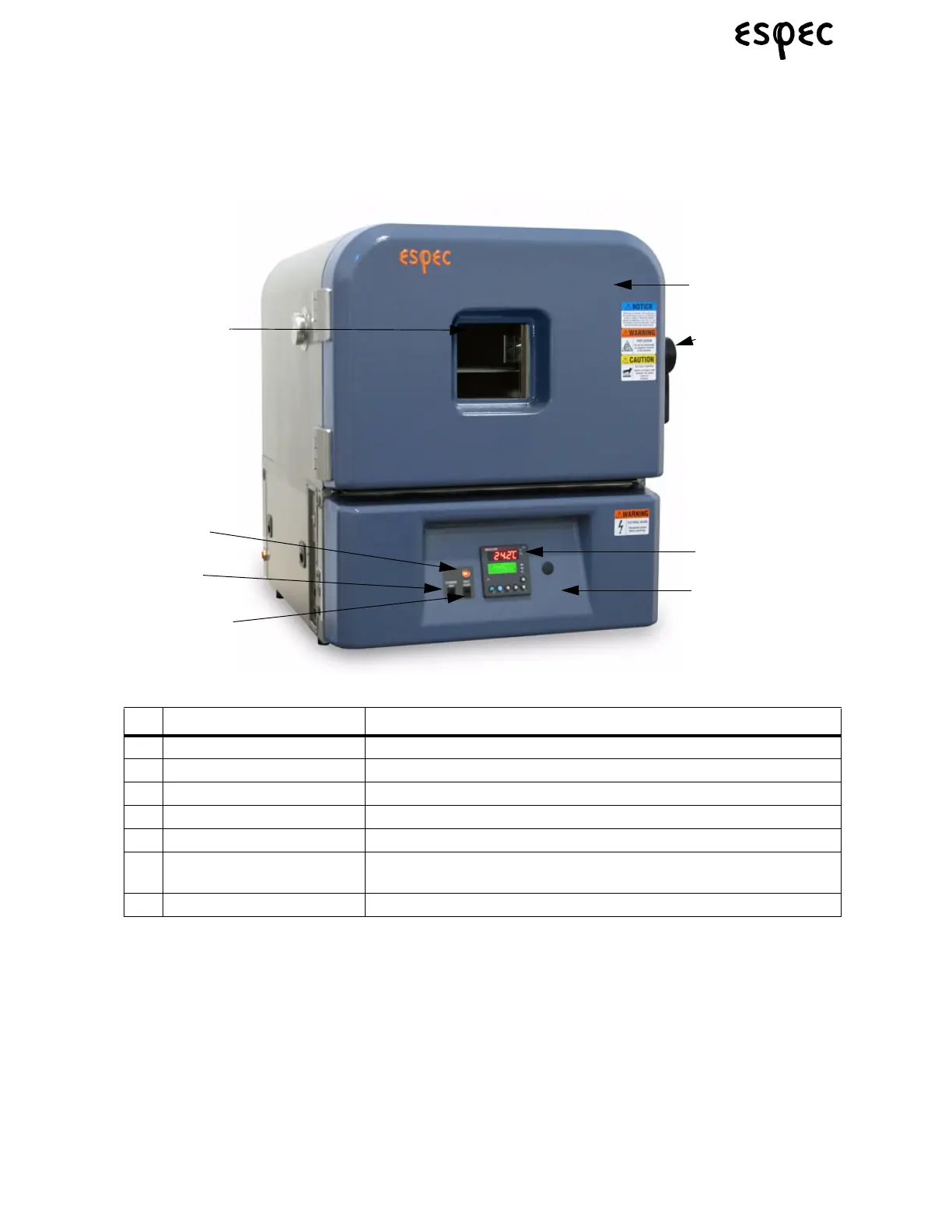
FIGURE 4.1.CHAMBER FRONT
TABLE 4.1. CHAMBER FRONT PARTS
Name Function/Use
(1) Instrumentation Panel User-interface panel for controlling the temperature (& humidity) controller.
(2) Electrical Compartment Door Open to access the electric parts compartment.
(3) Door Handle Use to open/close the chamber door.
(4) Chamber Door Open to access the test area.
(5) Chamber Run Switch Turns chamber ON if no faults are present.
(6) Fault Reset Switch Resets faults on chamber. If fault indicator is ON, this must be activated
before chamber will run.
(7) Chamber Fault Indicator Indicates a fault condition on the chamber.
Electrical Compart-
ment Door (2)
Chamber Fault
Indicator
Chamber Run
Switch
Fault Reset Switch
Optional Window
Chamber Door (4)
Door Handle (3)
Instrumentation
Panel (1)



 To Next Page