EasyManua.ls Logo

ESPEC BTX-475 - Controller Interface Usage

Default Icon
82 pages
Print Icon
To Next Page IconTo Next Page
To Previous Page IconTo Previous Page
Loading...
Operation
38
Bench Top User’s Manual
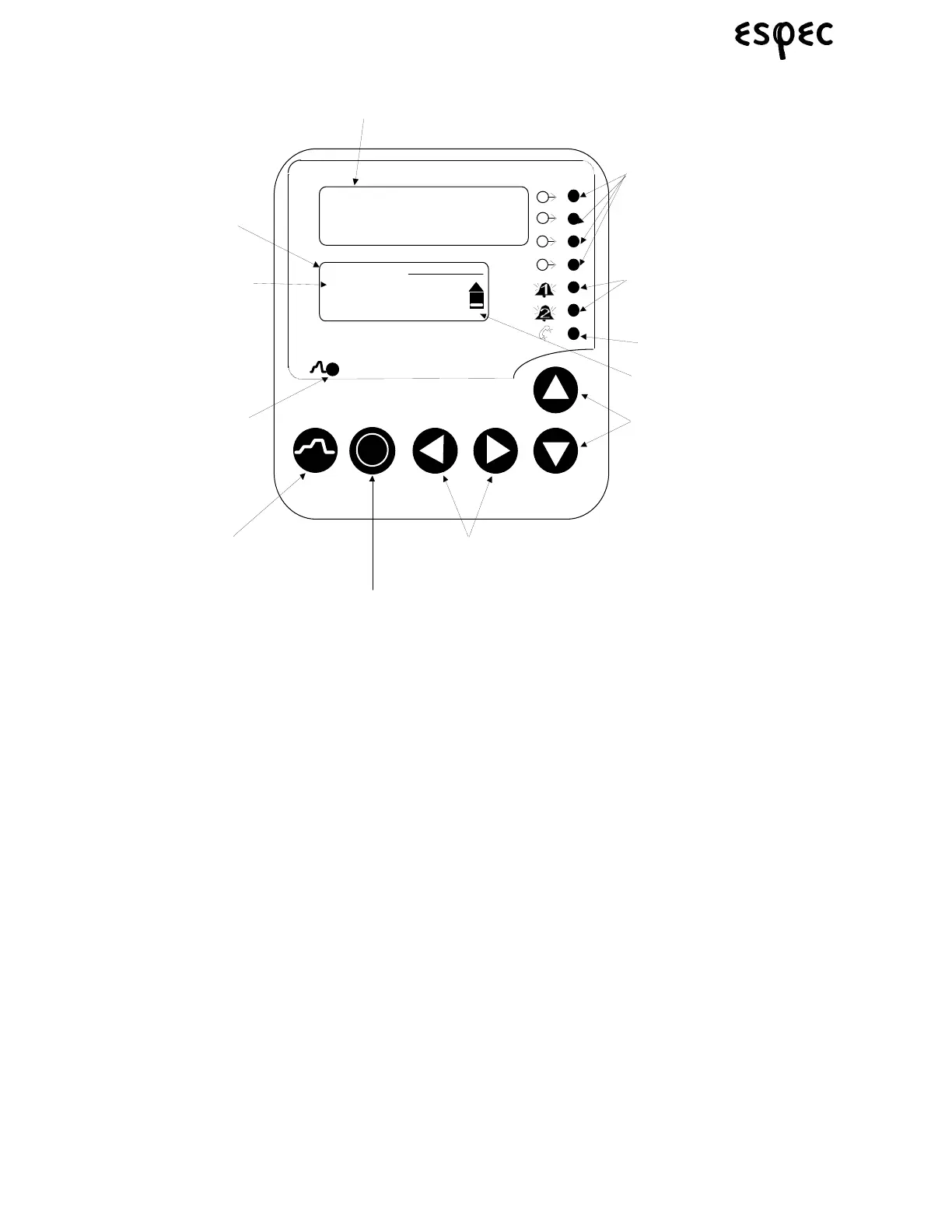
6.5 Operating the Controller
Note: The controller alarms are factory configured for control of the cooling system. DO
NOT change alarm settings or incorrect chamber operation may result.
i
WATLOW
F
4
7 6 . 0 F
Main Page
Go to Profiles
Go to Setup
Go To Factory
1A
1B
2A
2B
Active Output
Indicator Lights
Alarm Output
Indicator Lights
Communications
Indicator Light
Scroll Bar
Upper Display
Lower Display
Cursor
Profile
Indicator Light
Up and Down Keys
(Move Up/Increase and
Move Down/Decrease)
Left and Right Keys
(Back Out and Next)
Profile Key
(Profile Run/Hold)
Informa ti on K e y
(Toggle for more
Informa ti on)

Table of Contents

Related product manuals