ETEL Doc. - Operation & Software Manual # DSC2P 903 / Ver. F / 3/6/05 Chapter D: Programming
Operation & Software Manual
Direct Drives & Systems 215
14.1.1.3 WTW command
The WTW command (WaiT for Window) allows the user to define a ’window’ around the target position to reach
(refer to §13.7
for more information about the definition of the window) when the standard reference mode is
selected (K61=1). The WTW command stops the execution of the sequence on the used axis until the motor
arrive inside the window.
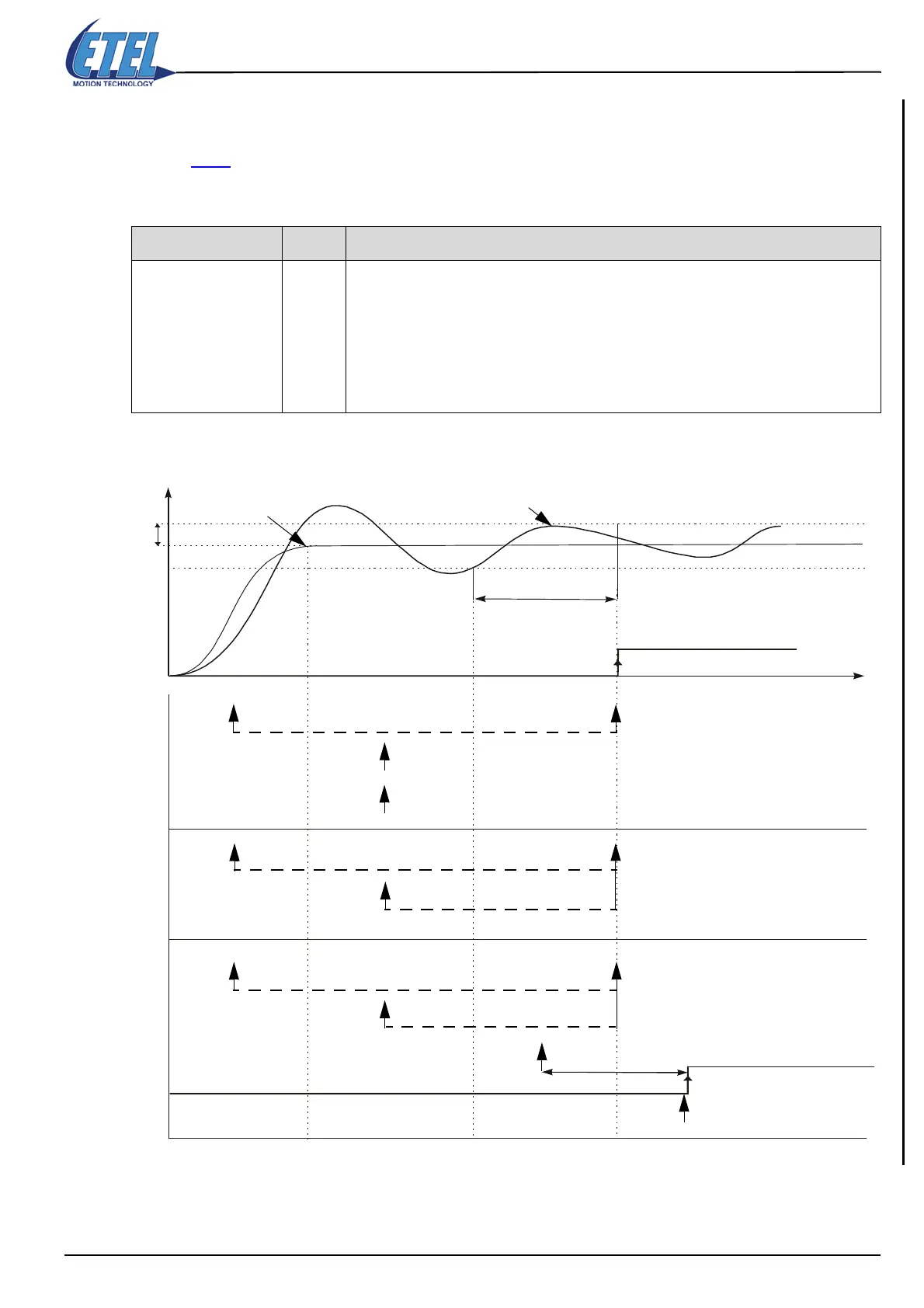
Here is a graphical representation of the above-mentioned explanations:
Command format <P1> Comment
WTW.<axis> = <P1>
0
1
2
Waits for the bit ’in-window’ (bit# 5 of SD1) to be at 1. If the theoretical trajectory is finished (bit#
4 of SD1 at 0) when this command is executed, the controller acknowledges the command
without testing if the motor is in the window or not. WTW.<axis>=0 command must not be
preceded by a WTM.<axis> command because the WTW command must be executed before
reaching the theoretical position.
Waits for the bit ’in-window’ (bit# 5 of SD1) to be at 1 without taking into account if the theoretical
trajectory is finished or not.
Restarts a new test by clearing the bit ’in-window’ (bit# 5 of SD1) without taking into account if the
theoretical trajectory is finished or not.
K39
WTW=0
WTW=1
WTW=2
K38
Real position
Theoretical trajectory
finished
In-window
WTW=0 executed here
Here is the end of the wait
WTW=0 executed here
Here is the end of the wait
WTW=1 executed here
WTW=1 executed here
Here is the end of the wait
WTW=2 executed here
WTW=2 executed here
WTW=2 executed here
In-window
Time
K38
Here is the end of the wait
Here is the end of the wait


 To Next Page