E8_Aus_rev07 – 2021-02-02
Paper roll integrated printer
- The printer only works if the paper roll is inserted.
- If no paper roll is inserted, the printer does not work.
- The button on the printer is used to feed the paper.
- Press the button once to feed the paper by one line.
- Hold down the button to feed the paper continuously.
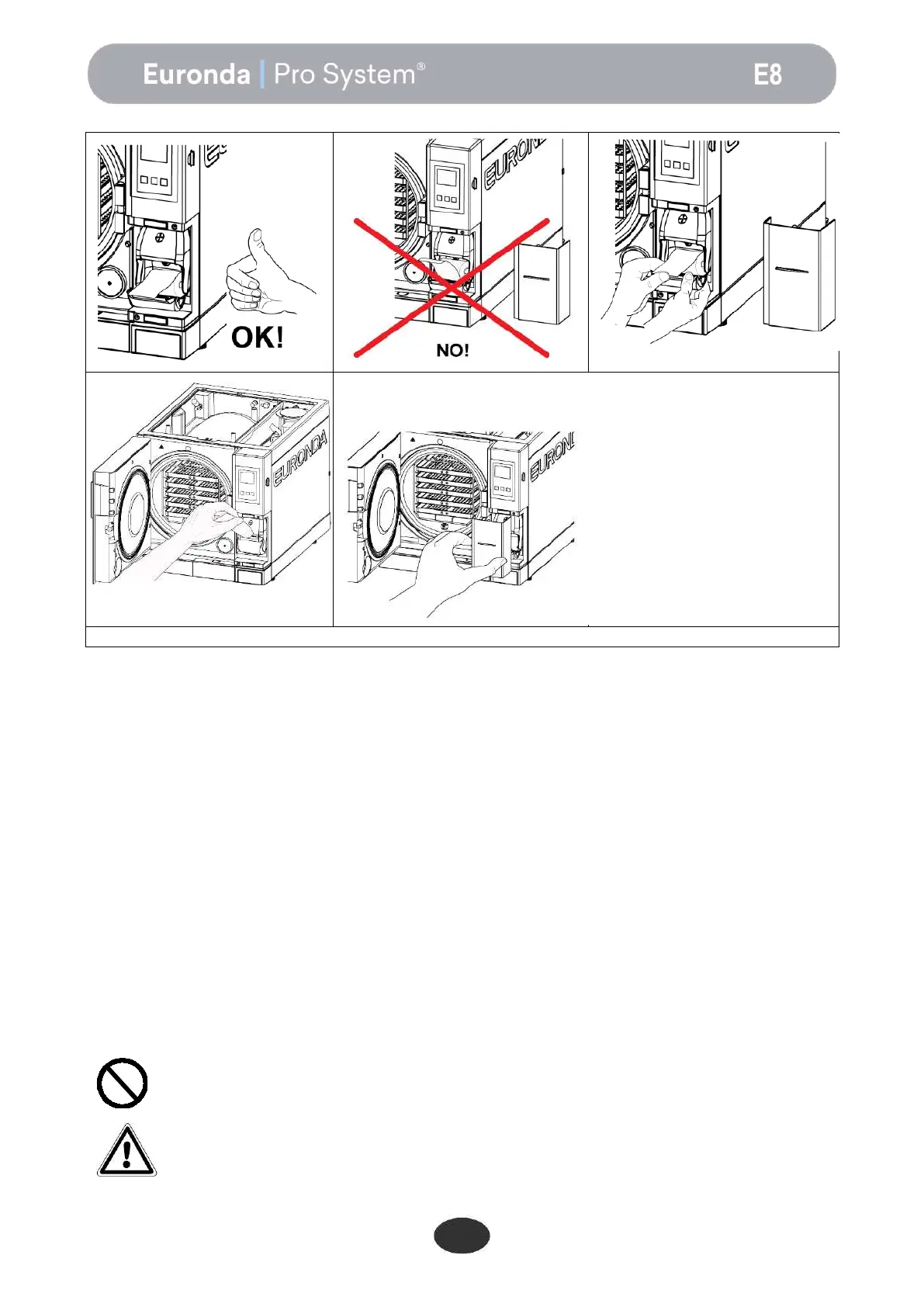
To fit a new roll of paper:
1. Open the paper roll housing cover by holding the sides with your fingers and pulling it slightly.
2. Remove the empty roll, if present.
3. Fit the new paper roll as shown in the figure; make sure the paper leaves the roll in the right direction.
4. Pull out a small quantity of paper and close the cover.
5. Tear off the excess paper.
Use rolls of thermal printer paper with the following characteristics:
width: 57 - 58 mm
maximum diameter: 40 mm
Do not expose thermal printer paper, both before and after use, to direct sunlight, heat or
humidity.
Avoid direct contact with materials in polyvinyl, as well as solvents and various
derivatives (filing envelopes in PVC, acrylics and paper treated with ammonia vapours).
Rolls should be kept in a dry place with humidity of no more than 70% and direct
temperature lower than 35° centigrade.


 To Next Page