E8_Aus_rev07 – 2021-02-02
For enveloped loads over the indicated weight it is not guaranteed a correct drying.
7.2.1 Start-up, execution and end of a cycle
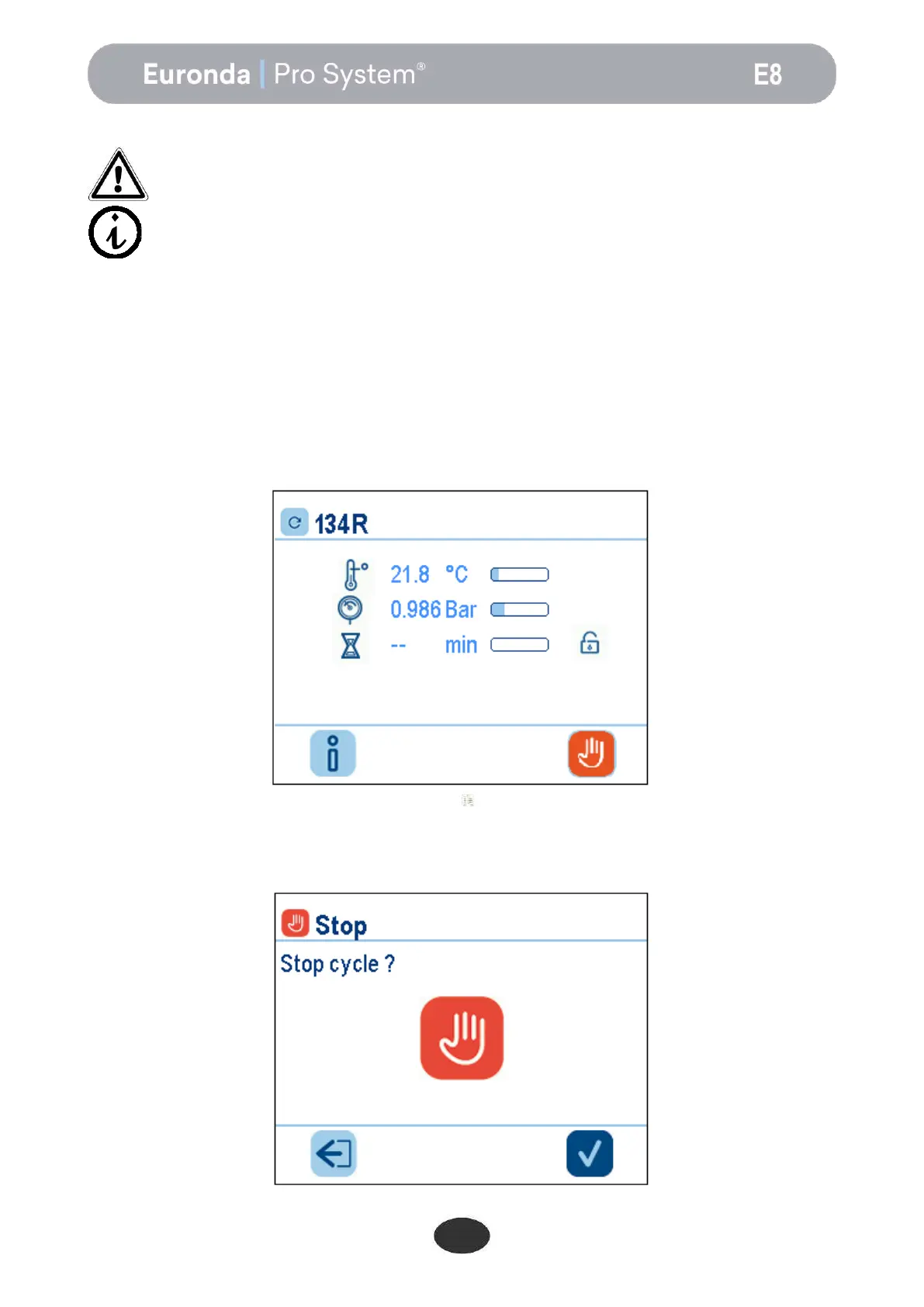
While the steriliser is performing a sterilisation or test cycle, the following screen appears on the display. This
shows:
at the top the cycle name (134R in this case);
below, an indicator of the cycle stage: pre-vacuums, sterilisation, drying;
below, the instantaneous temperature value in °C, of the pressure in bars, an hourglass with an
approximate estimate of the time left to the end of the cycle, and the padlock symbol, to indicate the
status of the door
At the bottom, the hand icon for manually stopping the cycle and the “i” icon for accessing the menus giving
detailed information on the values read by the probes.
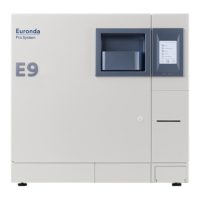
If the icon is touched when a cycle is being run the following screen appears requesting confirmation of the
manual stop. Touching the tick icon again will confirm the intention to stop the machine, and the machine will
therefore start the manual stop procedure. If the left-arrow icon is touched the previous screen appears.
Important: set the load that has to be sterilized on the highest available part of
the tray.


 To Next Page