E8_Aus_rev07 – 2021-02-02
7.2 SELECTING A STERILIZATION CYCLE
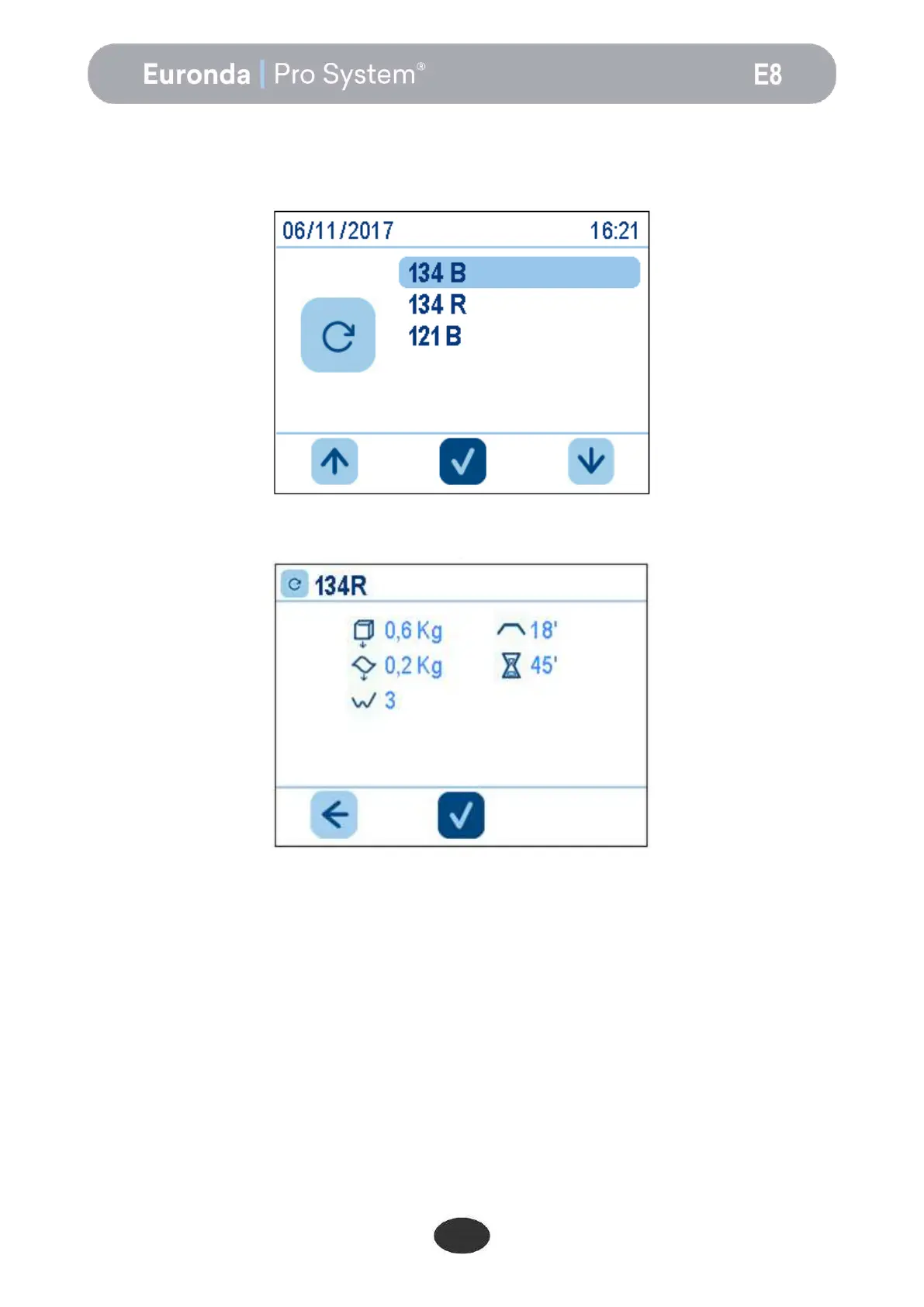
To select a sterilisation cycle, use the arrow buttons to find the required cycle on the Cycles screen and then
press the middle button:
After the cycle has been selected, this screen appears:
This screen summarises the main characteristics of the chosen cycle:
at the top, the cycle name (134 rapido);
next to the cube image, the maximum admissible solid load (0.6 kg in this case);
next to the wave image, the maximum admissible porous load (0.2 kg in this case);
next to the zig-zag line, the number of pre-vacuum cycles for removing the air required by the cycle (3 in
this case);
next to the flat line, the sterilisation time (18 minutes in this case);
next to the hour glass, the average cycle duration (45 minutes in this case).
At the bottom, the tick for running the cycle and the arrow-left icon for returning to the previous screen.
For loads not exceeding 0.6 kg of solid and 0.2 kg of porous, placed on the same tray, it is possible to
perform a rapid cycle allowing the load to be sterilised in an average time of 30 minutes. The RAPID cycle
has a shorter drying time that dries the load in any case, even if it is placed in bags.


 To Next Page