E8_Aus_rev07 – 2021-02-02
7.7.4 Printer type set up
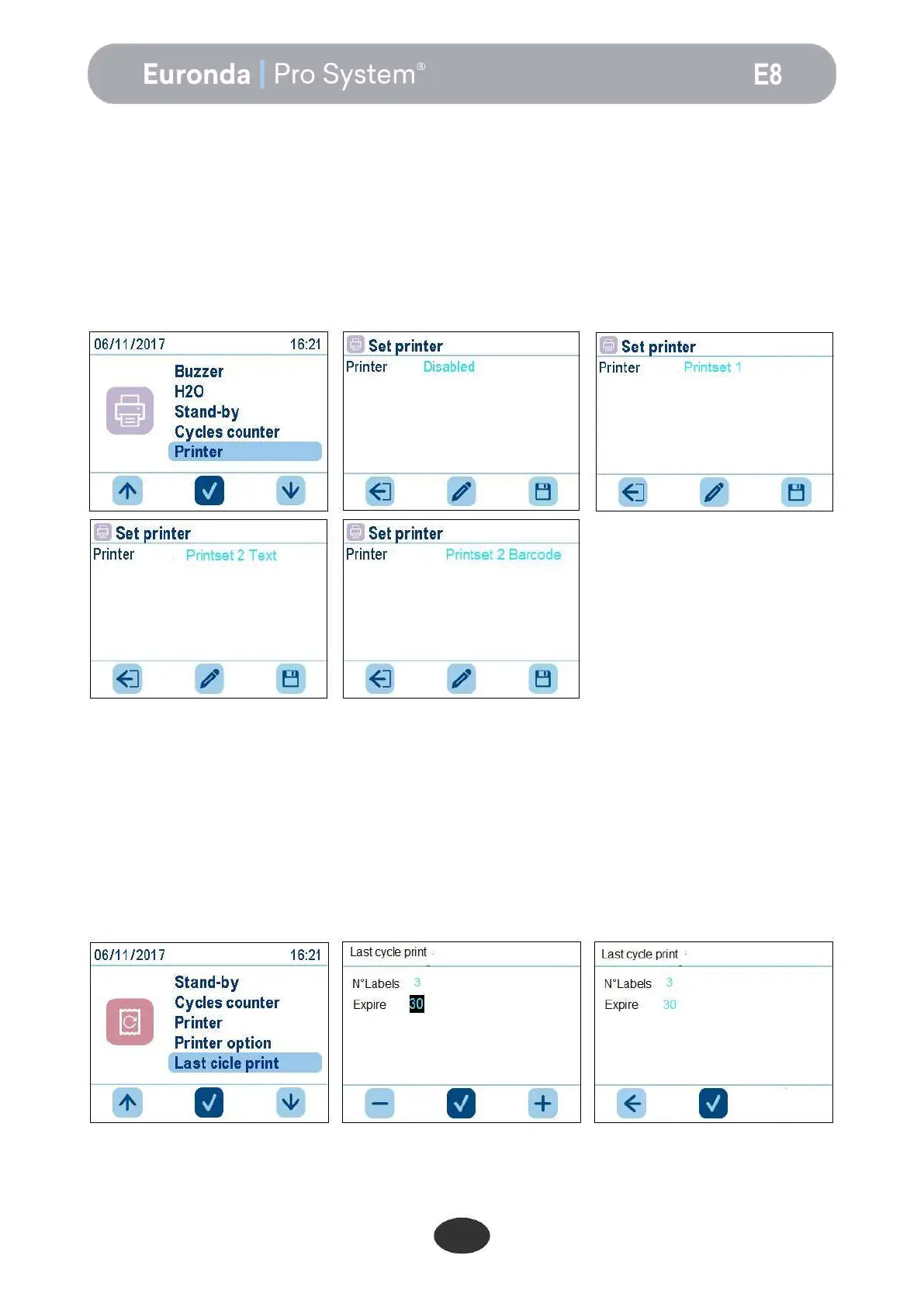
The unit can have 2 optional printer types (integrated thermal printer and integrated label thermal printer). By
default, the machine uses the printing off mode. After electrically and mechanically connecting the desired
printer, for interfacing it with the autoclave proceed as follows.
The following selection options are available:
1 = integrated thermal printer
2 = integrated label printer with printing of text
3 = integrated label printer with printing of barcode
After selecting the printer and required type of printing, press the right button to save, press the left button to
exit, or press the middle button to return and set the type again.
At the end of each cycle the autoclave will print the number of labels set, plus one "status transfer" label, to
confirm the end of the cycle.
7.7.5 Label reprinting management
If a label roll is exhausted during printing, the unit gives the possibility of reprinting the labels. The cycle will
complete normally without printing the labels. Access the settings menu and select the last cycle print menu.
Then set the number of labels and the expiry. After setting the two lines, press the middle button to confirm
and start printing.


 To Next Page