The Harmonizer
®
Programmer’s Manual
© 1999-2008 Eventide, Inc. Page 51 of 97 Release 1.3
Feedback
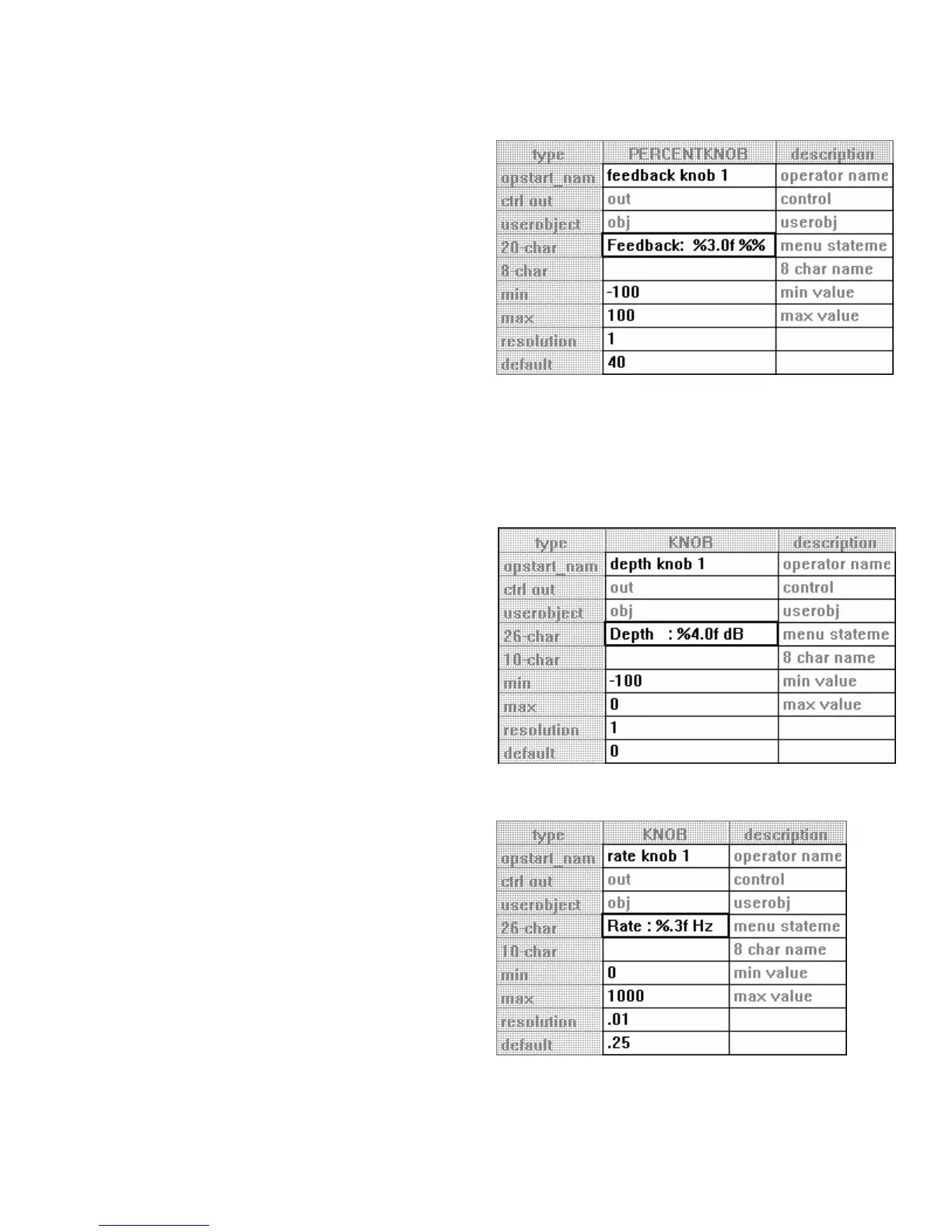
Add a percentknob module and connect its
control output to amp2 on the mix module. Then
double click on it. Change the specifiers as
shown to the right.
• The mix module’s control inputs accept a
value from -1 to +1 (negative values invert the
phase of the applied signal)
. Recall that the
percentknob module’s output will be
1/100th that of its displayed value. Thus we
can display the feedback as a percentage and
still get the appropriate fractional control
output.
• The “%%” in the menu statement is necessary to allow a single “%” symbol to appear on the
Harmonizer’s display. This is because “%” is a special symbol that tells the Harmonizer that
numeric information is to be displayed in what follows. Thus, to tell it that you actually want to
display a “%” symbol requires two.
Depth
Add a knob module and connect its control
output to gain2 on the mixer module. Then
double click on it to alter its specifiers to match
those shown to the right.
• The control inputs on the mixer module
accept values from -100 to zero.
Rate
Add a knob module and connect its control
output to freq on the LFO module. Then double
click on it to alter its specifiers to match those
shown to the right.
• The
freq control input on the LFO module
accepts a value between zero and 1000.



 To Next Page