The Harmonizer
®
Programmer’s Manual
© 1999-2008 Eventide, Inc. Page 84 of 97 Release 1.3
The actual text used for a parameter and the way changes made
to a parameter’s value in the PARAMETER area translate to
control output changes in the Patch Editor area are set up by
<modify>ing the “parameter adjuster’s” module in the Patch
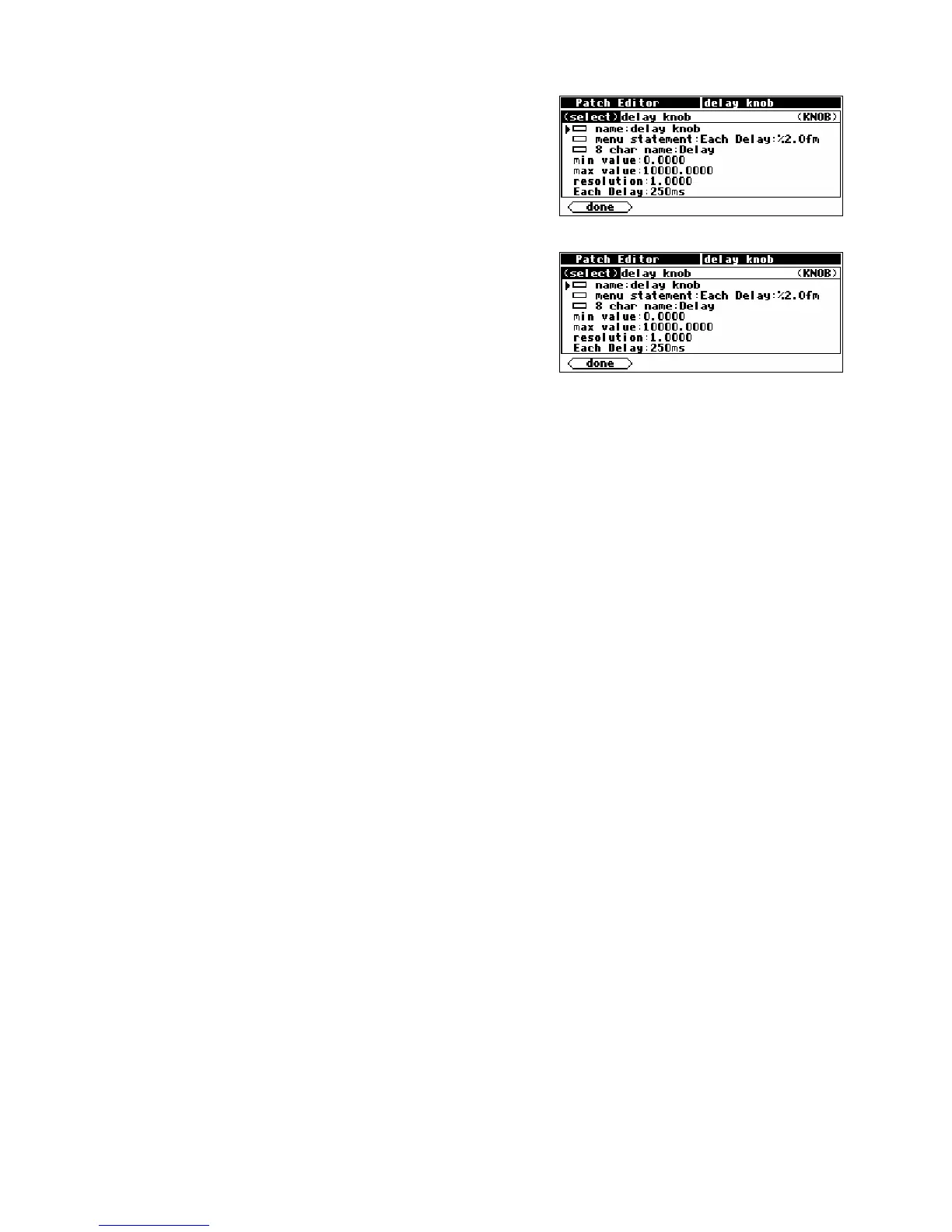
Editor area.. This screen shown to the right is a composite
picture of the
<modify> menu for the knob module in the Patch
Instruct
program.
• The module name specifier is set to “delay knob."
• The menu statement specifier is set to “Each
Delay:%2.0fms
” (the last ‘s’ is hidden). This means that on a
menu page in the PARAMETER area where this knob
module’s menu statement shows up, the text “Each
Delay: xxxxxms
” will show, where xxxxx actually reflects
the value that the parameter is set to. The “%2.0f” part is
described in some detail later.
• The 8 char name is “Delay." The 8 char name is what would show up as a SOFT KEY if this
module’s userobject were connected to the head module.
• The min value specifier sets the minimum value that the parameter can be set to.
• The max value specifier sets the maximum value that the parameter can be set to.
• The resolution specifier sets the “jump” that the parameter value makes when the KNOB is rotated.
In other words, when the user rotates the KNOB, the resolution is how far the parameter value
changes per incremental movement.
• The last line in the <modify> menu shows “Each Delay:250ms” This is called the “example line."
It is an example of what the menu statement actually looks like when viewed in the PARAMETER
area. If the example line is selected, the parameter value can be set and the parameter will behave
the same as it does when used in the PARAMETER area.
Let’s look at these lines in more detail, shall we?
Menu Statement
The menu statement is a crucial specifier used in the basic knob module, which is the most common
“parameter adjuster." The
menu statement is the line that will appear in PARAMETER area menu
page. The
menu statement may contain up to 20 characters including the parameter value. Anything
over 20 characters will not be displayed.
The first job of the
menu statement is to indicate to the user what the parameter is for. It should also
contain the format for the parameter value that will be displayed, indicating the number of spaces that
the parameter value will take up and how many digits will be after the decimal point for a numerical
parameter value (parameter values can be text as well, more on this later). You must specify this format bearing
in mind the min value, the max value, and the resolution.
The syntax of the format is:
%Y.Xf
where
Y is the number of spaces reserved for display and X is the maximum number of digits after the
decimal point. The percent(
%), period(.), and f must be used as shown. If the period(.) is removed, the
Harmonizer will display six digits after the decimal point. Here are example formats and results that



 To Next Page