The Harmonizer
®
Programmer’s Manual
© 1999-2008 Eventide, Inc. Page 85 of 97 Release 1.3
would be displayed on a menu page in the PARAMETER area. “~” represents a space that will be
inserted.
format for 1.2345 for 23456.0013 for .1234 for 1 for -55.234
%1.2f 1.23 23456.00 0.12 1.00 -55.23
%4.2f 1.23 23456.00 0.12 1.00 -55.23
%5.2f ~1.23 23456.00 ~0.12 ~1.00 -55.23
%5.0f ~~~~1 23456 ~~~~0 ~~~~1 -55.23
%7.1f ~~~~1.2 23456.0 ~~~~0.1 ~~~~1.0 ~-55.23
%9.4f ~~~1.2345 23456.2345 ~~~0.1234 ~~~1.0000 ~-55.2300
%2f 1.234497 23456.001300 0.123398 1.000000 -55.234000
Refer to the separate User Manual on entering text for a list of
the characters included in the text insert menus. The formats
shown here can be created using the % character, numbers, a
small f, and a period (.).
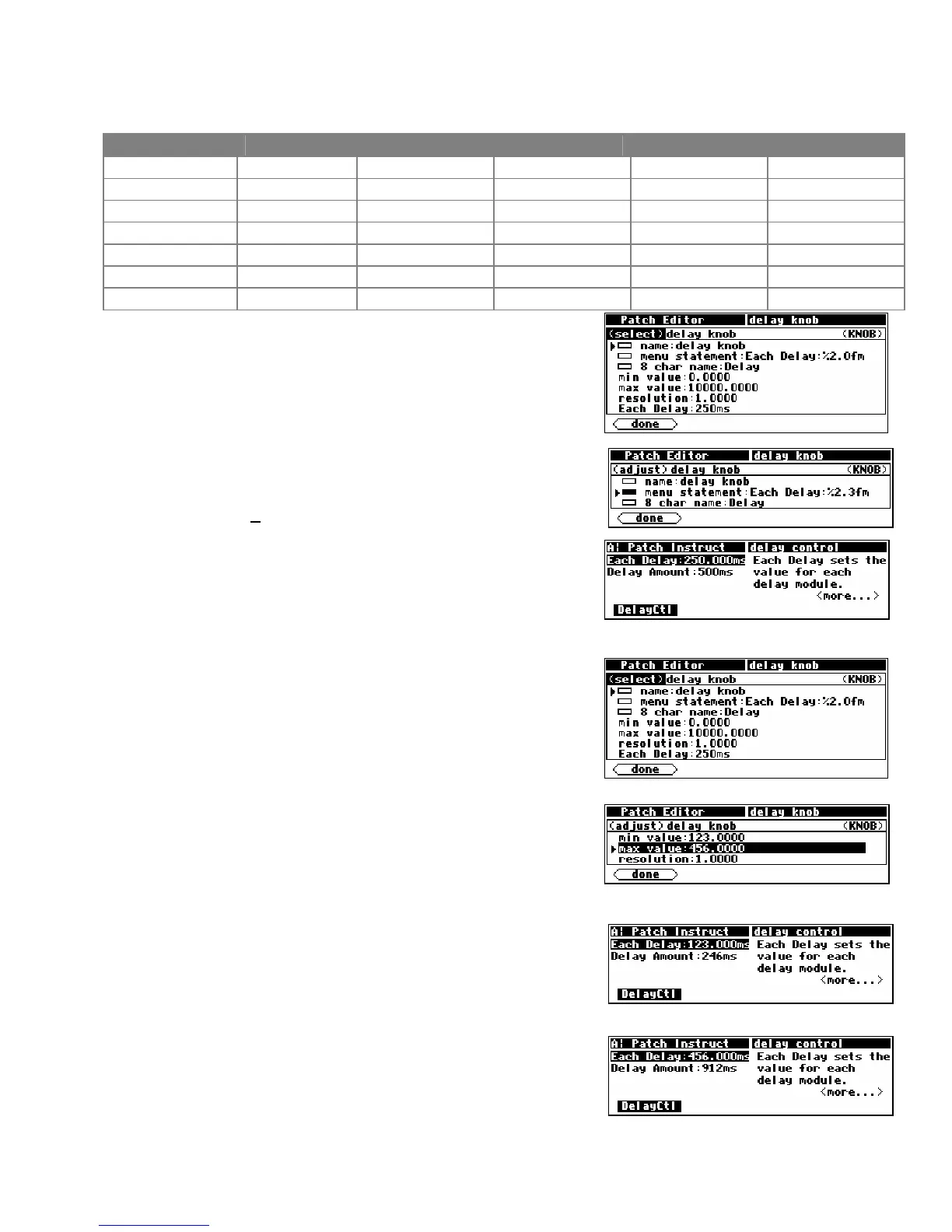
As an wee exercise, load the Patch Instruct program from the
“Programming” bank, go to Patch Editor area, change the
screen mode to aud+ctrl, and highlight the knb module. Then
use the <modify> SOFT KEY to change the menu statement to
“Each Delay:%2.3fms” as shown to the right.
Now go to the PARAMETER area and see the difference that
made to the display. Note the decimal value in the “Each
Delay
” parameter. It used to read 250. Now it reads
250.000. Contain yourself. . .
Min and Max Values
The lower and upper limits of a numeric parameter value are
set as specifiers in the module that controls the parameter. In
the example program Patch Instruct, the “delay knob”
parameter value has a range of 0.0000 to 10000.0000 set by
the
min value and max value specifiers. You can adjust these
limits using the numeric keypad or the
KNOB.
As another wee exercise, load the program
Patch Instruct
from the “Programming” bank, go to the Patch Editor area,
change the screen mode to
aud+ctrl, and highlight the knb
module. Then, use the <modify> SOFT KEY to change the min
value
and max value to set different limits as shown to the
right.
Now go to the PARAMETER area and test the Each Delay
parameter. To the right we bump up against the new
min
value
.
And on this screen we bump up against the new
max value.
You will find
max value and min value specifiers in most of
the “interface” group modules.



 To Next Page