10
137
Eversense E3 CGM User Guide
Log Specific Events
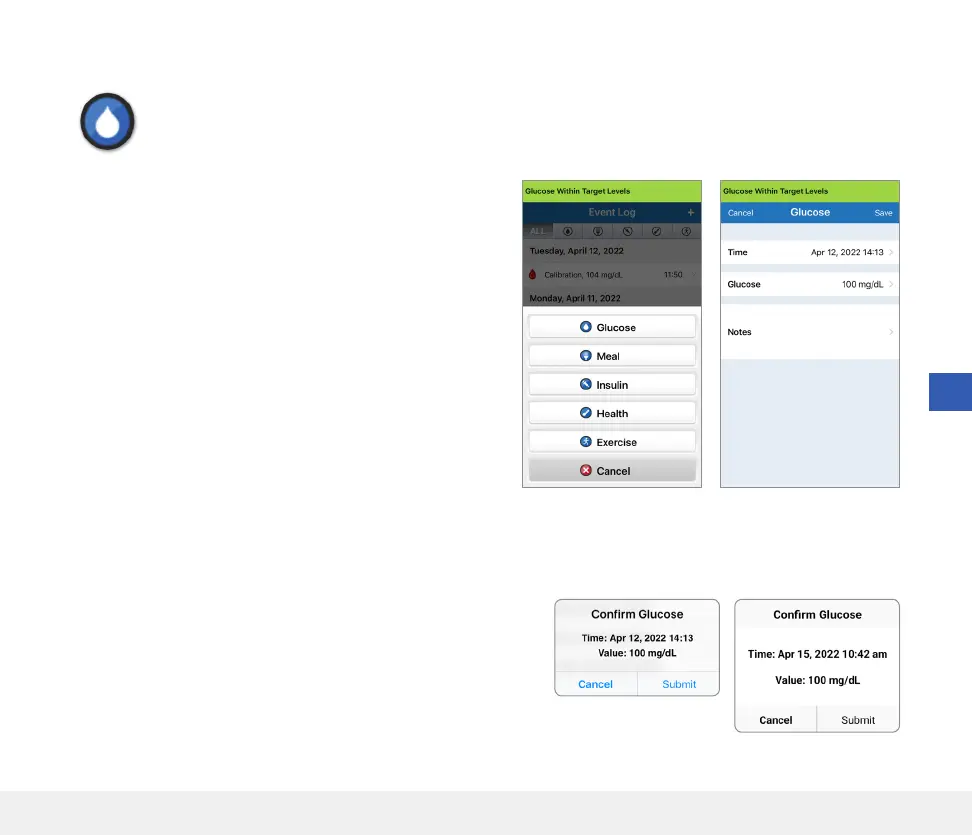
Glucose
Enter and track blood glucose meter tests (test results other than calibrations).
1. Tap Menu > Event Log.
2. Add an event using the event icon “
+
” > Glucose.
3. Tap Time to enter the correct date and time.
Tap Done.
4. Tap Glucose to enter the correct blood glucose value.
Tap Done.
Note: You can enter a BG value between 20 and
600 mg/dL. Entries < 20 mg/dL will be converted to 20,
and entries above 600 mg/dL will be converted to 600
for calculation and display purposes.
5. Tap Save.
6. On the Confirm Glucose pop-up box, tap Submit to confirm
the glucose event and return to the EVENT LOG screen,
or tap Cancel to exit without saving changes or to edit the
information before saving.
Note: Glucose Events do not replace calibration measurements.
You will still have to enter calibration readings.
iOS
Android



 To Next Page