33
Eversense E3 CGM User Guide
3
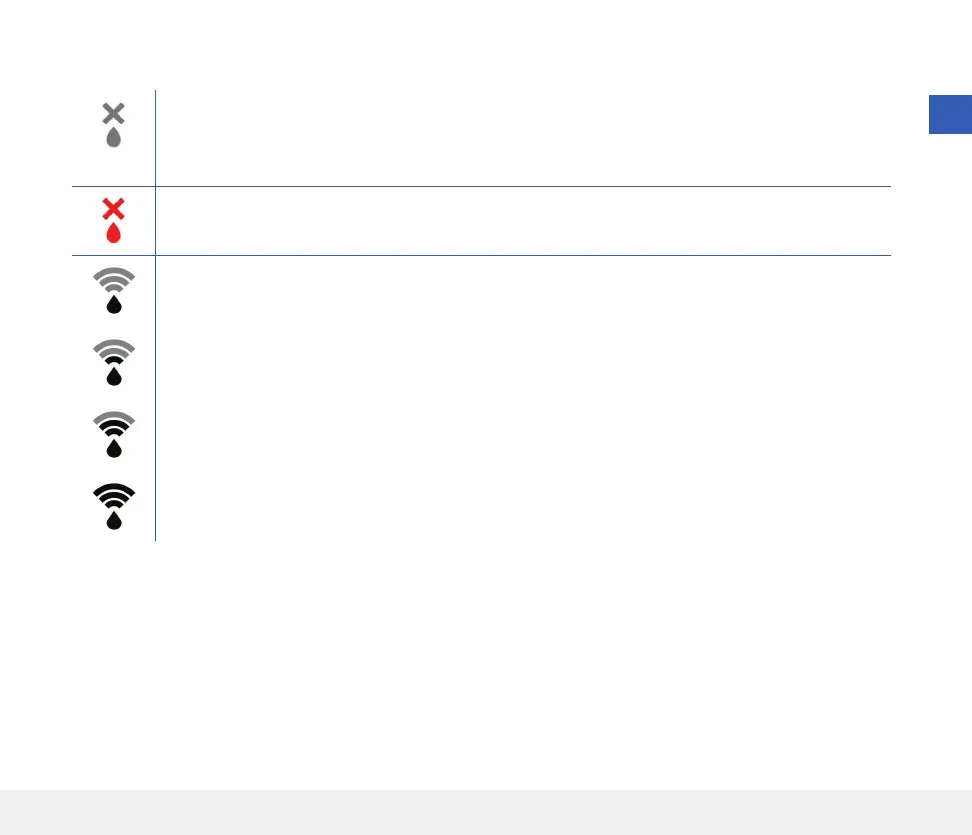
Smart Transmitter Connection Icons
When the icon is a grey blood drop with an X, no smart transmitter is detected. You will see this icon
before you pair your smart transmitter to your mobile app and any time the BLE connection between
the smart transmitter and your mobile app is interrupted.
When the icon is a red blood drop with an X, no sensor is detected. You will see this icon before you
link a sensor to your transmitter and any time a linked sensor cannot be detected by the transmitter.
When the icon is a grey or black blood drop with bars on top, the NFC connection between the sensor
and smart transmitter has been established.
The bars indicate the strength of the connection. Signal strength information is also displayed in
Main Menu > Placement Guide in the Eversense App.
Reminder: You cannot link to a sensor until your transmitter is paired with the Eversense App.



 To Next Page