60
Eversense E3 CGM User Guide
7
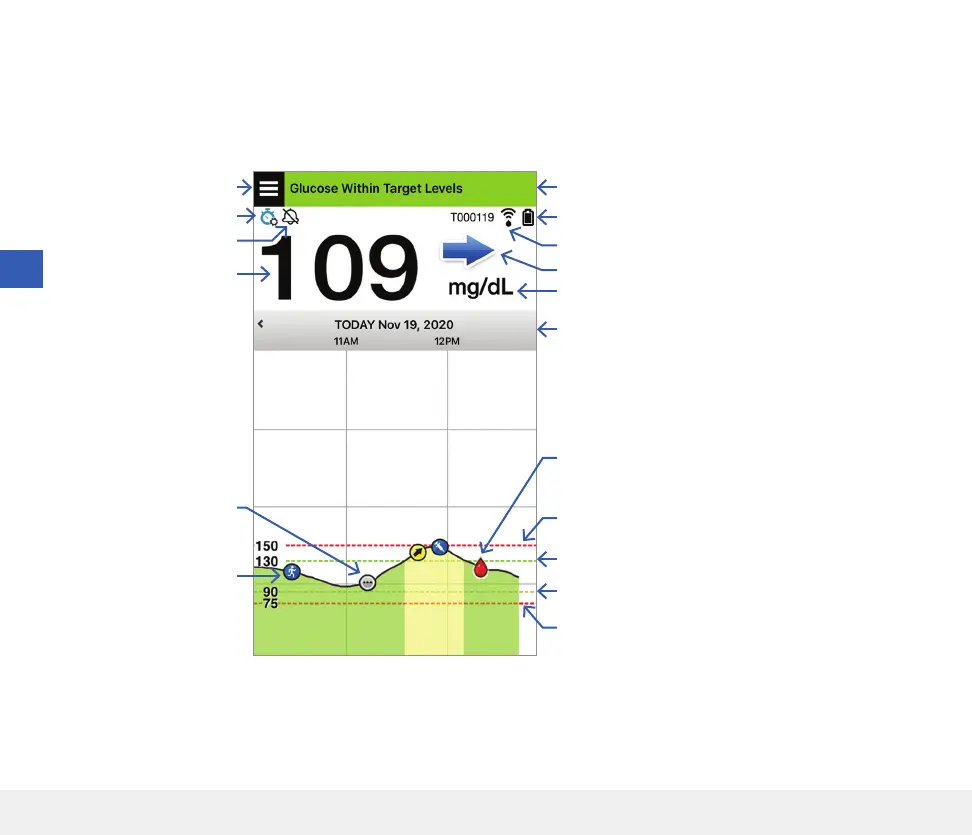
Get To Know the “My Glucose” Screen
The MY GLUCOSE screen is the main display screen for the app. It displays a variety of data, including sensor
glucose readings, direction and rate of change arrow, trend graph, events, calibrations, alerts and notifications.
Before making a treatment decision, you should take into account the sensor glucose value, the trend graph, the trend
arrow and any alerts from the Eversense E3 CGM System. If no trend arrow is displayed, the system does not have
enough data to display direction and rate of change. You should not make a treatment decision based solely on the
sensor glucose value.
Menu icon
Temp Profile icon
Date and time
Smart Transmitter battery power
Current glucose reading
Status bar
Multiple events icon
Trend arrow
Smart Transmitter connection information
Unit of measurement
Low Glucose Alert level (Bottom red dashed line)
High Glucose Target level (Top green dashed line)
High Glucose Alert level (Top red dashed line)
Low Glucose Target level (Bottom green dashed line)
Calibration complete icon
Event icon
Do Not Disturb icon



 To Next Page