92
Eversense E3 CGM User Guide
8
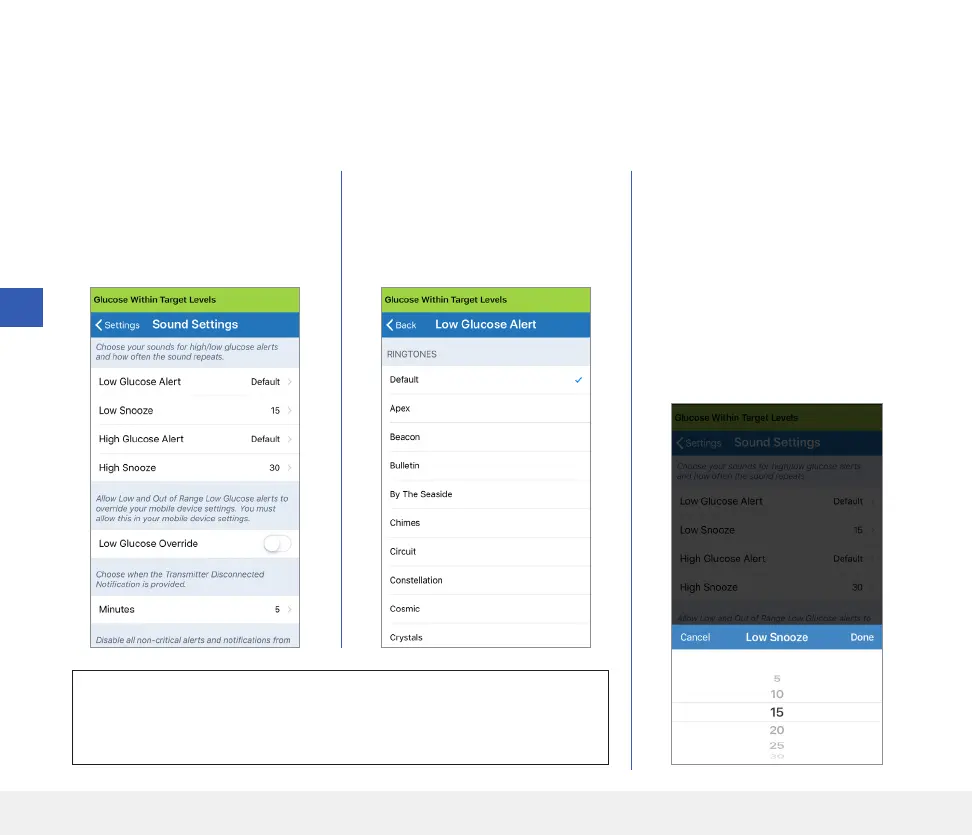
Setting Sounds
The SOUND SETTINGS screen displays the alert sound settings for Low Glucose and High Glucose. This screen
also allows you to enter a snooze setting for the alerts listed, and the option to have Low and Out of Range Low
Glucose Alerts to override your phone sound settings (iOS 12 and above, and Android 6 and above).
IMPORTANT: Be sure the sound on your mobile device is turned
on. If you turn the sound on your mobile device o, you will not hear any
sounds from the app.
2. Tap each alert to select the
alert sound. Tap Back to
get back to the SOUND
SETTINGS screen.
1. Tap Menu > Settings >
Sound Settings to display
the SOUND SETTINGS
screen.
3. Tap each snooze alert to set
how often the alert repeats.
• Tap Done when complete.
By setting the snooze alert, you
can set how often an alert repeats
after you have received a Low
Glucose and High Glucose alert.



 To Next Page