15
178
Eversense E3 CGM User Guide
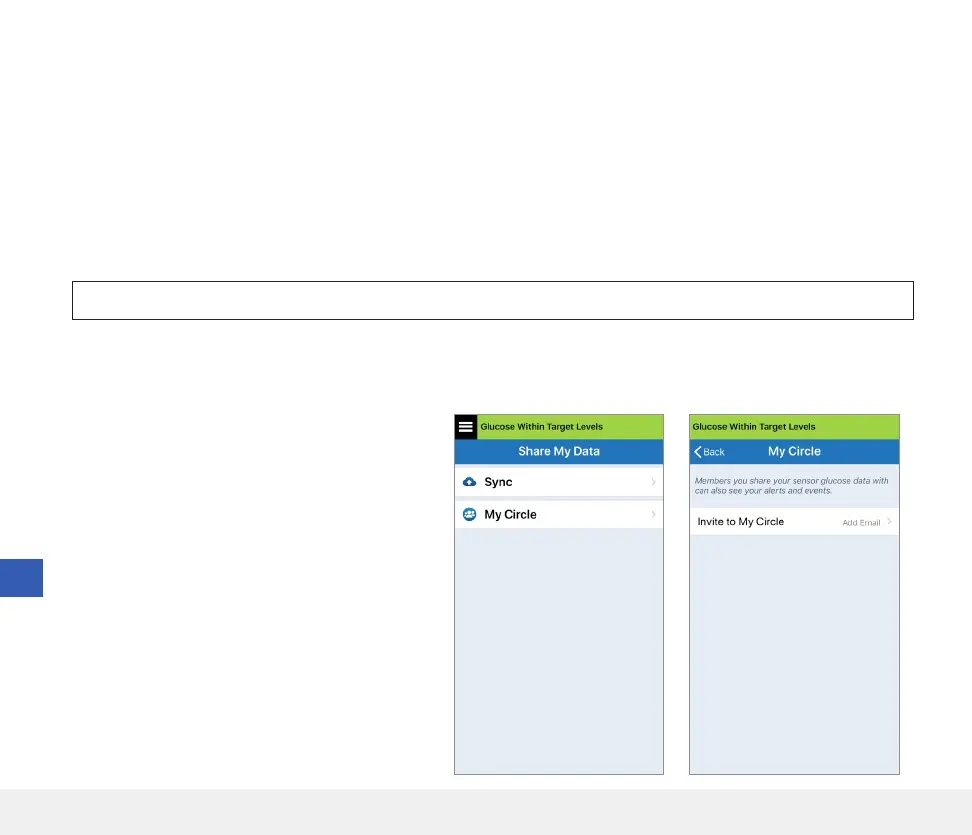
Through the MY CIRCLE screen on your Eversense CGM Mobile App, you can invite up to five people to view your
data. When you invite someone to join your Circle, an invitation will be sent to the email address you entered. Once
the invitation is accepted, and the Eversense NOW App is downloaded, members of your Circle can view your recent
glucose data, events and alerts.
IMPORTANT: Members of your Circle who do not have the Eversense NOW App will not be able to see your data.
As long as your Eversense CGM System App and the Eversense NOW App have an internet connection, your glucose
data is synced to the Eversense NOW App approximately every 5 minutes. Calibration values may take longer to sync
to the Eversense NOW App.
2. To invite a new member to view your
glucose data, tap Invite to My Circle.
1. From the Main Menu, tap Share My Data >
My Circle to display the MY CIRCLE
screen.
If you have turned o Auto Sync, your glucose
data will NOT be available on the Eversense NOW
Remote Monitoring App.
Cautions (continued)
• If the Eversense NOW user does not allow notifications from the Eversense NOW App, they will not receive glucose
related alerts from you.
• If you have your mobile device set to Do Not Disturb, you will not hear any notifications from the Eversense NOW App.



 To Next Page