Model 5601ACO2 Automatic Changeover Unit
VistaLINK
®
CONFIGURATION Revision 1.2 Page 5-3
5.3. Monitoring the 5601ACO2 using the General Status Tab
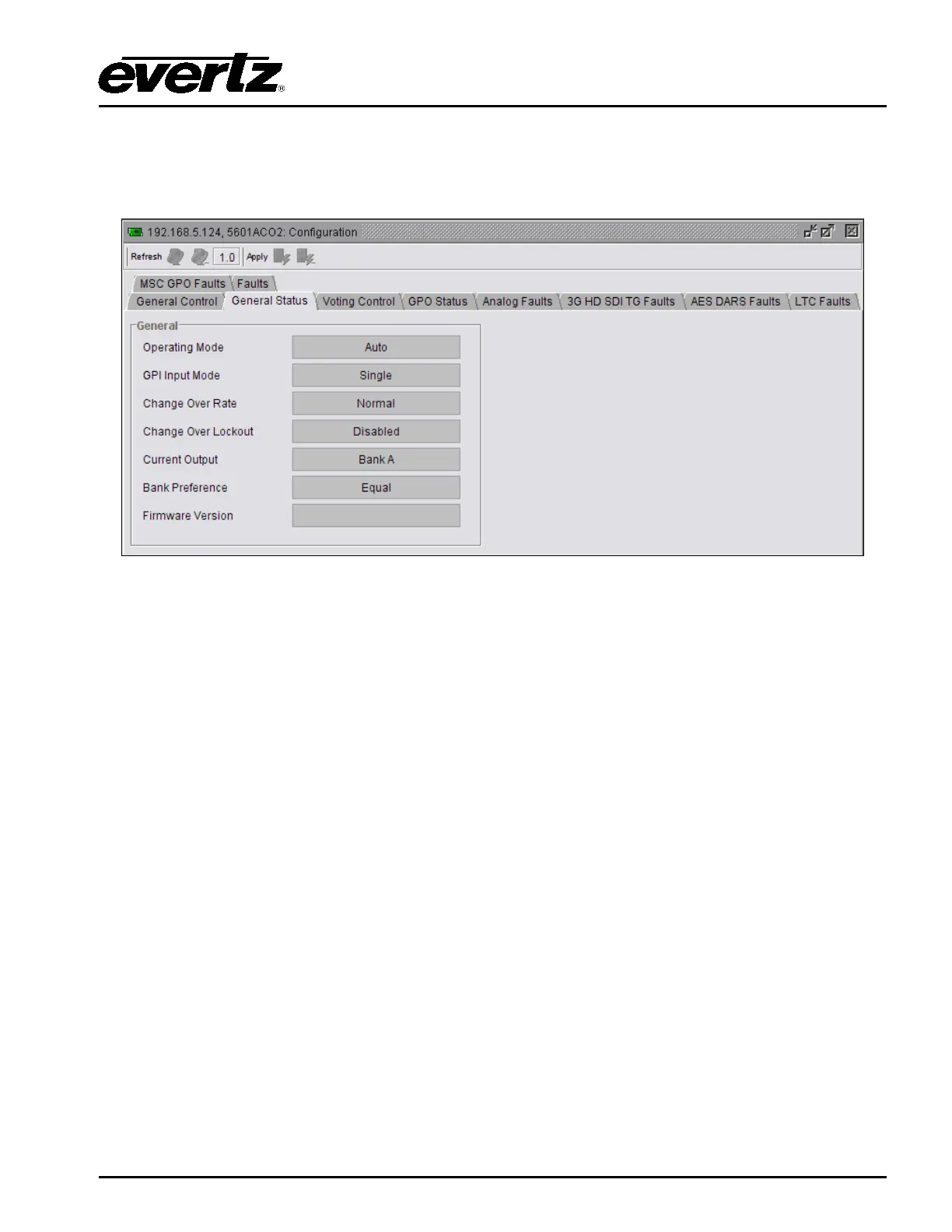
The General Status tab enables the user to view the status of various parameters for the 5601ACO2.
These status conditions will not be updated live unless the auto refresh is enabled.
Figure 5-2: VistaLINK
®
Monitoring – General Status
Operating Mode: Indicates the Operating mode currently in use. This can be set in the General
Control tab or by the switches on the main board (see section
3.2).
GPI Input Mode: Indicates the GPI Input mode currently in use. The type of GPI control is set
with the DIP switches (see section 3.3.1).
Change Over Rate: Displays the change over rate that has been selected by the DIP switches
(see section 3.3.2).
Change Over Lockout: Indicates what type of change limiting has been selected. Change limiting is
controlled by DIP switches 7 and 8 (see section 3.3.4).
Current Output: Displays which bank is selected as the current output of the 5601ACO2.
Bank Preference: Reports which bank is preferred by the 5601ACO2. The bank preference is
set by the bank priority DIP switches (see section
3.3.3).
Firmware Version: Displays the current firmware version.



 To Next Page