Model 5601ACO2 Automatic Changeover Unit
VistaLINK
®
CONFIGURATION Revision 1.2 Page 5-9
5.6.3. Setting the AES DARS Faults
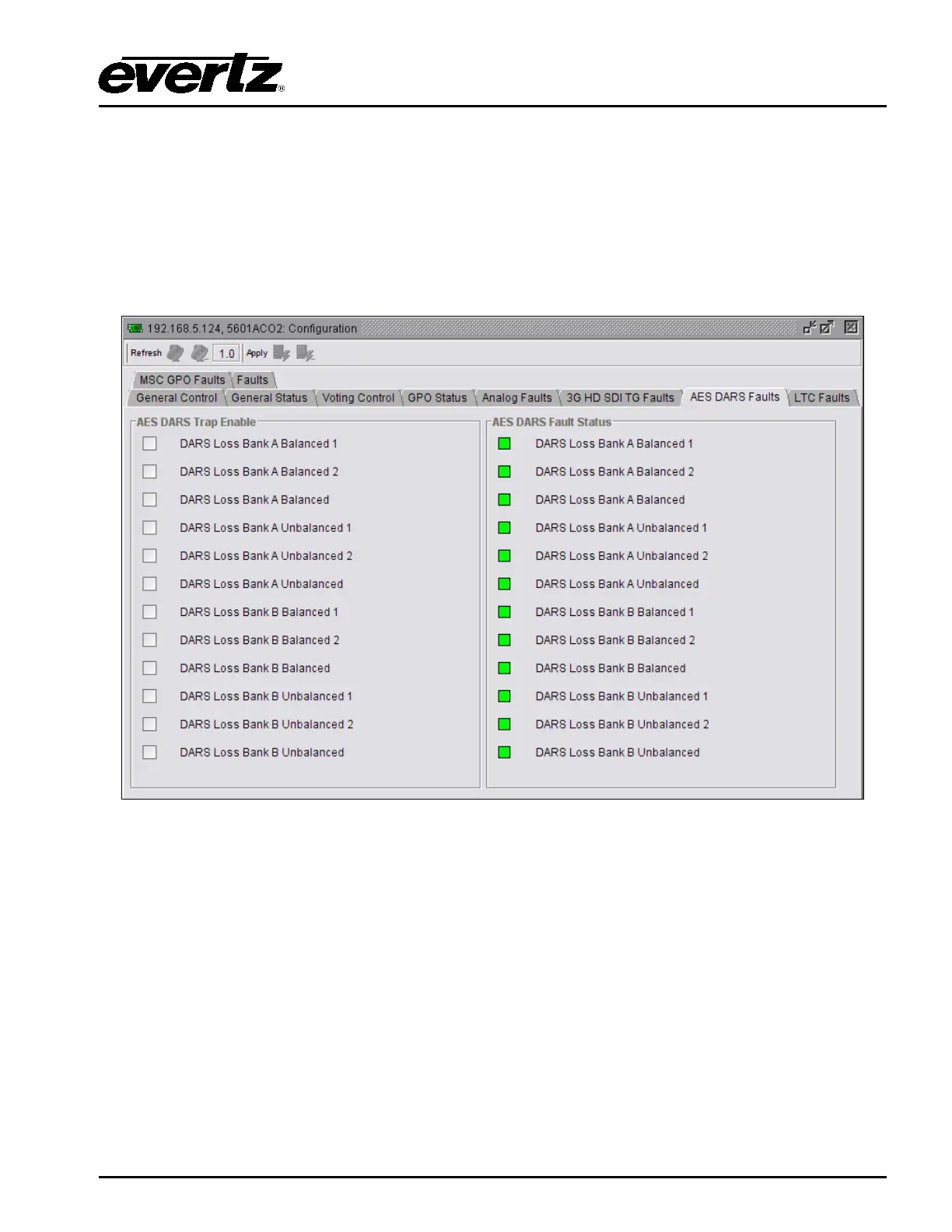
As illustrated in Figure
5-7, this control allows the user to enable AES DARS traps and monitor the trap
status. To enable a particular trap, simply click the box located beside each trap so that a check-mark
appears. When a check-mark is present, the SNMP trap is enabled. When a check-mark is not
present, the trap is disabled.
The AES DARS Fault Status section displays whether a fault is active or not. If the box is green, then
the corresponding fault is not active. If the box is red, then the corresponding fault is active.
Figure 5-7: VistaLINK
®
Monitoring – AES DARS Faults
5.6.4. Setting the LTC Faults
The LTC Faults tab, as illustrated in Figure
5-8, allows the user to enable LTC traps and monitor the
trap status. To enable a particular trap, simply click the box located beside each trap so that a check-
mark appears. When a check-mark is present, the SNMP trap is enabled. When a check-mark is not
present, the trap is disabled.
The LTC Fault Status section displays whether a fault is active or not. If the box is green, then the
corresponding fault is not active. If the box is red, then the corresponding fault is active.



 To Next Page