Test Results
NetBlazer 411
Summary (iSAM)
Summary (iSAM)
From the Test menu, tap Results, and the Summary tab.
Start Time indicates the date and time the test has been started. The
date and time is reset every time the test is restarted.
Configuration/Performance Results and RFC 6349 Results buttons
are used to respectively display summary results for Service
Configuration Test and Service Performance Test, or RFC 6349 Test
when results don’t fit on one page.
Service Configuration Test and Service
Performance Test
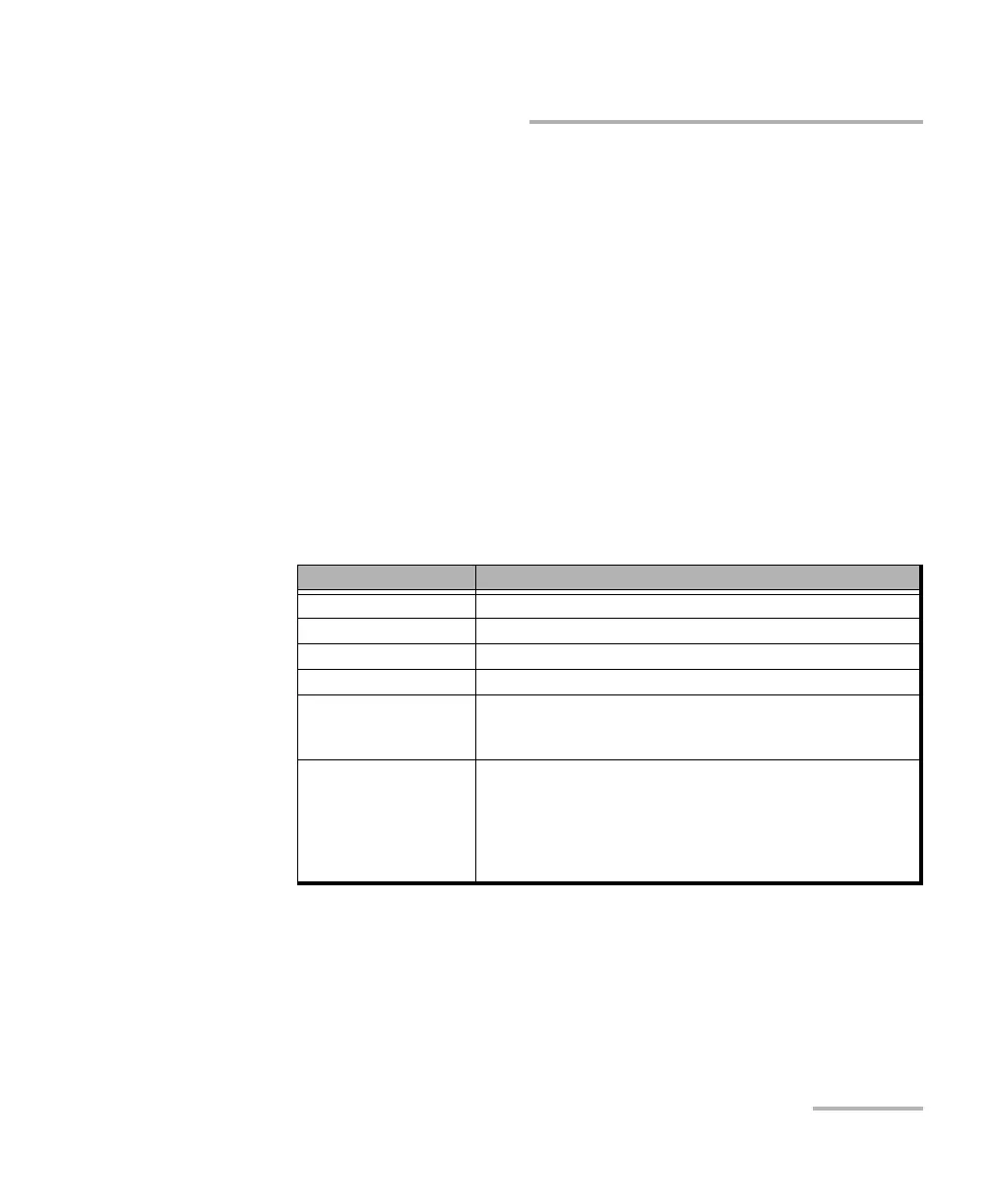
The actual test status is displayed as follows:
Test Status Description
“--” Test has not started.
Disabled Test/subtests is/are disabled.
Running Test/subtest is currently running.
Data Transfer Test/subtest is running but no test traffic is being transmitted.
Completed, <Verdict> Test/subtest has completed with the test pass/fail verdict.
A fail verdict is declared when a Link Down or LOS is detected,
or when any SLA parameter fails.
Aborted, <reason> Test/subtest has been aborted either manually (Stop) or
automatically from an alarm and the reason why the test has
been aborted is also displayed as follows:
Link down alarm, LOS alarm, Timeout during execution,
DTS connection failed, Loss of remote connection (DTS),
Unresolved addresses, Stopped












 To Next Page