SSP200 • Product Configuration Software 55
Password
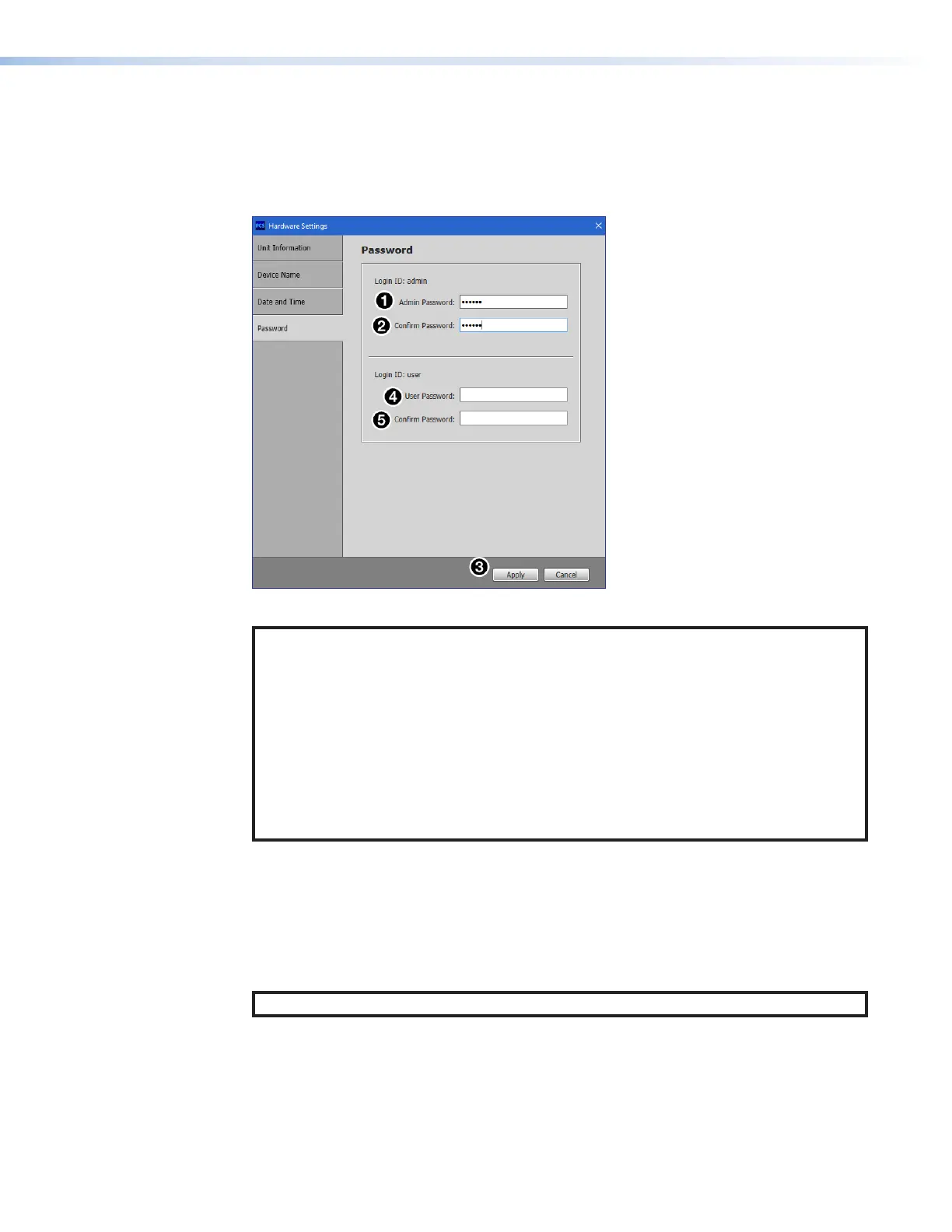
The Password panel (see figure50) allows the user to set an administrator and user
password on the device. Administrators and users can view all settings on the device.
Administrators have the ability to make adjustments to any setting. Users can make
changes to a limited subset of settings.
Figure 50. Hardware Settings: Password
NOTES:
• A username is required to access the internal web pages or the device through the
PCS program. When prompted, enter admin as the username for administrator
passwords or user as the username for user passwords.
• A password can be up to 128 characters in length. All man‑readable characters
are permitted except “|”. Password cannot be a
single space. Passwords are
case‑sensitive.
• The factory configured passwords for all accounts on this device have been set to
the device serial number. Passwords are case sensitive. If the SSP 200 is reset, the
passwords revert to the default, which is extron.
To create or change an administrator password:
1. In the Administrator Password field (
1
), enter the desired administrator password.
2. In the Confirm Password field (
2
), reenter the administrator password.
3. Click the Apply button (
3
).
To create a user password:
NOTE: A user password cannot be set until an administrator password has been set.
1. In the User Password field (
4
), enter the desired user password.
2. In the Confirm Password field (
5
), reenter the user password.
3. Click the Apply button (
3
).
50



 To Next Page