69
ENGLISH
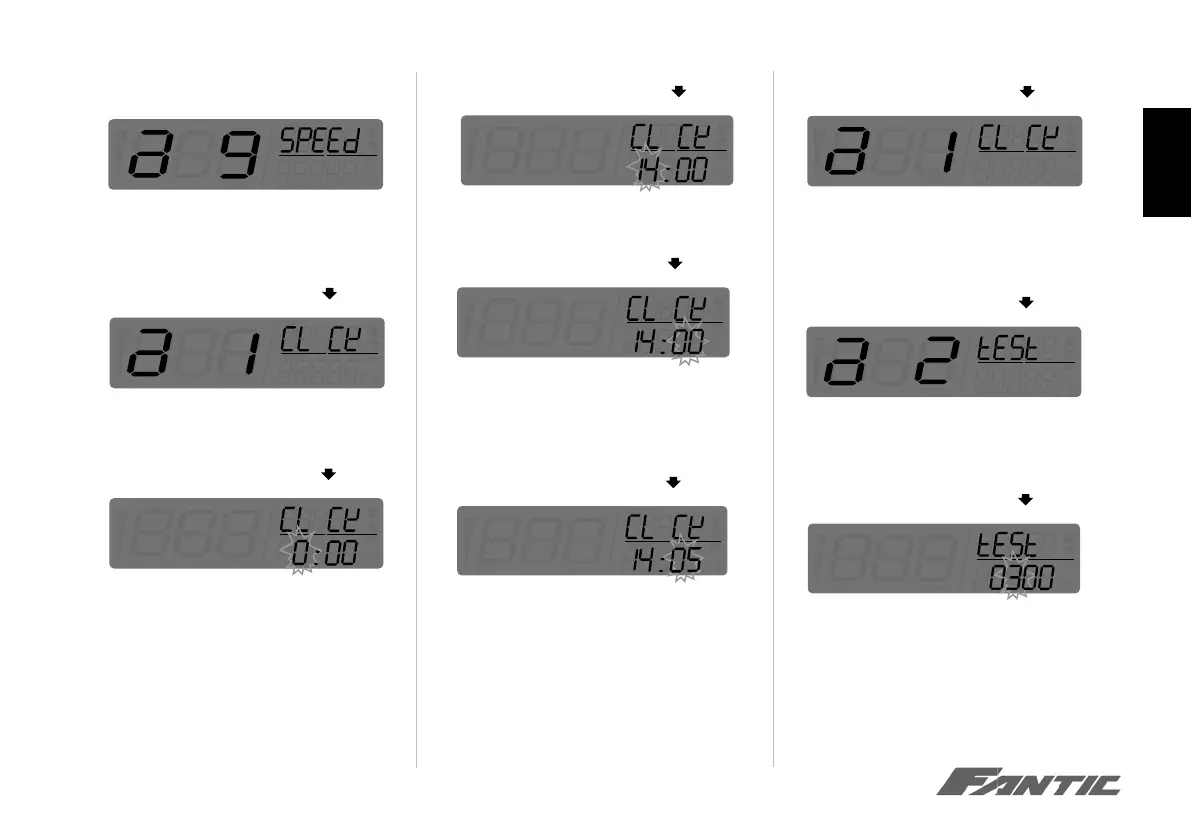
• Press the Select button to switch to the Clock
menu to the Test menu (Stopwatch distance setup
entering screen)
• Press Adjust button to enter the distance setup for
Stopwatch. In this example Distance for Stopwatch
setting value was changed from 300 to 350.
• Press Adjust button to go back to the Stopwatch
setting screen
• Press the Select button to change the setting
NOTE The range of distance for Stopwatch
is from 100m to 2000m.
Clock setting
• Press the Adjust button to switch to the speed
menu to the dock (Hour) setting.
• Press the Select button to enter the the clock
(Hour) setting.
• Press the Select button to choose the hour you
want to set. In this example whe st the hour at
14:00.
NOTE Setting range: 0-24 H.
NOTE Sequent of cursor movement: Hours
Ten-Digit of Minute>Single Digit of Minute.
O
O
• Press the Adjust button to enter the minute set-
ting.
• Press the Select button to choose the minute you
want to set. In this example we change the setting
to 14:05
NOTE Setting range: 0-59 minutes.
• Now the minute is changed from 14:00 to 14:05
• Press Adjust button to get back to Clock setting
screen.
O
O
O
O



 To Next Page