Partie V – Infusion
50
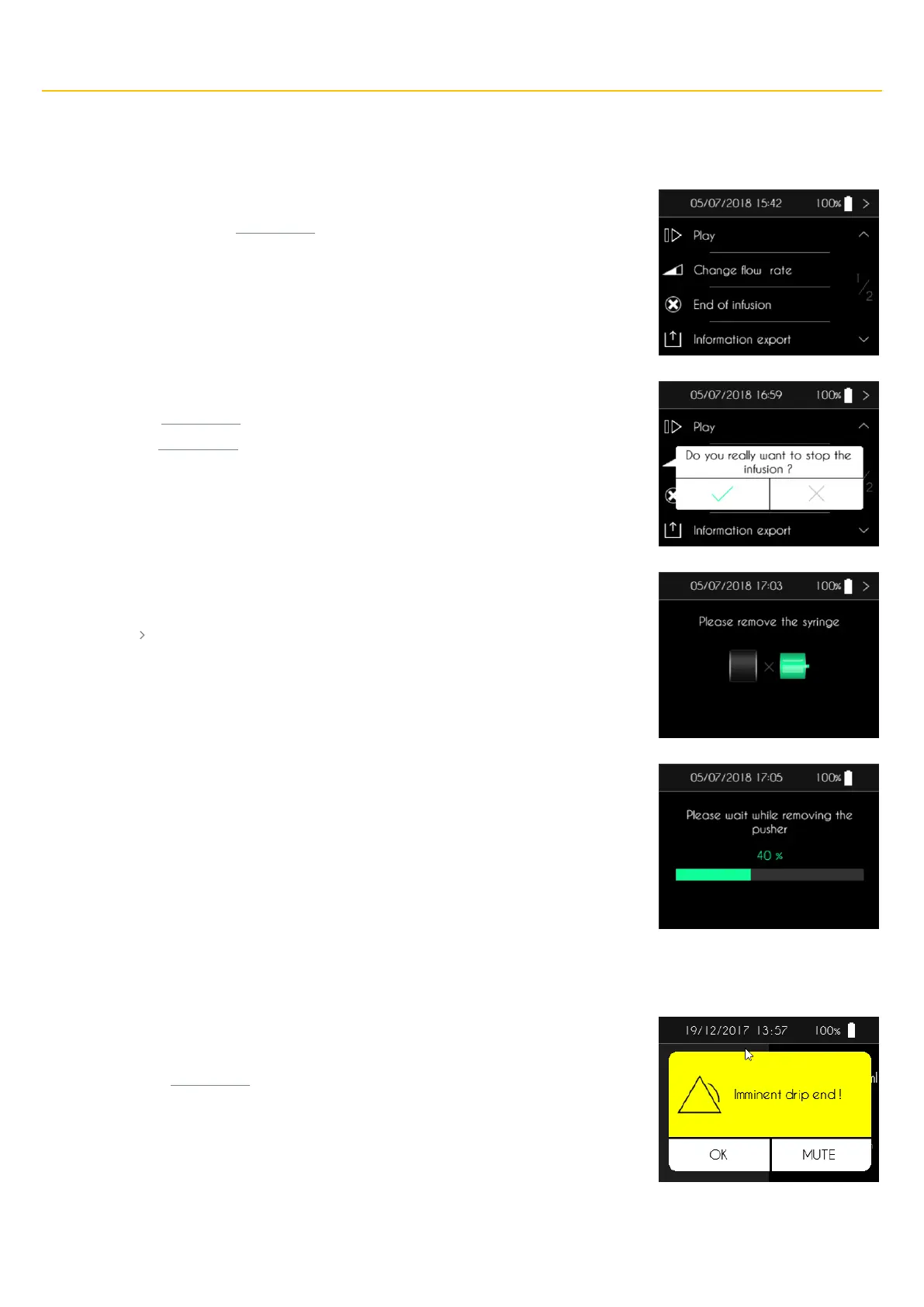
End of infusion
Stopping the infusion
The SO
♥
CONNECT PID pump displays the first screen of the infusion control menu.
▪ Press “End of infusion” for 2 seconds.
The SO
♥
CONNECT PID pump displays a confirmation message.
▪ Press “✓” , for 2 seconds, to validate the end of infusion.
▪ Press “X” , for 2 seconds, to cancel.
After confirmation, the SO
♥
CONNECT PID pump displays the screen requesting removal of the
syringe.
▪ Press “ ” once the syringe is removed.
The SO
♥
CONNECT PID pump retracts the pusher. This operation can take several minutes.
Automatic end of infusion
Infusion about to end
The SO
♥
CONNECT PID pump generates an alarm approximately 5 minutes before the end of the
infusion. The infusion is not stopped when this alarm is generated.
▪ Press “OK”, for 2 seconds, to acknowledge the alarm.



 To Next Page