4.1.3.4 Menu views
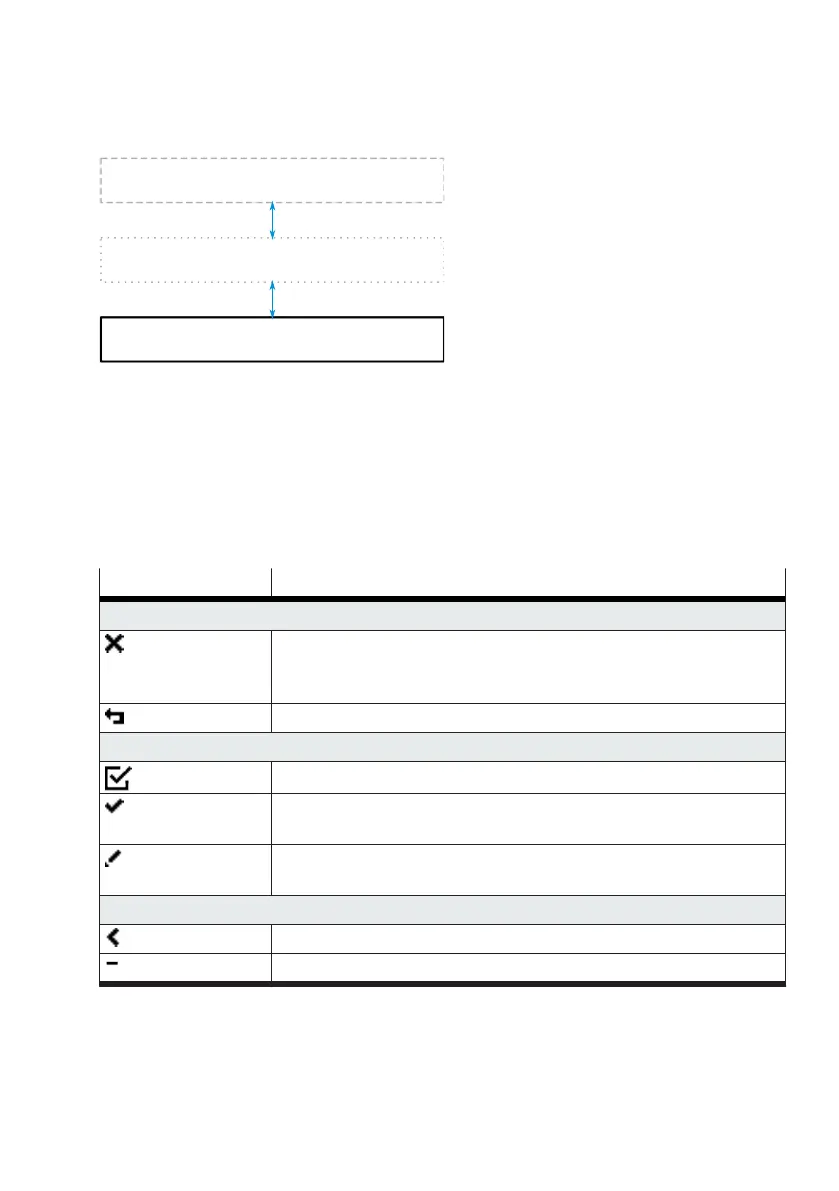
Fig. 7: Information structure
The menu views contain all the parameters, functions and information required for commissioning and
configuration of the device. A detailed description of the individual menus and parameters can be
found in chapter
è
7.2 Checking and setting parameters in the menu views.
The menu views become visible by pressing the lower key in the process views.
Key functions
The following key functions are available for navigation and settings in the menu views. The key
functions are displayed context-dependent relevant to the current menu.
Symbol Function
Up key
–
Exit menu: return from the top menu level to the last active process
view.
–
Cancel: exit the settings view without saving the changes.
–
Return to the next higher menu level.
Down key
–
Select or deselect the focused parameter
–
Navigate to the next lower menu level.
–
Apply: exit the settings view and accept changes.
–
Call a routine, action or wizard.
–
Edit parameters: open settings view.
Left key
–
Change selection: switch to the previous menu entry or selection option.
–
Reduce parameter values.


 To Next Page