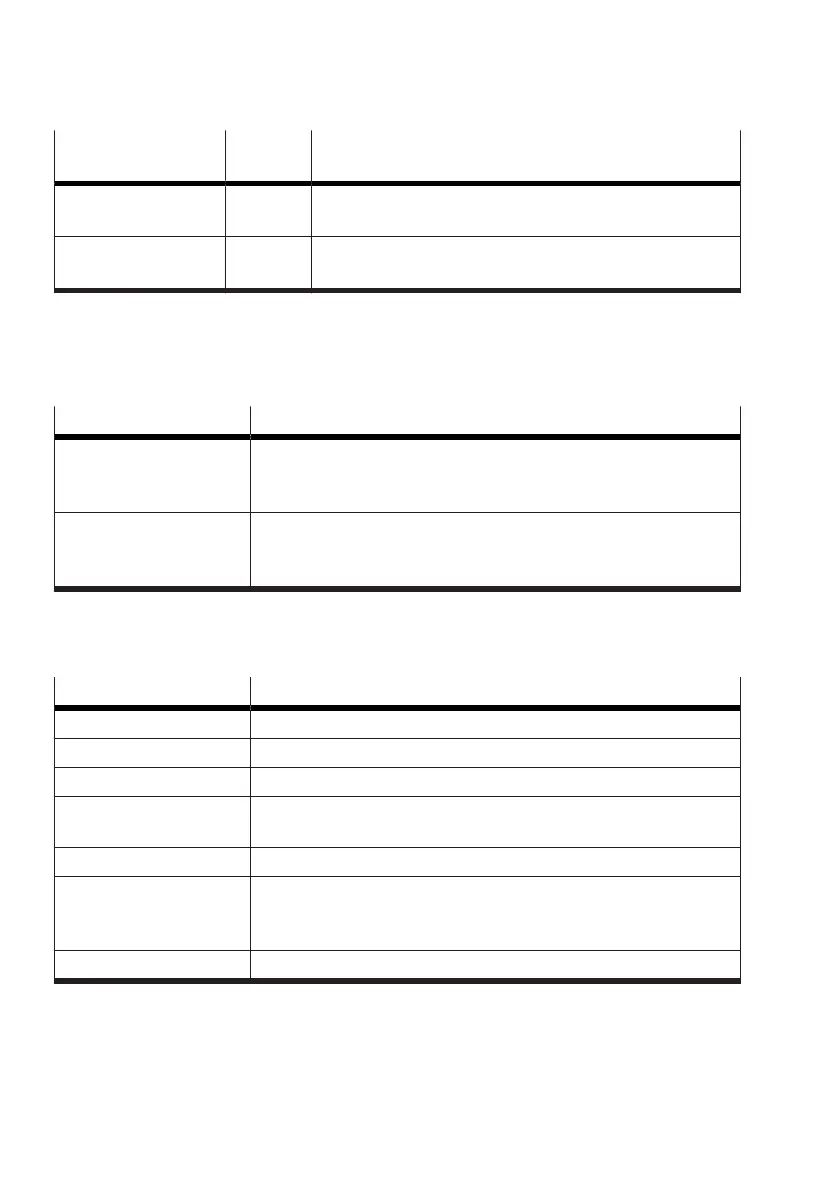
Option Value
range
Description
Check function active,
inactive
Functional check
Factory setting: inactive
Failure active,
inactive
Error
Factory setting: inactive
Tab. 57: DO1 state configuration
‘Digital Output 2’ menu
DO2 logic
The ‘DO2 logic’ parameter defines the switching logic of the function of the digital output 2.
Value Description
ACTIVE LOW Switching logic ‘ACTIVE LOW’
The low level is output at digital output 2 if the assigned function or the
status to be acknowledged is active.
ACTIVE HIGH Factory setting: switching logic ‘ACTIVE HIGH’
The high level is output at digital output 2 if the assigned function or
the status to be acknowledged is active.
Tab. 58: DO2 logic
DO2 function
The ‘DO2 function’ parameter defines the statuses that are fed back via the digital output.
Value Description
inactive Factory setting: inactive. There is no feedback via the digital input.
Lower value active The reaching of the lower user-defined position limit value is fed back.
Upper value active The reaching of the upper user-defined position limit value is fed back.
Both values active The reaching of the upper or lower user-defined position limit value is
fed back.
Diagnosis state The diagnostic status is acknowledged.
No auto operat. The deviation from automatic operation is reported.
Deviation from automatic operation: manual operation, not initialised,
active initialisation routine
PST running An active Partial Stroke Test is reported.
Tab. 59: DO2 function
DO2 lower value
The ‘DO2 lower value’ parameter defines the lower limit value for monitoring the actual position. This
value must be reached or undershot in order to generate feedback at digital output 2.


 To Next Page