3. Commissioning
3-13
Festo CPX-FB36-EN en 1611a English
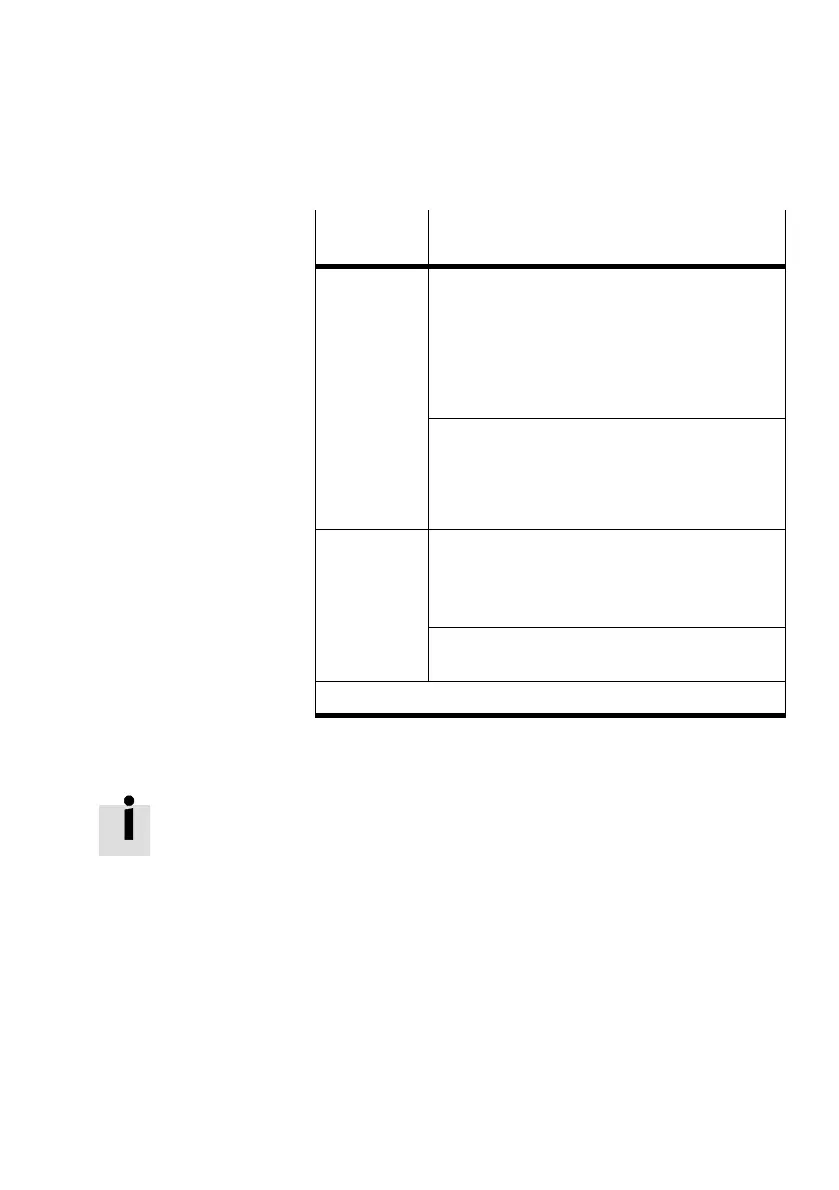
Operating
mode
Values
Remote I/O “Input” and “output”:
Number of assigned inputs and outputs of the CPX
terminal:
– for data format SINT: in bytes
– for data format INT: in words
The entry “Size” = 0 for inputs and outputs is not
permissible in the Remote I/O operating mode.
“Configuration”
– Number of memory slots occupied by CPX para
meters
or
– 0 (standard setting)
1)
Remote con
troller
“Input” and “output”:
Set data field size (è Tab. 1/3):
– for data format SINT: in bytes
– for data format INT: in words
“Configuration”
– 0 (standard setting)
1)
1) “Configuration Assembly” not used
Tab. 3/4: Input values for “Size”
When using a CPX terminal without inputs:
Activate status bits via DIL switch2 (è Tab. 1/3).
The following settings then apply for the input data (“Input”):
– for SINT format: “Size” = 2
– for INT format: “Size” = 1
10. Confirm entries with the “OK” button.
11. Close the “Module Properties” dialogue.
The bus node appears as a newly integrated participant in the
“Controller Organizer” window in the “I/O Configuration/Eth
ernet” directory.



 To Next Page