9
DMP10 / DMP20 Description
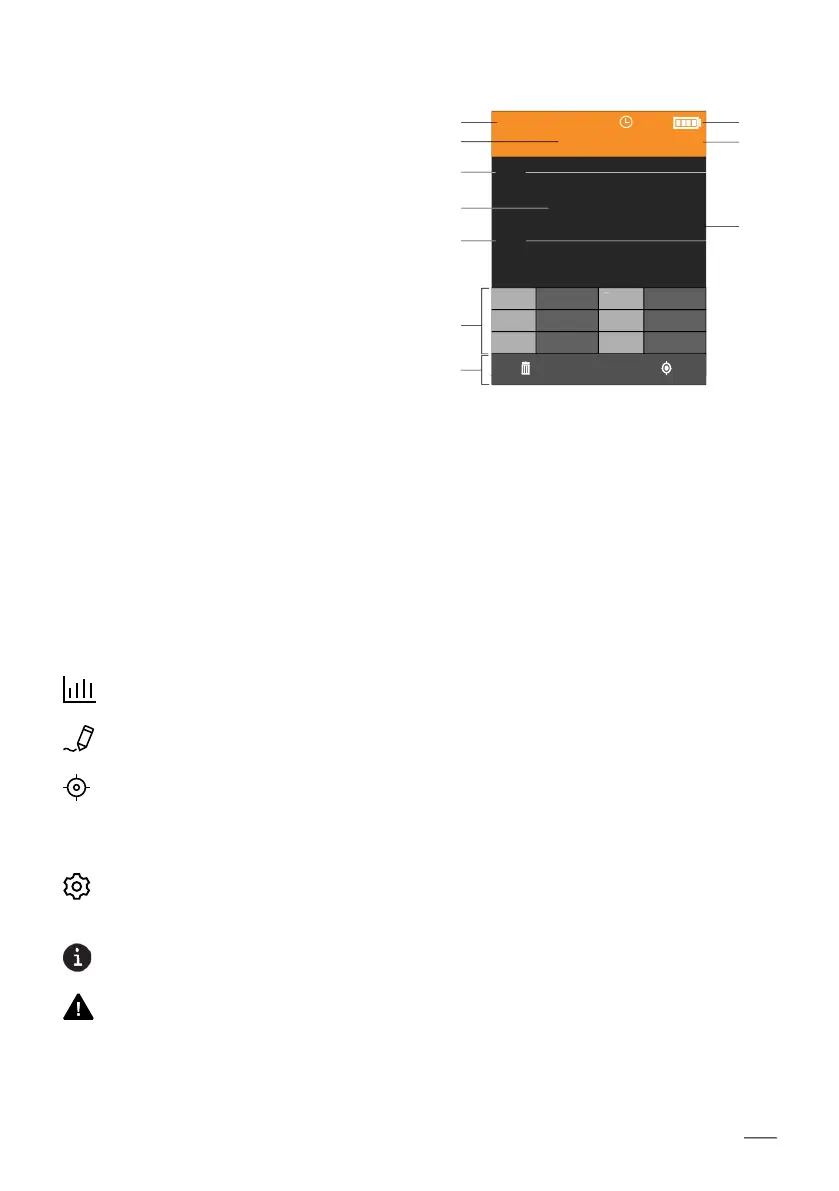
3.5 Measurement view
1 Currently measured coating/base
material combination, NF/FE or NC/
NF
2 Batch name
3 Specification limits
4 Reading currently being measured
5 Statistical values
6 Key assignment line (example: delete
function, calibration function)
7 Status displays; icons indicate active
autom. gauge shutdown (clock), bat-
tery charge status or the active con-
nection via USB for example.
8 Information displays; icons indicate
set measuring mode, offset, etc.
9 Unit of measurement
3.6 Display icons/codes
Statistics menu, contains statistical evaluations and displays for the open batch.
Batch Modify menu, contains a list of alterable batch settings
Calibrations menu, contains a list of calibrations already created, the New func-
tion for creating a new calibration and special functions for calibrations already
created, e.g. Rename, Shortened course and Delete
Gauge Settings menu, contains a list of alterable gauge settings
Indicates additional information
Indicates warnings
NF/FE
Batch 001
n 10 46.8
s 1.81 Min 44.9
Max 48.5 V[%] 3.9
x
47.3
µm
44.5
49.0
Example of the Measurement
view showing statistics with
set specification limits
1
2
3
4
3
5
6
7
8
9













 To Next Page