76
Movethe joystickleftorrighttoswitchbetween
theindividualmainmenusonthedisplay.
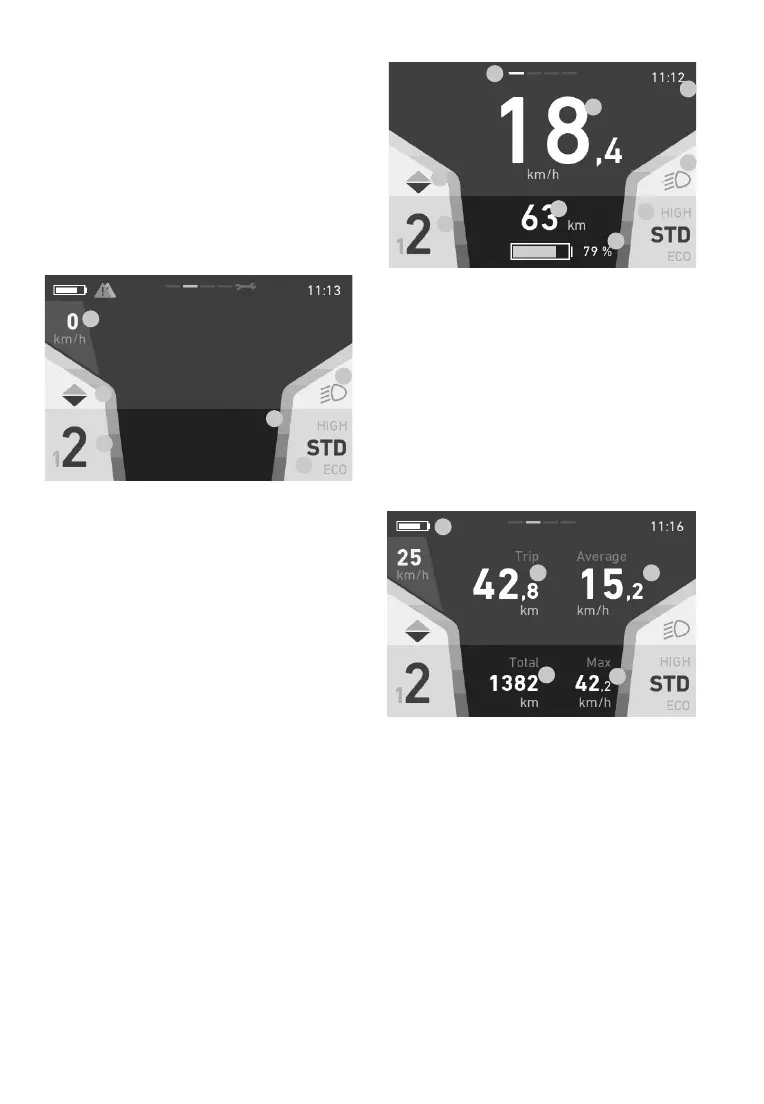
The following main menus are available:
Drive: Mainviewwithkeyinformationsuch
asspeed,remainingrangeetc.The
systemalwaysstartsupinthisview.
Info: Informationaboutthecurrentjourney
Fitness:Informationabouttherider’sathletic
performance
Data: Topographic data and
ambient temperature
1.
2.
3.
4.
5.
6.
Generalvehiclesettings
This display remains the same in all views and
shows you key settings and information on the
vehicleandthecurrentjourney.
1. Speed
2. Gearrecommendation(onlywith(2-gear)
36V
MultiSpeedmid-engine)
3. Currentmotorgear(onlywith(2-gear)
36V
MultiSpeedmid-engine)
4. Light(high/lowbeam)
5. Current assistance level
6. Colouredbars:Assistpowerindicator
Drive
1.
2.
3.
4.
4.
5.
6.
7.
8.
1. Currentspeed
2. Gearrecommendation(onlywith(2-gear)
36VMultiSpeedmid-engine)
3. Currentmotorgear(onlywith(2-gear)
36VMultiSpeedmid-engine)
4. Remainingrange/batterylevelbasedonthe
current assistance level (battery is red if
remaining range is below 20%)
5. Light(high/lowbeam)
6. Currentassistancelevel
7. Time
8. Currentscreentop-centrebar
Info
1.
2. 3.
4.
5.
1. Chargingstatus(top-leftsymbol)
2. Distancetravelledoncurrenttour(trip)
3. Averagespeedoncurrenttour(trip)
4. Totaldistancetravelled(cannotbereset)
5. Maximumspeedoncurrenttour(trip)


 To Next Page