1312
5.6 Errorcodes
Thepartsofthee-bikesystemaremonitoredat
alltimesduringuseandcharging.Ifanerrorisde-
tected, an error code will be displayed on the con-
sole.
Toswitchtheconsolebacktothestandard
display,pressthejoystickbuttontoacknowledge
the error. If the error cannot be acknowledged,
troubleshoot it according to the table below or
contactyourFLYERspecialistretailer.Depending
on the error code, the assistance is automatically
stoppedas necessary.You cancontinue to use
the bicycle normally without the drive even if the
assistance function is no longer being provided
bythemotor.Ifanerrorisdisplayed,troubleshoot
it according to the measures described in the ta
-
ble
below and/or contact your FLYERspecialist
retailer.
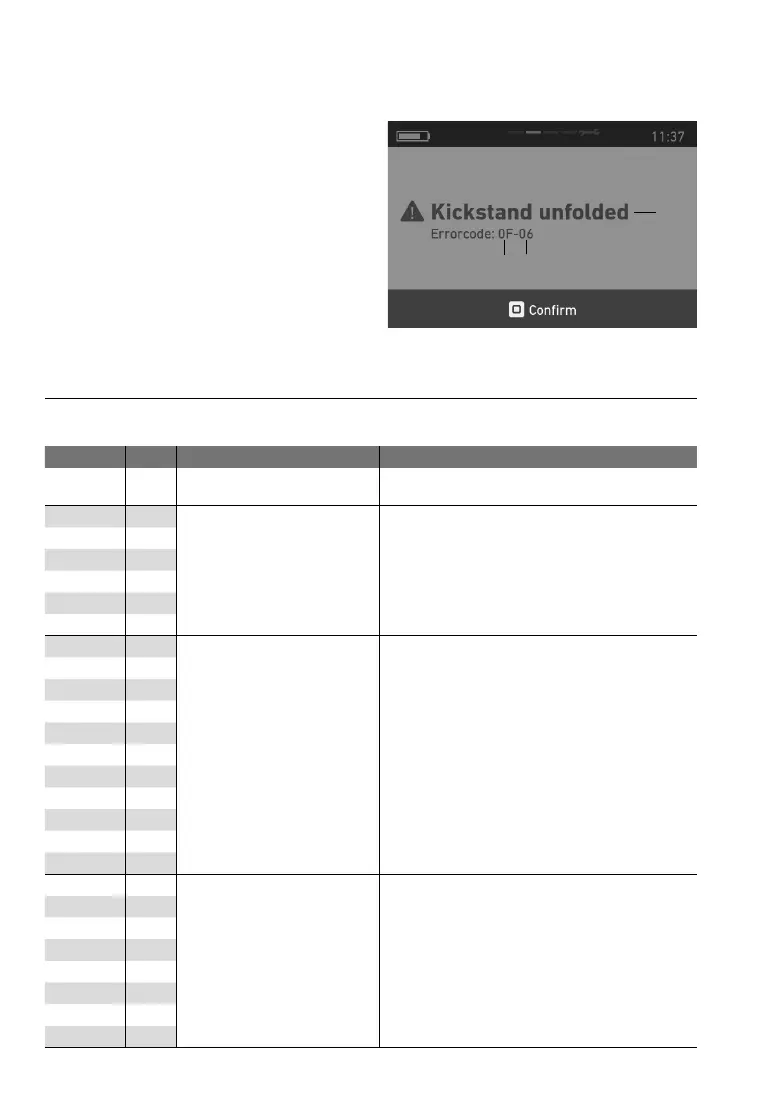
5.6.1 Identifyingerrors
Anerrorcanbeclearlyidentiedonthebasisof
thecategoryandcodedisplayed.Textindicating
theerrorcategoryisalsoalwaysdisplayed.
1
2
3
1 Error text, 2 Category, 3 Code
Category Code Displayedtext Remedy
00 00 Unknownerror
Restartthesystem.Iftheproblempersists,
contactyourFLYERspecialistretailer.
01 01
ECUsoftware
Restartthesystem.Iftheproblempersists,
contactyourFLYERspecialistretailer.
01 02
01 1D
01 1E
01 2C
01 2D
02 03
ECUidentication
Verify that the originally supplied
components are connected and restart the
system.
If
theproblempersists,
contact
yourFLYERspecialistretailer.
02 04
02 1F
02 20
02 21
02 22
02 23
02 24
02 25
02 26
02 27
03 05
ECUcommunicationerror
Checkallconnections.
Remove
andthenreinsertthebattery.Then
restartthesystem.
03 06
03 07
03 28
03 29
03 2A
03 2B
03 17
5.7 Errortables


 To Next Page