98
5.4 Conrmingaselection
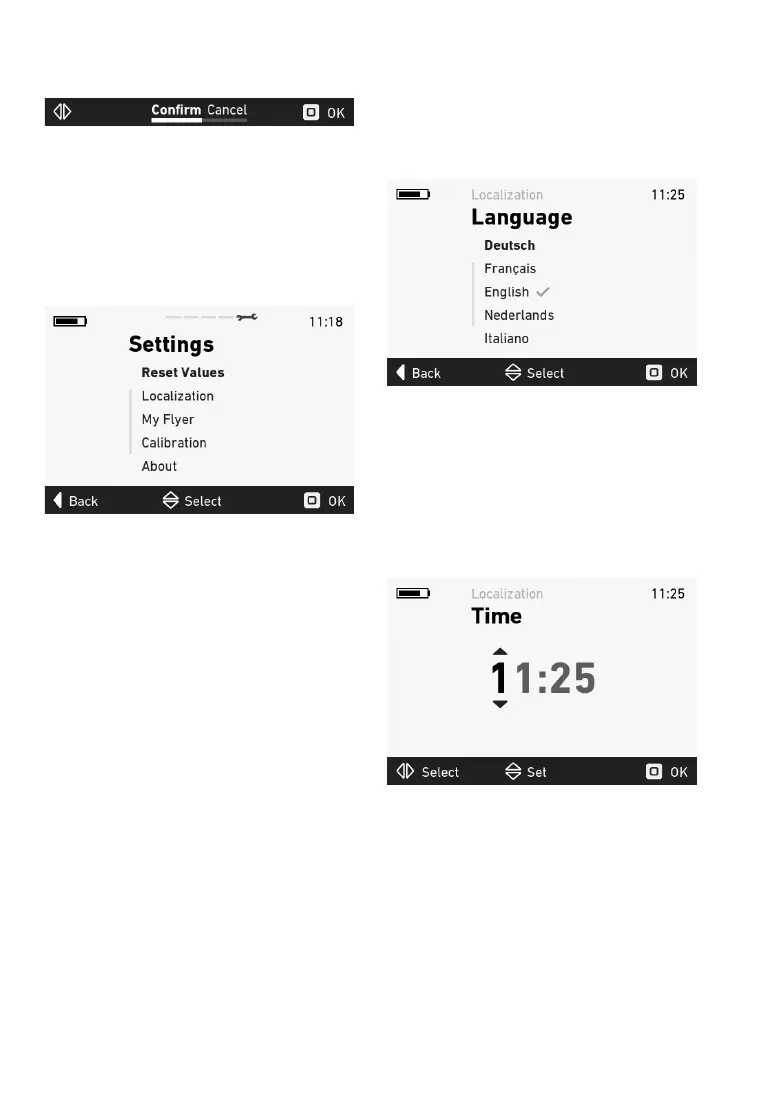
Whenyouconrmaselection,thefollowingview
is shown in the navigation bar:
Figure5:Navigationbarintheconrmationview
Movethejoystickleftorrighttoselectthedesired
function.Pressthejoysticktoconrmorrejectthe
input.
5.5 Settingsmenu
Openthesettingsmenubynavigatingalltheway
totherightwiththejoystick.Youcanonlyopen
thesettingsmenuwhilestationary.
Figure6:Settingsmenu
5.5.1 Menustructure
i. Reset values
i. Reset trip data
ii. Restore factory settings
ii. Basic settings
i. Language
ii. Time
iii. Date
iv. Units
v. Clock format
iii.MyFlyer
i. Vibration feedback
ii. Backlight
iii. Automaticpoweroff
iv.Calibration
i. Elevation
ii. Incline
v. About
5.5.2 Languagemenu
Youcanchoosefromthefollowinglanguagesin
the language menu:
• German
• French
• English
• Dutch
• Italian
Figure7:Languagemenu
The check mark indicates which language is cur-
rently
applied.Pressthejoysticktoapplythenew
settingsafterconrmation(see5.3).
5.5.3 Timemenu
You can set the current time in the time menu.
Move the joystick up and down to change the
numbers.Movethejoystickleftandrighttoswitch
betweennumbers.
Figure 8: Time menu
Pressthejoysticktoapplythenewsettingsafter
conrmation(see5.3).


 To Next Page