Manual LogoMatic G2
18
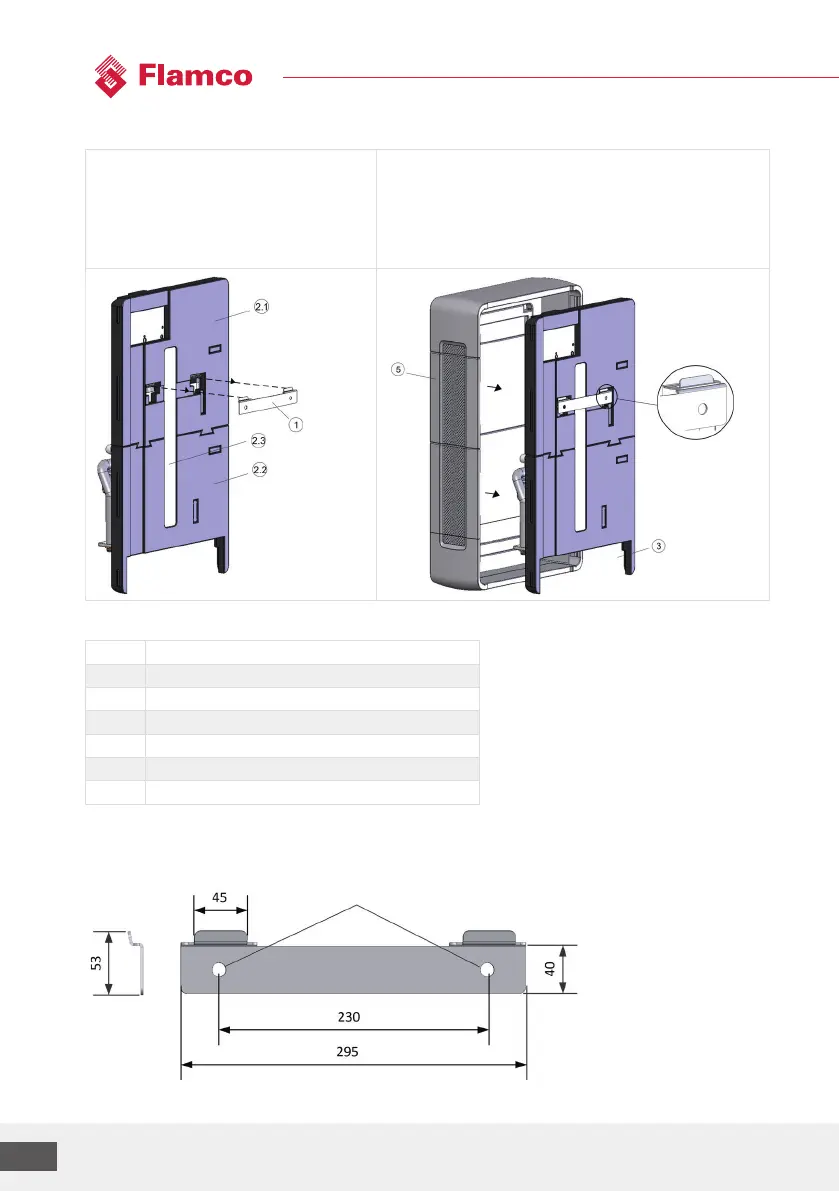
Construction and installation steps
1. Attach retaining plate to wall
(observe the following dimensions)
2. Hang LogoMatic G2 station with rear
insulation and stabilisation plate
onretaining plate
3. Carry out hydraulic and electrical connections
4. Commissioning (see chap. 5)
5. Attach front insulation parts
Legend
Pos. Description
1 Wall retaining plate
2.1 Rear insulation top
2.2 Rear insulation bottom
2.3 Stabilisation plate
3 Aperture for hydraulic connections
5 Front insulation
Dimensions of retaining plate (pos. 1) for wall mounting:
Diam. 12mm



 To Next Page