Flora Digital Printing System
Model LJ320P
Copyright 2011@ Shenzhen Runtianzhi Image Technology Co.,Ltd. By Victor Xu
~59~
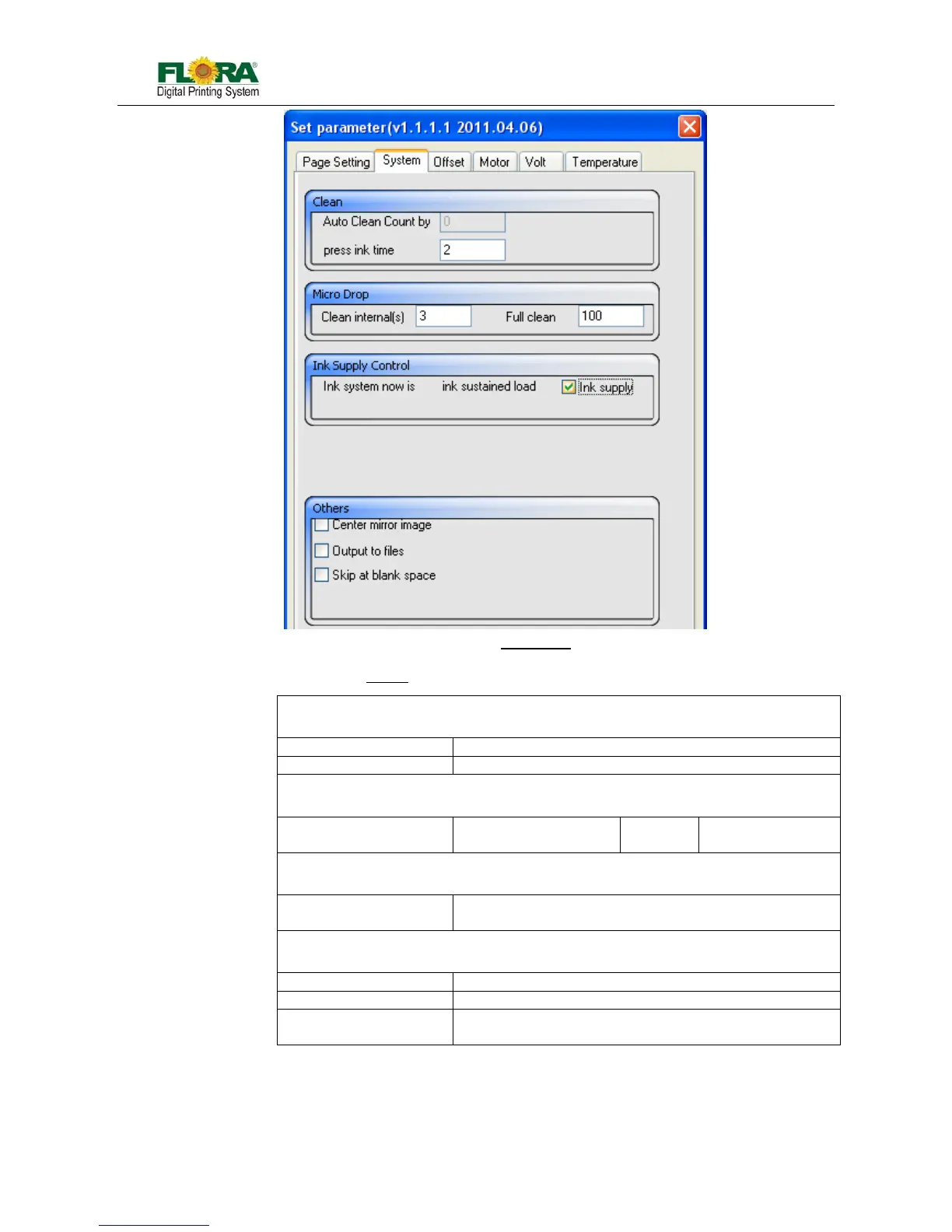
Clean
Auto Clean Count by The clean times can be set in this text box
Press ink time Priming time can be set in this text box
Micro Drop
Clean internal(s) Set the micro drop
period
Full clean Set the drop size of
the micro drop
Ink Supply Control
ink supply check box If tick this box, the pump will supply ink until the sub-tank
is full, or the pump will stop working within 25 seconds
Other
Center mirror image ----
Output to files ----
Skip at blank space
check box
Tick this box, the printer will skip over the blank space in
the image, and start to print from image.
Offset Tab
The tab supplies text box for soft ware alignment. Please refer to Section 5.5.5 for more
details.
Table.6.4.5.1-2 System
Fig.6.4.5.1-2 System Tab



 To Next Page