Flora Digital Printing System
Model LJ320P
Copyright 2011@ Shenzhen Runtianzhi Image Technology Co.,Ltd. By Victor Xu
~60~
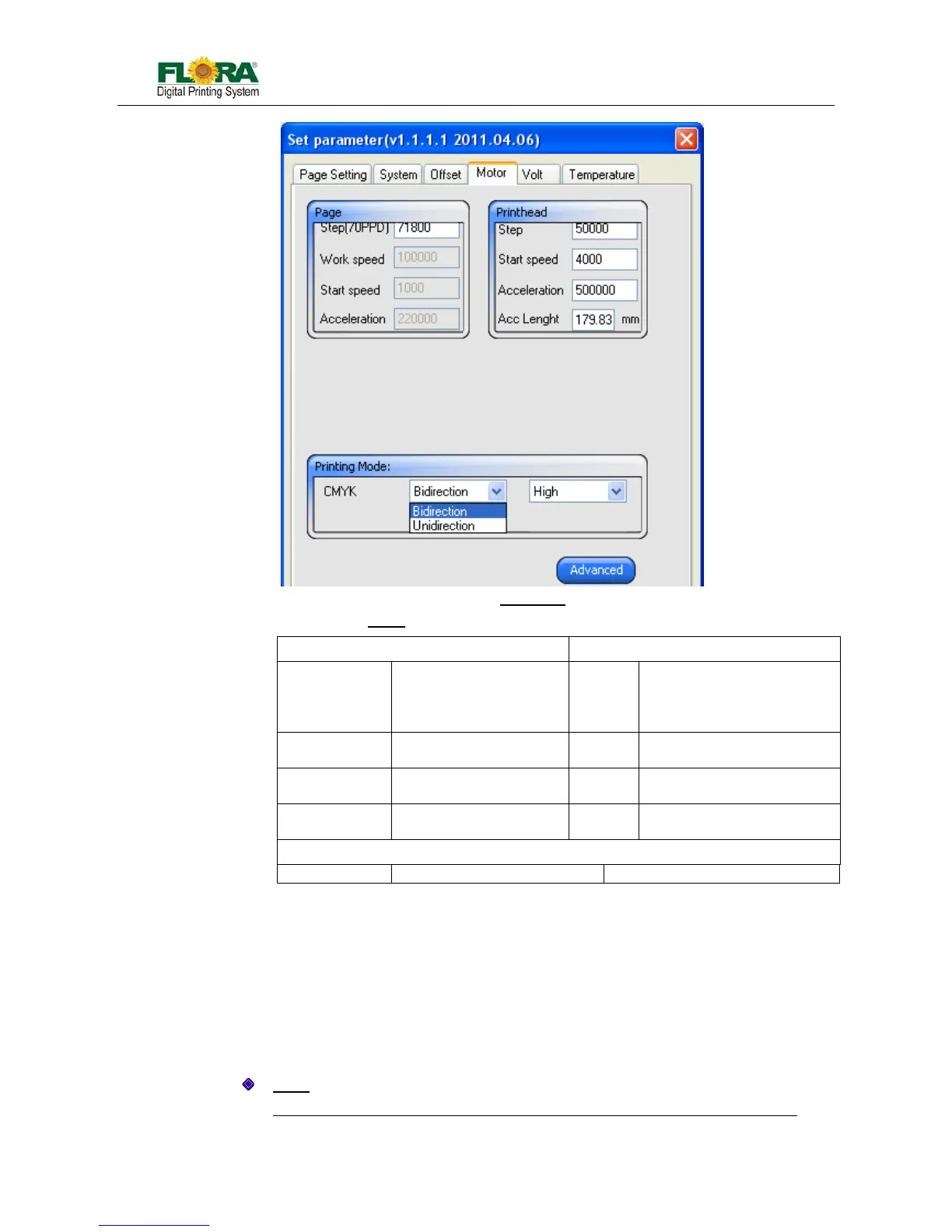
Motor Tab
Page Print head
Step (111PPD) this text box used to
change page feeding
step(Refer to Step Align)
Step this text box used to set the
carriage moving step when
clicking right moving icon on
test print tool bar
Work speed Feeding Speed Start
speed
Carriage motor start speed
Start speed Feeding motor start
speed
Acceler
ation
Carriage acceleration at
both sides
Acceleration Feeding acceleration Acc
Length
Acc length for speed up
Printing Mode
CMYK Choose Direction Choose Speed
Temperature Tab
Refer to Section 5.5.2 for more detail.
Voltage Tab
Refer to Section 5.5.2 for more detail.
6.4.5.2 Pass Number Setting
This section will introduce how to set pass number. The same resolution with different
pass number will produce different quality, so it is important for you to handle this.
Path:
Default job properties → Advanced(Parameter setting) → Motor → Advanced:
Table.6.4.5.1-3 Motor
Fig.6.4.5.1-3 Motor Tab



 To Next Page