Page 20CWT S5 Installation & Maintenance ManualIssue 5
Product description
Figure 10, Coin validator back side
4.3.4.3 Escrow
The task of the escrow is to store the inserted coins until the customer accepts
or cancels the purchase. Accepted coins are guided into the coin box (4).
Cancelling the purchase empties the coins into the coin return cup (1). The
volume of the escrow is approximately 25 2€ coins.
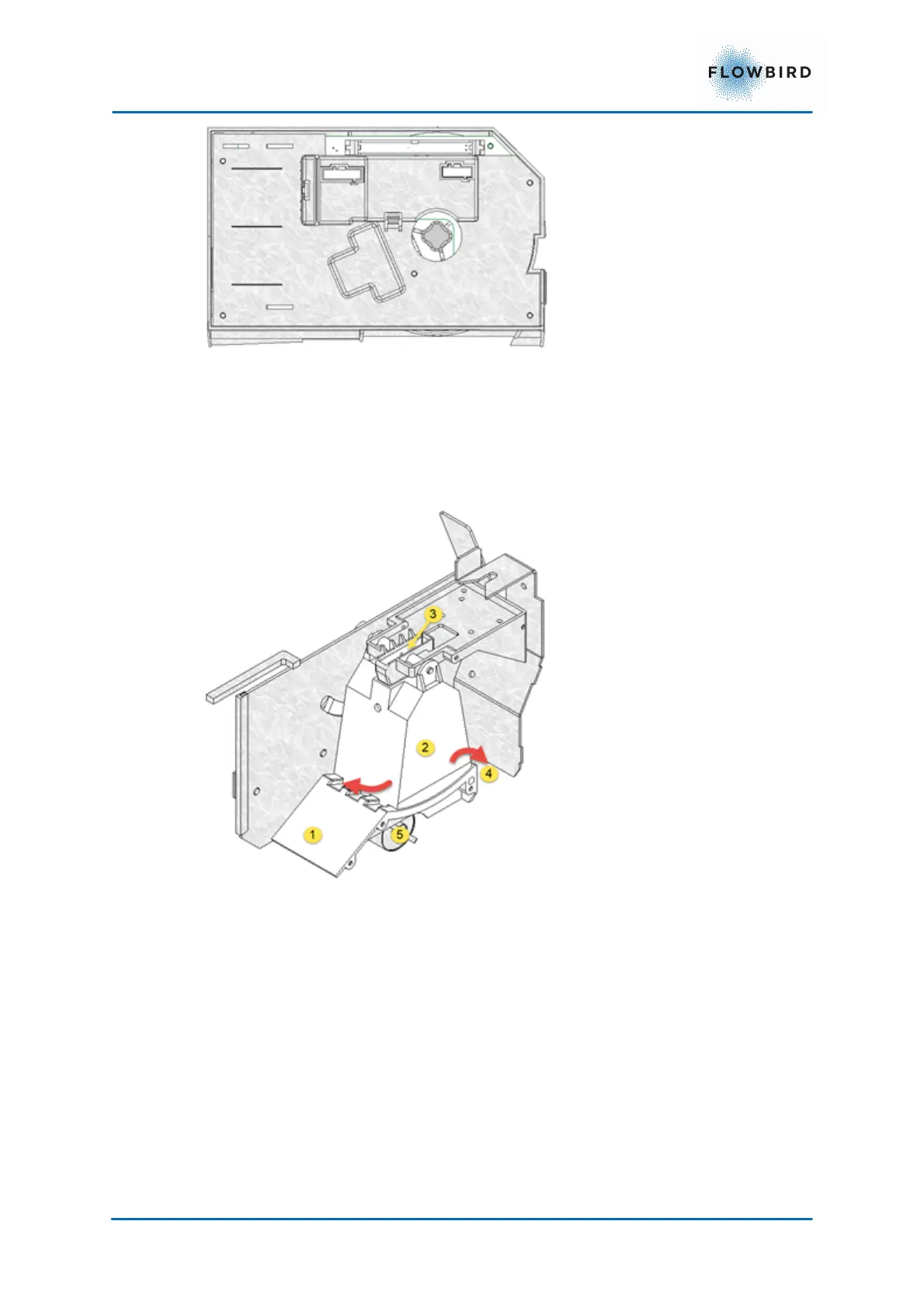
Figure 11, Escrow unit opened
The figure above shows the Escrow unit without its cover.
To the left is the scrap channel (1) through which any objects rejected by the
coin validator will fall into the coin return cup.
In the middle is the escrow (2) container with the Coin inlet (3) on top of it
On the right side the coin validator is open to the funnel (4)
At the bottom of the unit is the motor (5) located
The escrow can be rotated to the left or right by the motor via a gear system
attached to the flap.
4.3.4.4
Coin box
The coin box has 4.6 litre capacity. A presence sensor and software detection of
when the box is near full (75%) and full (100%) is also built into the system.



 To Next Page