Home
Flowserve
Controller
PMV D3
Page 36 (Circuit boards (PCB))
Flowserve PMV D3 - Circuit boards (PCB)
56 pages
Manual
Save Page as PDF
To Next Page
To Next Page
To Previous Page
To Previous Page
Loading...
36
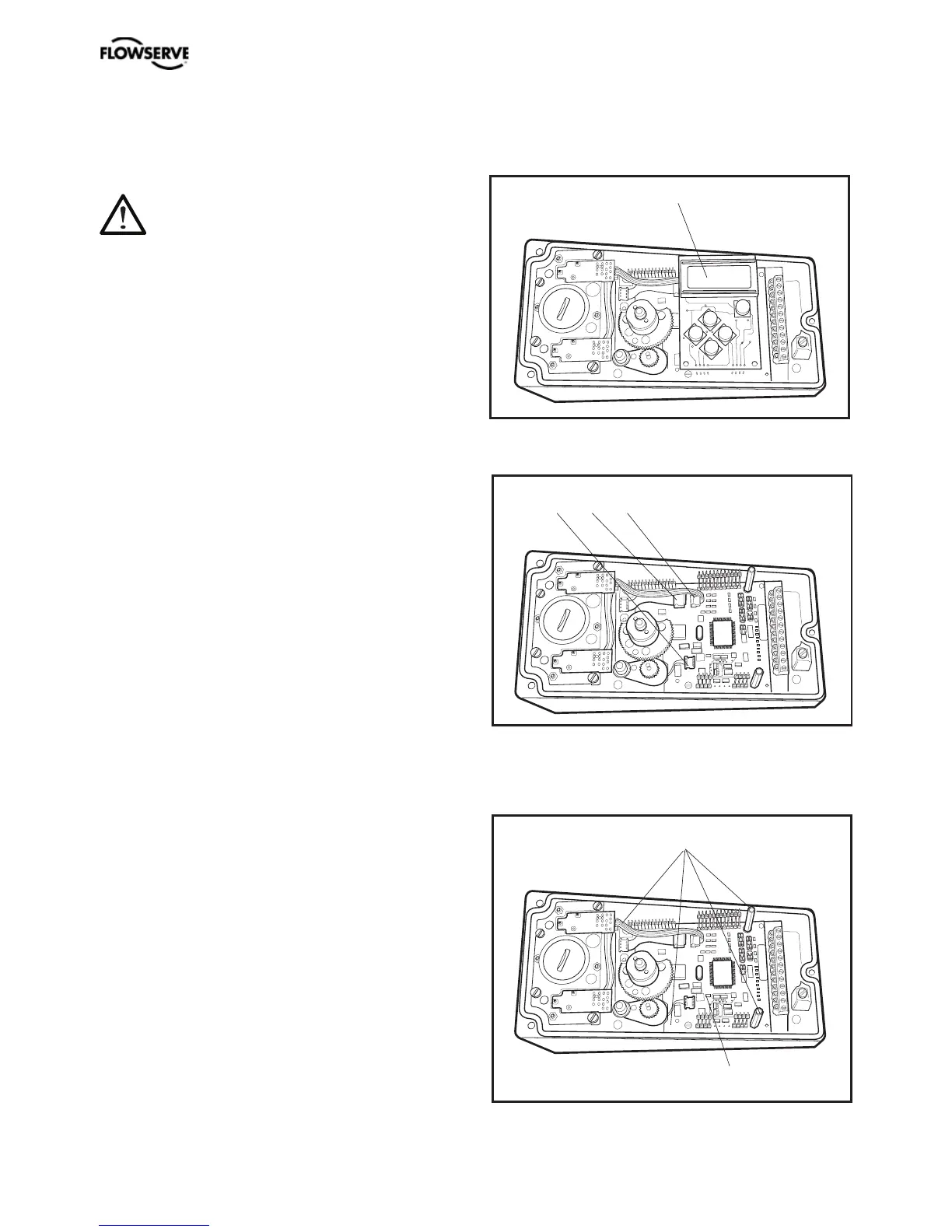
Circuit boards (PCB)
Disconnect or switch off the electric
power supply before starting any
work.
•
Lift off the display PCB, D.
•
Release the cable connections E, F and G,
•
Unscrew the spacers H and lift up the
terminal board I.
D
E F G
I
H
PMV D3 Digital Positioner FCD PMENIM0001-06 A5 09/16
35
37
Table of Contents
Main Page
Default Chapter
2
Table of Contents
2
1 Introduction
3
Safety Instruction
3
2 Storage
5
General
5
Storage Indoors
5
Storage Outdoors or for a Longer Period
5
Storage in a Warm Place
5
3 Design
6
4 Variants
7
5 Function
8
6 Installation
9
Removal of Covers
9
Tubing
9
Air Supply Requirements
9
Mounting
10
Connections
11
Single Action Positioner, Direct Function
12
Double Action Positioner, Direct Function
12
Electrical Connections
13
Signs
15
D3 Digital Positioner Model Code
16
7 Control
17
Menus and Pushbuttons
17
Other Functions
17
Menu Indicator
18
Menus
18
Changing Parameter Values
18
Menu System
19
First Start (with Calibration Sequence)
20
ISA100 Wireless Function (WL)
23
Expert Calibration
33
8 Maintenance/Service
35
Disassembling PMV D3
35
Silencer
37
Potentiometer
38
Transmitter Boards
38
Disassembling PMV D3 Ex
43
Filter Change
44
9 Trouble Shooting
45
10 Technical Data
46
11 Dimensions
48
12 Spare Parts
51
Related product manuals
Flowserve MX
112 pages
Flowserve Logix 510si
16 pages
Flowserve Limitorque MX
44 pages
Flowserve Limitorque QX
96 pages
Flowserve Limitorque MX-85
164 pages
Flowserve Limitorque MX-10
164 pages
Flowserve Limitorque MX-140
164 pages
Flowserve Limitorque L120-85
52 pages
Flowserve Limitorque L120-10
36 pages
Flowserve Limitorque L120-190
56 pages
Flowserve Automax SuperNova S050
4 pages
Flowserve Limitorque L120 Series
36 pages







 To Next Page