–
Connect the reference to input A.
–
Check the readout against the accuracy requirements of your
application.
n
Acceptance Test
As an acceptance test, the following table gives a worst case figure
after a 30 minute warm up time. All deviations that can occur in a
year are added together.
n
Acceptance Test, PM6685R
To fully test the accuracy of the PM6685R, a reference signal of ex
-
tremely high stability is needed. Examples of such references are
Cesium Atomic references, or transmitted signals from a nationally
or internationally traceable source, like the GPS satellites.
Recommended Test Equipment
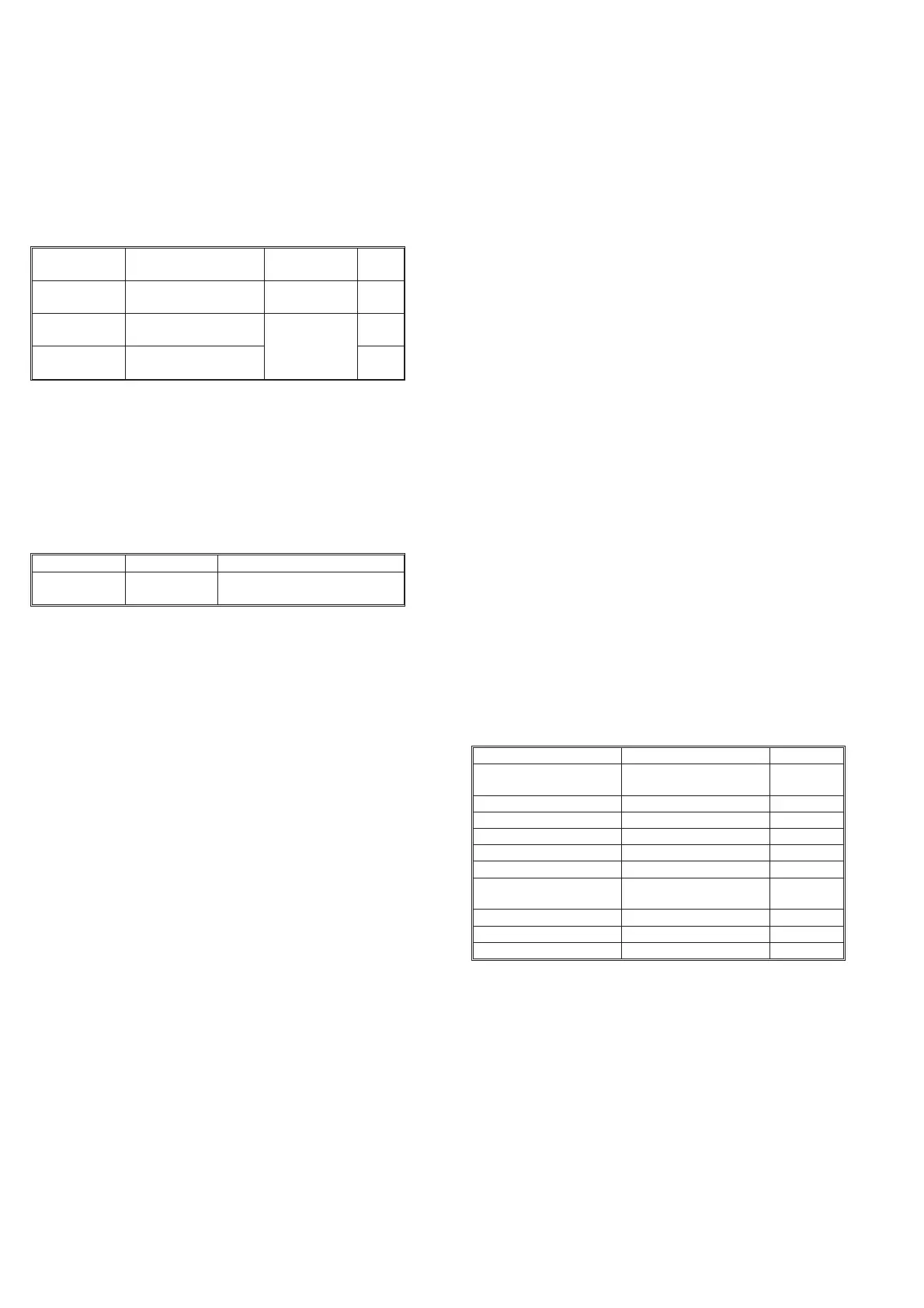
Type Stability Model
10 MHz refer
-
ence
£ 1x10
-10
910R with satellite contact dur
-
ing the last 72 hours.
Test Procedure
–
Connect the counter to the line power.
–
Check that the UNLOCK indicator turns on, and then turns off
again within 6 minutes after connecting line power.
–
Connect the 10 MHz reference signal to input A of the counter.
–
Select FREQUENCY A measurement.
–
Select 2 s measuring time.
–
Check that the displayed frequency is 10.00000000 MHz
±0.05 Hz £ 10 minutes after connection to line power.
Rear Input/Output
INT REF Output
–
Connect an oscilloscope to the 10 MHz output on the rear of
the counter. Use coaxial cable and 50 W termination.
–
The output voltage is sinusoidal and should be above 2.8 V
PP
.
EXT REF Input
–
Press the PRESET key, then press the ENTER key to set your
counter in the Default setting.
–
Apply 10 MHz sine to input A equipped with a T-piece and to
Ext Ref input at the rear, terminated with 50 W. Amplitude on
10 MHz signal; 200 mV
RMS
, (560 mV
PP
)
–
Press the Ext Ref key.
–
The display should show 10.00000000
6
Hz ± 5 LSD.
EXT ARM INPUT
–
Press the PRESET key, then press the ENTER key to set your
counter in the Default setting.
–
Select 50 W input impedance.
–
Apply 10 MHz 500 mV
RMS
, (1.4 V
PP
) sine to input A
–
The counter measures and displays 10 MHz.
–
Press the AUX MENU key.
–
Press the DATA ENTRY UP/DOWN keys until the display
shows ‘Ar. Start’, confirm by pressing the ENTER key.
–
Press DATA ENTRY UP/DOWN keys until the display shows
‘POS’, confirm by pressing the ENTER key.
–
Press the ENTER key once more.
–
The counter does not measure.
–
Connect a pulse generator to Ext Arm input.
–
Settings for pulse generator: single shot pulse, amplitude TTL
=0-2V
PP
, and duration = 10 ns.
–
Apply one single pulse to Ext Arm input.
–
The counter measures once and shows 10 MHz on the display.
Measuring Functions
Preparation for Check of Measuring Function is as follows:
–
Connect a 10 MHz sine wave signal with 2.0 V
PP
amplitude
via a T-piece to Input A.
–
Connect a cable from the T-piece to Input E (Ext Arm) at the
rear.
–
Select the measuring function as in the ‘Selected Function’ col
-
umn and check that the counter performs the correct measure
-
ment by displaying the result as shown under the “Display”
column in the following table.
1) Value depends on the symmetry of the signal.
2) Exact value depends on the input signal.
2-4 Performance Check, Rear Input/Output
Oscillator Frequency readout Suitable refer
-
ence
Pass
/Fail
Standard 10.00000000 MHz
±120 Hz
PM9691
PM9691 10.00000000 MHz
±1 Hz PM6685R
PM6681R
PM9692 10.00000000 MHz
±0.25 Hz
Table 2-5 Acceptance test for oscillators.
Selected Function Display Pass/ Fail
PRESET
ENTER
DEFAULT?
10 MHz
2)
IMPA50W 10 MHz
2)
Non AUTO 10 MHz
2)
PER A 100 ns
2)
RATIO A/E 1.0000000
PWIDTH A 50 ns
1)
TOT A MAN
DISPLAY HOLD Start counting
DISPLAY HOLD Stop counting
DUTY FACT 0.500000
1)
AUTO 0.500000
1)
Table 2-6 Measuring functions check.


 To Next Page