How to Replace Surface
Mounted Devices
Most of the components in this instrument are mounted on the sur
-
face of the board instead of through holes in the board. These compo
-
nents are not hard to replace but they require another technique. If
you do not have special SMD desoldering equipment, follow the in
-
structions below:
9-2 How to Replace Surface Mounted Devices
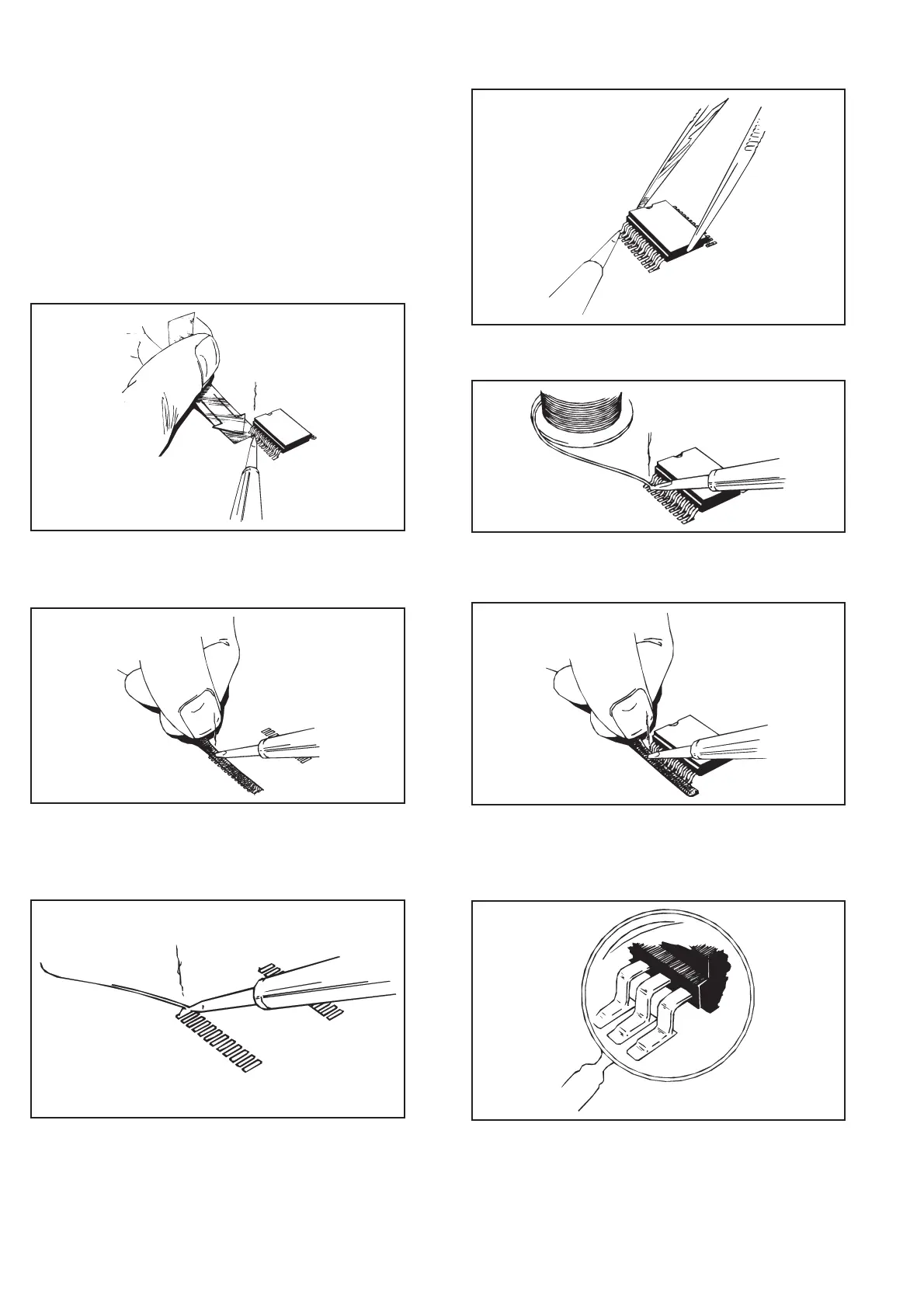
Fig. 9-1 Heat the leads and push a thin aluminum sheet
between the leads and the PC-board.
Fig. 9-2 When removed, clean the pads with desoldering
braid.
Fig. 9-3 Place solder on the pad.
Fig 9-4 Attach the IC to the pad with the solder.
Fig. 9-5 Solder all leads with plenty of solder; don’t worry
about short-circuits at this stage.
Fig. 9-6 Remove excessive solder with desoldering braid.
Fig. 9-7 Use a strong magnifying glass to make sure there
are no short-circuits or unsoldered leads.


 To Next Page