109
MR-8HD/CD Owner’s Manual (Track editing)
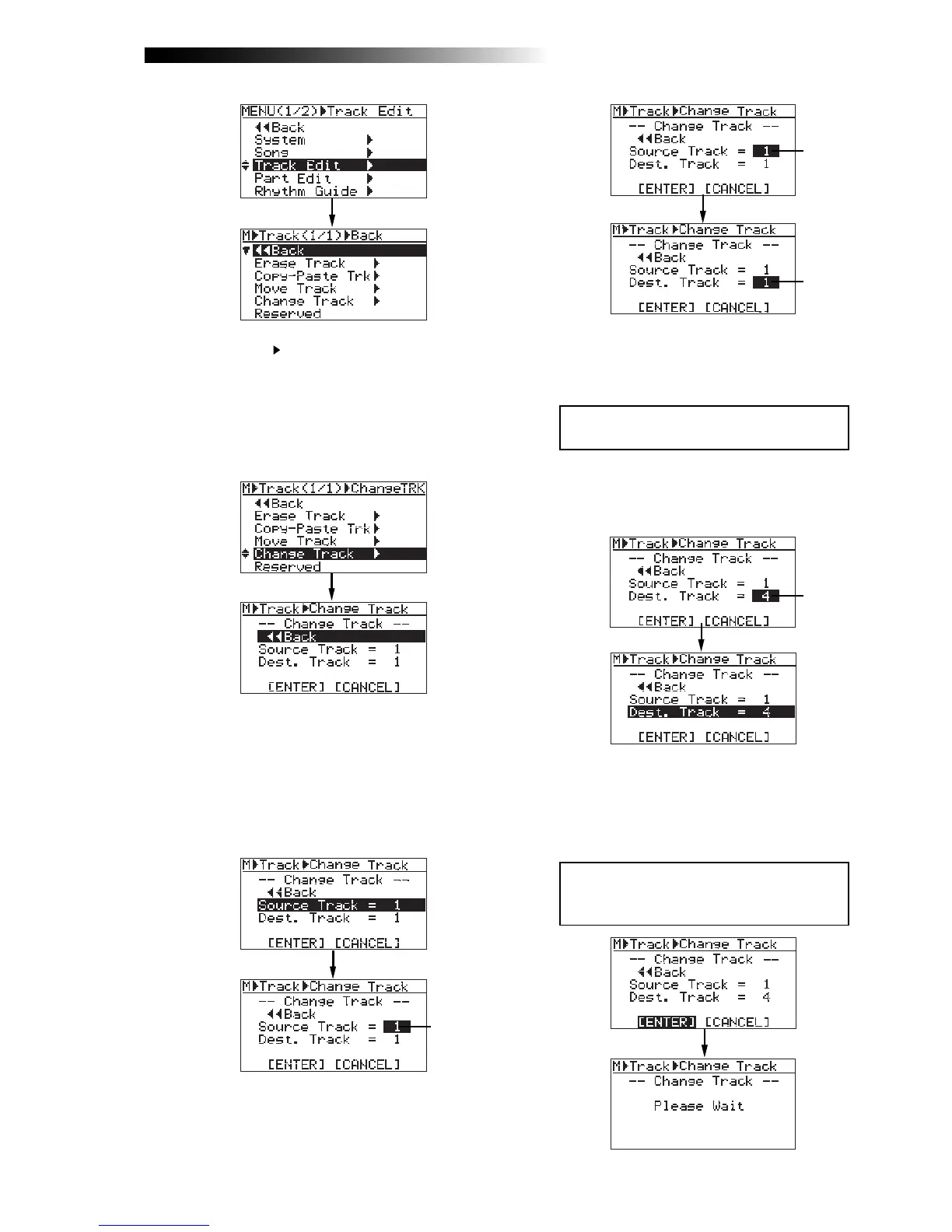
4) Rotate the [MENU/ENTER] knob to select
"Change Track
", and press the [MENU/ENTER]
knob.
5) Rotate the [MENU/ENTER] knob to select
"Source Track = *", and press the [MENU/ENTER]
knob.
You can now select the desired exchange source
track(s) by rotating the [MENU/ENTER] knob.
The available options are:
• 1 through 8 (mono track)
• 1/2, 3/4, 5/6 and 7/8 (stereo tracks)
6) Rotate the [MENU/ENTER] knob to select the
source track(s), and press the [MENU/ENTER] knob.
You can now select the desired destination
track(s).
<Note>:
If you want to cancel the exchange op-
eration, move the cursor to "
[CANCEL]
" on the
screen, and press the [
MENU/ENTER
] knob.
<Note>:
You cannot select the same track(s)
for the exchange source and destination.
8) Rotate the [MENU/ENTER] knob to move the
cursor to "[ENTER]" on the screen, and press the
[MENU/ENTER] knob.
The display shows "Please Wait", immediately
followed by "Completed" when the MR-8HD/
CD completes the exchange operation.
You can select the same number of tracks as
the exchange source track(s). For example, if
you select a mono track for the exchange
source, you can only select a mono track for
the exchange destination.
The display now shows the screen for select-
ing the source track(s) and destination track(s)
of the exchange operation.
"Source Track" selects the exchange source
track(s), while "Dest. Track" selects the exchange
destination track(s).
7) Rotate the [MENU/ENTER] knob to select the
destination track(s), and press the
[MENU/ENTER] knob.
“Dest. Track = *” is now highlighted on the screen.
Flashing
Flashing
Flashing
Flashing



 To Next Page